
1. data binding
mainly 2 methods: static, dynamic
(datacontext, datatable, bindinglist... I just mark them here as I ever saw them somewhere. )
the page can get the data via "get" method of the model you specified
a.
    <Window.DataContext>
        <local:ViewModel/>
    </Window.DataContext>
b.
ItemsSource="{Binding Path=Option_data}"
c.
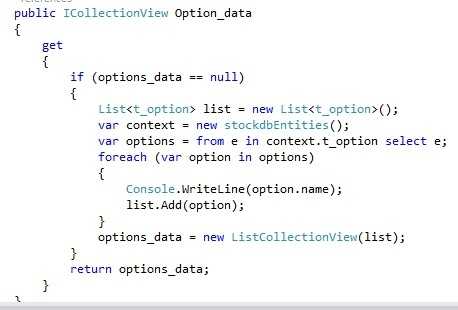
(here should build another view model to exhibit on the page)
(TODO: specify the data grid column name to substitute the name automatically generated from the data structure))
2. event handing
TODO......
crazy proj : No 6 - data binding + event handing,布布扣,bubuko.com
crazy proj : No 6 - data binding + event handing
原文:http://www.cnblogs.com/surgod/p/3627216.html