
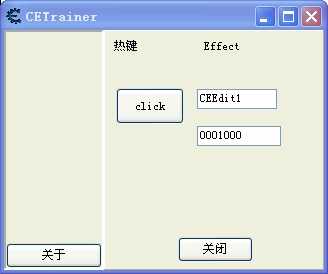
function CEButton1Click(sender)
local x = getProperty(CETrainer.CEEdit1,"Text")--这句很重要,获取文本框的值
--writeInteger(0x42c0c0,readInteger(0x42c0c0)+x)--设置0X42C0C0地址的值
setProperty(CETrainer.CEEdit2,"Text","0001000")--设定第二个文本框的值
end


--TRAINERGENERATORSTART--
--这是自动生成的代码. 请在个区域内个修改代码
--如果你重新生成修改器, 获取删除和重写代码

--Uncomment the following line if this is a Cheat Table format trainer and you don‘t want CE to show (Tip, save as .CETRAINER alternatively)
--hideAllCEWindows()

RequiredCEVersion=6.4
if (getCEVersion==nil) or (getCEVersion()<RequiredCEVersion) then
  messageDialog(‘Please install Cheat Engine ‘..RequiredCEVersion, mtError, mbOK)
  closeCE()
end
addresslist=getAddressList()


CETrainer.SEPERATOR.Visible=false

getAutoAttachList().add("修改器测试工具.exe")
gPlaySoundOnAction=false
CETrainer.show()
function AboutClick()
  showMessage(gAboutText)
end
gAboutText=[[This trainer was made by Cheat
Engine
www.cheatengine.org]]

function CloseClick()
  --called by the close button onClick event, and when closing the form
  closeCE()
  return caFree --onClick doesn‘t care, but onClose would like a result
end

--TRAINERGENERATORSTOP--
原文:http://www.cnblogs.com/jhcla/p/4726937.html