
WPF 应用程序启动后,会有两个线程:
1. 一个是用来处理UI呈现(处理UI的请求,比如输入和展现等操作)。
2. 一个用来管理 UI的 (对UI元素及整个UI进行管理)。
WPF在线程里面是不可以直接操作UI元素,如果在一个非UI线程里操作UI元素,将会报错!
XAML代码如下:
|
1
2
3
4
5
6
7
8
9 |
<Window x:Class="WpfApp1112.Window1" Title="Window1"
Height="300"
Width="300"> <Grid> <TextBlock Height="23"
Name="textBlock1"
Text="window1"
VerticalAlignment="Top"
Width="176"
/> <Button x:Name="btnOk"
Content="Click"
Width="88"
Height="22"
Click="btnOk_Click"/> </Grid></Window> |
后台代码如下:
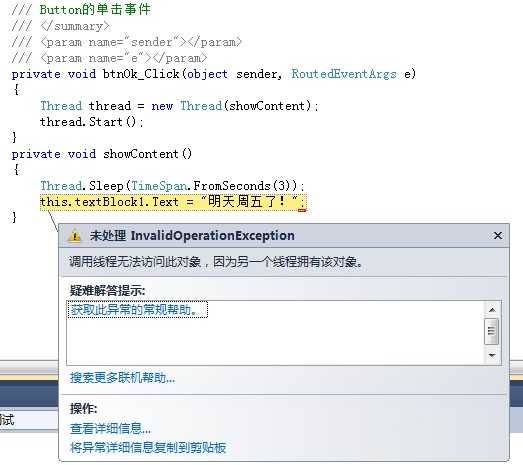
那么我们可以用Window.Dispatcher.Invoke() 来操作。代码如下:
|
1
2
3
4
5
6
7
8
9
10
11
12
13
14
15
16
17
18 |
/// <summary> /// Button的单击事件 /// </summary> /// <param name="sender"></param> /// <param name="e"></param> private
void btnOk_Click(object
sender, RoutedEventArgs e) { Thread thread = new
Thread(showContent); thread.Start(); } private
void showContent() { Application.Current.Dispatcher.BeginInvoke(DispatcherPriority.Normal, (ThreadStart)delegate() { Thread.Sleep(TimeSpan.FromSeconds(10)); this.textBlock1.Text = "明天周五了!"; }); } |
方法还可以这么写,以下代码实现效果和上面完全一样
|
1
2
3
4
5
6
7
8
9
10
11
12
13
14
15
16
17
18
19
20
21
22 |
private
void btnOk_Click(object
sender, RoutedEventArgs e) { //第一种方法: new
Thread(() => { Application.Current.Dispatcher.BeginInvoke(DispatcherPriority.Normal, new
Action(() => { Thread.Sleep(TimeSpan.FromSeconds(10)); this.textBlock1.Text = "明天周五了!"; })); }).Start(); //第二种方法: new
Thread(() => { Application.Current.Dispatcher.BeginInvoke(DispatcherPriority.Normal, (ThreadStart)delegate() { Thread.Sleep(TimeSpan.FromSeconds(10)); this.textBlock1.Text = "明天周五了!"; }); }).Start(); } |
比起上面的代码更简洁,经过测试以上两个方法都可以实现异步调用!
Dispatcher及线程操作,布布扣,bubuko.com
原文:http://www.cnblogs.com/cw_volcano/p/3637090.html