首页 > 其他 > 详细

Xcode5 添加一个Github/Repository 并且Checkout

时间:2015-10-08 13:12:49      阅读:160      评论:0      收藏:0      [点我收藏+]

1. 添加一个Account  也就是添加一个 Repository.
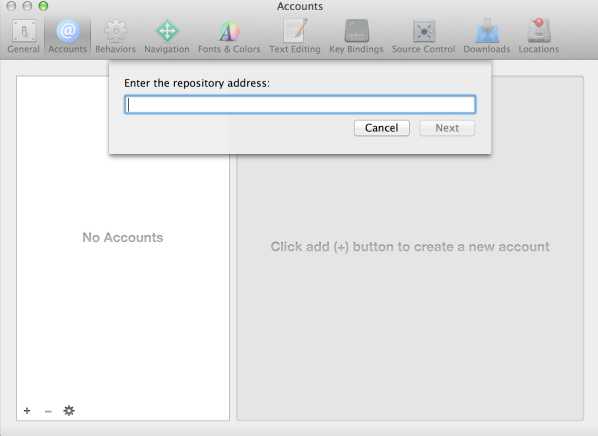
  • In Xcode, choose Xcode > Preferences, and click Accounts.
  • Press the Add button (+), and choose Add Repository.
  • Enter the repository address as prompted, and click Next.

     技术分享

     If necessary, enter your credentials.

     Xcode stores this information automatically after you enter it.

2、Check Out 

     在Xcode的 Source Control菜单中,选择CheckOut,然后选择Repositories菜单,选刚才添加好的Repo 然后Check Out到本地即可。

Xcode5 添加一个Github/Repository 并且Checkout

原文:http://www.cnblogs.com/tangaofeng/p/4860605.html

(0)
(0)
   
举报
评论 一句话评论(0
关于我们 - 联系我们 - 留言反馈 - 联系我们:wmxa8@hotmail.com
© 2014 bubuko.com 版权所有
打开技术之扣,分享程序人生!