
有时候我们需要在HTML页面上显示条码。今天给大家分享在Barcode Professional中,如何将在HTML上显示条码。
步骤:
VB
Imports Neodynamic.WebControls.BarcodeProfessional
C#
using Neodynamic.WebControls.BarcodeProfessional;
VB
Dim bcp As New BarcodeProfessional
bcp.Code = Request.QueryString("code")
bcp.Symbology = Symbology.Code128
Dim barcodeImage As Byte() = bcp.GetBarcodeImage(System.Drawing.Imaging.ImageFormat.Gif)
If (barcodeImage Is Nothing) Then
Response.End()
Else
Response.Clear()
Response.ContentType = "image/gif"
Response.BinaryWrite(barcodeImage)
Response.End()
End If
C#
BarcodeProfessional bcp = new BarcodeProfessional();
bcp.Code = Request.QueryString["code"];
bcp.Symbology = Symbology.Code128;
byte[] barcodeImage = bcp.GetBarcodeImage(System.Drawing.Imaging.ImageFormat.Gif);
if(barcodeImage == null)
Response.End();
else
{
Response.Clear();
Response.ContentType = "image/gif";
Response.BinaryWrite(barcodeImage);
Response.End();
}
<!DOCTYPE HTML PUBLIC "-//W3C//DTD HTML 4.0 Transitional//EN">
<html>
<head>
<title>Barcode Professional in a HTML Page</title>
<script type="text/javascript">
function ChangeBarcode(code)
{
var elem = document.getElementById("imgBarcode");
if(elem!=null)
elem.src="BarcodeGen.aspx?code="+code;
}
</script>
</head>
<body>
<P>
<FONT face="Arial"><b>Barcode Professional in a HTML page</b></FONT>
</P>
<P>
<IMG id="imgBarcode"  src="BarcodeGen.aspx?code=12300445">
</P>
<P>
<FONT face="Arial" size="2">Enter a value to encode:</FONT><BR>
<INPUT id="Text1" type="text" name="Text1">
<INPUT id="Button1" type="button" value="View Barcode" name="Button1"
onclick="ChangeBarcode(Text1.value)">
</P>
</body>
</html>
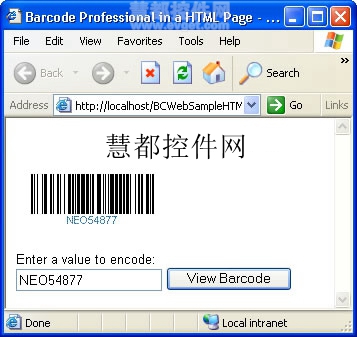
Barcode Professional for ASP.NET使用教程:HTML页面显示条码
原文:http://www.cnblogs.com/jp294936239/p/4942260.html