
1,编辑DataGridView,添加一列 CheckBox ,Name 赋值为 "select",如下图:
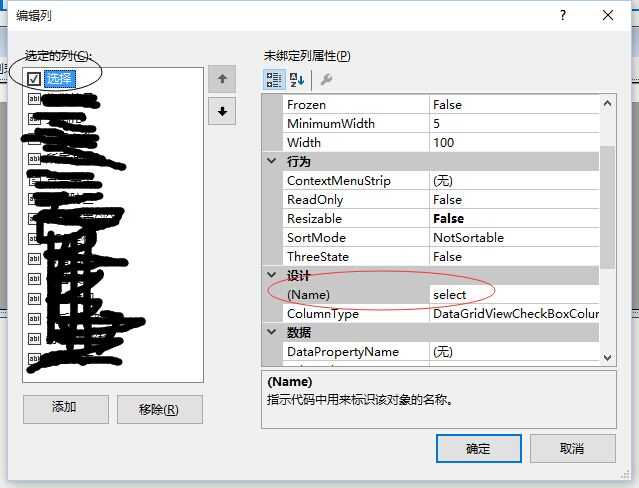
2,取消 datagridview 的可编辑属性,添加 CellClick 事件,用代码来控制checkbox的选中状态,具体代码如下:
        private void dataGridView1_CellClick(object sender, DataGridViewCellEventArgs e)
        {
            if (e.RowIndex == -1 || e.ColumnIndex == -1) return;

            if (dataGridView1.Columns[e.ColumnIndex].Name != "select") return;

            DataGridViewCheckBoxCell cell = (DataGridViewCheckBoxCell)dataGridView1.Rows[e.RowIndex].Cells[e.ColumnIndex];
            if (cell.Value != null && (bool)cell.Value)
            {
                cell.Value = false;
            }
            else
            {
                cell.Value = true;
            }
        }
3,为datagridview关联一个右键菜单,具体的如何获取datagridview中checkbox选中的行代码如下:
        private List<AlarmModel> GetAlarmConfirmModelsByDGVCheckbox()
        {
            List<AlarmModel> alarmModels = new List<AlarmModel>();
            foreach (DataGridViewRow row in dataGridView1.Rows)
            {
                if (row.Cells["select"].Value != null && (bool)row.Cells["select"].Value)
                {
                    AlarmModel model = row.DataBoundItem as AlarmModel;
                    if (model == null) continue;
                    alarmModels.Add(model);
                }
            }
            return alarmModels.Count == 0 ? null : alarmModels;
        }
原文:http://www.cnblogs.com/bruceleeliya/p/4994052.html