
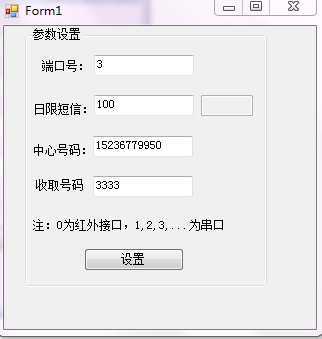
后台语句:
using System;
using System.Collections.Generic;
using System.ComponentModel;
using System.Data;
using System.Drawing;
using System.Linq;
using System.Text;
using System.Windows.Forms;
using System.Runtime.InteropServices;
using System.IO;
using System.Text;
using System.Security.Cryptography;
using System.Text.RegularExpressions;

namespace WindowsFormsApplication1
{
    public partial class Form1 : Form
    {
        public Form1()
        {
            InitializeComponent();
        }
        string[] allLine;
        private void Form1_Load(object sender, EventArgs e)
        {
            //读取数据
            string path = @"DMS.txt";
            allLine = File.ReadAllLines(path);
            string[] readText0 = allLine[0].Split(‘/‘);
            string[] readText1 = allLine[1].Split(‘/‘);
            string[] readText2 = allLine[2].Split(‘/‘);
            string[] readText3 = allLine[3].Split(‘/‘);
            string[] readText4 = allLine[4].Split(‘/‘);
            string[] readText5 = allLine[5].Split(‘/‘);
            string[] readText6 = allLine[6].Split(‘/‘);
            string[] readText7 = allLine[7].Split(‘/‘);
            //其中0为端口号,1为中心号码,2为接收号码,3为数据库ip,4为数据库名,5为用户名,6为密码,7日限短信
            MobPort.Text = readText0[0];
            MobileTele.Text = readText1[0];
            txtRecivePh.Text = readText2[0];
            SMSLimit.Text = readText7[0];
            //string s = "^[0-9]+(.[0-9]{n})?$";//正则表达式
            //Regex reg = new Regex(s);
            //if (!reg.IsMatch(this.textbox1.text))
            //{
            //    MessageBox.Show("请输入数字");
            //}
        }

        private void btnSet_Click(object sender, EventArgs e)
        {
            string path = @"DMS.txt";
            FileStream fs = new FileStream(path, FileMode.OpenOrCreate, FileAccess.ReadWrite);
            StreamWriter sw = new StreamWriter(fs);
            sw.WriteLine(MobPort.Text + "/端口号");
            sw.WriteLine(MobileTele.Text + "/中心号码");
            sw.WriteLine(txtRecivePh.Text + "/接收号码");
            sw.WriteLine(allLine[3]);
            sw.WriteLine(allLine[4]);
            sw.WriteLine(allLine[5]);
            sw.WriteLine(allLine[6]);
            sw.WriteLine(SMSLimit.Text + "/日限短信");
            //sw.writeLine(Label1.text + "\n" + Label2.Text);
            sw.Flush();
            sw.Close();
            fs.Close();
        }
    }
}
原文:http://www.cnblogs.com/sizhizhiyue/p/5015389.html