
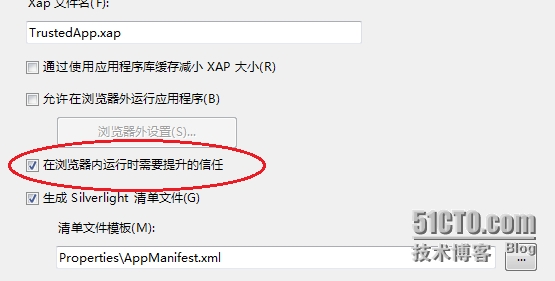
1、设置silverlight5的项目属性
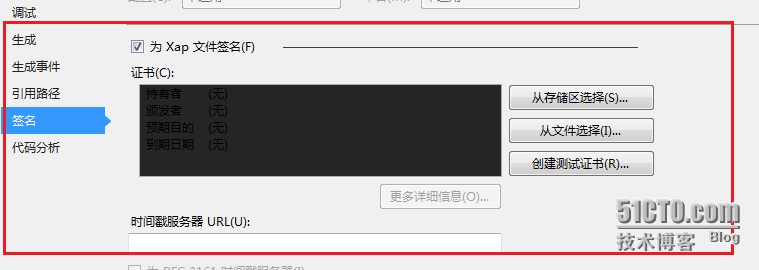
2、给silverlight5项目生成的XAP,进行pfx数字证书签名
3、安装测试cer数字证书和配置注册表(cer需要安装到两个地方,受信任的发行者和受信任根证书颁发机构).
下面是安装cer证书的代码(编写一个exe的程序给用户安装cer证书和设置注册表)
using Microsoft.Win32;
using System.Security.Cryptography.X509Certificates;
namespace InstallCertificate
{
class Program
{
static void Main(string[] args)
{
//CA数字证书(Resource.myCer 是cer数字证书字节数组内容)
X509Certificate2 certificate = new X509Certificate2(Resource.myCer);
//安装CA的根证书到受信任的发行者
X509Store storeTrustedPublisher = new X509Store(StoreName.TrustedPublisher, StoreLocation.CurrentUser);
storeTrustedPublisher.Open(OpenFlags.MaxAllowed);
storeTrustedPublisher.Add(certificate);
storeTrustedPublisher.Close();
//安装CA的根证书到受信任根证书颁发机构
X509Store storeRoot = new X509Store(StoreName.Root, StoreLocation.CurrentUser);
storeRoot.Open(OpenFlags.MaxAllowed);
storeRoot.Add(certificate);
storeRoot.Close();
//设置32位操作系统注册表
RegistryKey key32 = Registry.LocalMachine.OpenSubKey(@"Software\Microsoft\Silverlight");
if (key32 != null)
{
key32.SetValue("AllowElevatedTrustAppsInBrowser", 1);
}
//设置64位操作系统注册表
RegistryKey key64 = Registry.LocalMachine.OpenSubKey(@"Software\Wow6432Node\Microsoft\Silverlight");
if (key64 != null)
{
key64.SetValue("AllowElevatedTrustAppsInBrowser", 1);
}
}
}
}
Silverlight 5浏览器内受信应用,布布扣,bubuko.com
原文:http://8816173.blog.51cto.com/8806173/1394640