/*通配符选择器*/
*{
margin:0px;
padding:0px;
}
/*div的选择器*/
.div1{
border:1px solid red;
background:silver;
width:60px;
height:30px;
float:left;
margin-left:5px;
}
.div2{
position:relative;
left:10px;
top:10px;
width:100px;
height:80px;
background:pink;
float:left;
margin-left:5px;
}
/*相对定位,他原来的空间任然保留*/
#spe{
position:relative;
top:40px;
left:20px;
}
/*绝对定位:元素框从文档流里完全删除
对该元素最近的那个脱离了标准流的元素定位*/
#spe2{
position:absolute;
top:40px;
left:20px;
}
/*固定定位,只想对于视图的左上角定位*/
#spe{
position:fixed;
top:40px;
left:20px;
}
/*静态定位是默认的static left、top此时没有效果
靠margin来移动位置*/
/*z-index用于设置对象(div)显示时候,层叠的属性,
z-index值越小,则越在下层显示*/
[html] view plaincopy在CODE上查看代码片派生到我的代码片
<html>
<head>
<link rel="stylesheet" type="text/css" href="position.css"/>
</head>
<body>
<div class="div1">内容1</div>
<div class="div1">内容3</div>
<div class="div1">内容4</div>
<div class="div2">
<div class="div1" id="spe2">内容2</div>
</div>
</body>
</html>
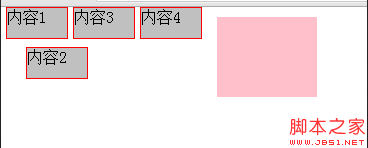
css中的四种定位方式示例介绍
原文:http://www.jb51.net/css/127844.html
