
页面静态化分为两种:伪静态和真静态,这里主要介绍的是真静态。
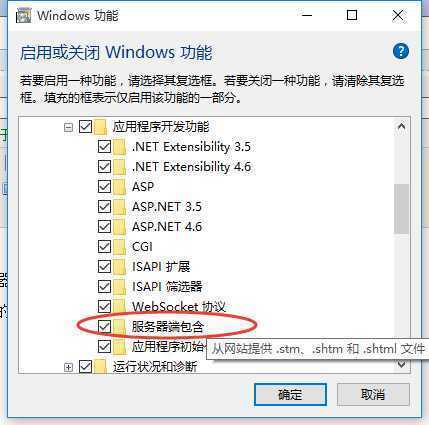
进入正题之前先简单介绍一下SSI和shtml:
1)、SSI是Server Side Include的简称(服务器端嵌入)
2)、shtml是包含有嵌入式服务器方包含命令的HTML文本。在被传送给浏览器之前,服务器会对shtml文档进行





        /// <summary>
        /// 生成shtml页面
        /// </summary>
        /// <param name="newsEntity">新闻实体</param>
        /// <returns></returns>
        public static bool GenerateShtmlPage(News newsEntity)
        {
            //返回信息
            string strMessage = string.Empty;
            //页面模板完整路径
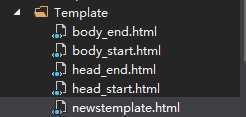
            string strTemplateFullPath = string.Format("{0}Template/{1}", AppDomain.CurrentDomain.BaseDirectory, "newstemplate.html");
            //保存shtml页面的绝对路径
            string strStaticPageAbsolutePath = GetStaticPageAbsolutePathByNewsId(newsEntity.NewsId);
            //获取模板占位符数组
            string[] arrPlaceholder = new string[3];
            arrPlaceholder[0] = "@title";
            arrPlaceholder[1] = "@news_title";
            arrPlaceholder[2] = "@news_content";
            //获取填充到模板中的占位符所对应的数据数组
            string[] arrReplaceContent = new string[3];
            arrReplaceContent[0] = newsEntity.NewsTitle;
            arrReplaceContent[1] = newsEntity.NewsTitle;
            arrReplaceContent[2] = newsEntity.NewsContent;
            //生成shtml页面
            return GenerateShtmlPage(strStaticPageAbsolutePath, strTemplateFullPath, arrPlaceholder, arrReplaceContent, out strMessage);
        }
        /// <summary>
        /// 根据静态的HTML页面模板生成静态页面
        /// </summary>
        /// <param name="strStaticPageAbsolutePath">存放静态页面所在绝对路径</param>
        /// <param name="strTemplateAbsolutePath">静态模板页面的绝对路径</param>
        /// <param name="arrPlaceholder">占位符数组</param>
        /// <param name="arrReplaceContent">要替换的内容数组</param>
        /// <param name="strMessage">返回信息</param>
        /// <returns>生成成功返回true,失败false</returns>
        public static bool GenerateStaticPage(string strStaticPageAbsolutePath, string strTemplateAbsolutePath, string[] arrPlaceholder, string[] arrReplaceContent, out string strMessage)
        {
            bool isSuccess = false;
            try
            {
                //生成存放静态页面目录
                if (!Directory.Exists(Path.GetDirectoryName(strStaticPageAbsolutePath)))
                {
                    Directory.CreateDirectory(Path.GetDirectoryName(strStaticPageAbsolutePath));
                }
                //验证占位符
                if (arrPlaceholder.Length != arrReplaceContent.Length)
                {
                    strMessage = string.Format("生成静态页面失败,占位符数组个数和替换内容个数不相等!存放路径为:{0}", strStaticPageAbsolutePath);
                    return false;
                }
                //生成存放静态页面文件
                if (File.Exists(strStaticPageAbsolutePath))
                {
                    File.Delete(strStaticPageAbsolutePath);
                }
                //获取模板HTML
                StringBuilder strHtml = new StringBuilder();
                strHtml.Append(File.ReadAllText(strTemplateAbsolutePath, Encoding.UTF8));
                //替换模板占位符,获取要生成的静态页面HTML
                for (int i = 0; i < arrPlaceholder.Length; i++)
                {
                    strHtml.Replace(arrPlaceholder[i], arrReplaceContent[i]);
                }
                //生成静态页面
                File.WriteAllText(strStaticPageAbsolutePath, strHtml.ToString());
                strMessage = string.Format("生成静态页面成功!存放路径:{0}", strStaticPageAbsolutePath);
                isSuccess = true;
            }
            catch (IOException ex)
            {
                strMessage = ex.Message;
                isSuccess = false;
            }
            catch (Exception ex)
            {
                strMessage = ex.Message;
                isSuccess = false;
            }
            return isSuccess;
        }
         /// <summary>
        /// 根据新闻id生成静态页面的绝对路径
        /// </summary>
        /// <param name="newsId">新闻id</param>
        /// <returns></returns>
        private static string GetShtmlPageAbsolutePathByNewsId(int newsId)
        {
            //静态页面名称
            string strShtmlPageName = string.Format("{0}.shtml", newsId);
            //静态页面相对路径
            string strShtmlPageRelativePath = string.Format("newspage\\{0}\\{1}", DateTime.Now.ToString("yyyy/MM/dd").Replace(‘/‘, ‘\\‘), strShtmlPageName);
            //静态页面完整路径
            string strShtmlPageAbsolutePath = AppDomain.CurrentDomain.BaseDirectory + strShtmlPageRelativePath;
            return strShtmlPageAbsolutePath;
        }
routes.MapRoute(
                name: "getnewspage",
                url: "newspage/{id}",
                defaults: new { controller = "News", action = "Details", id = UrlParameter.Optional }
            );
然后在News控制器中的Details正进行处理,使其访问29.shtml这个页面即可。
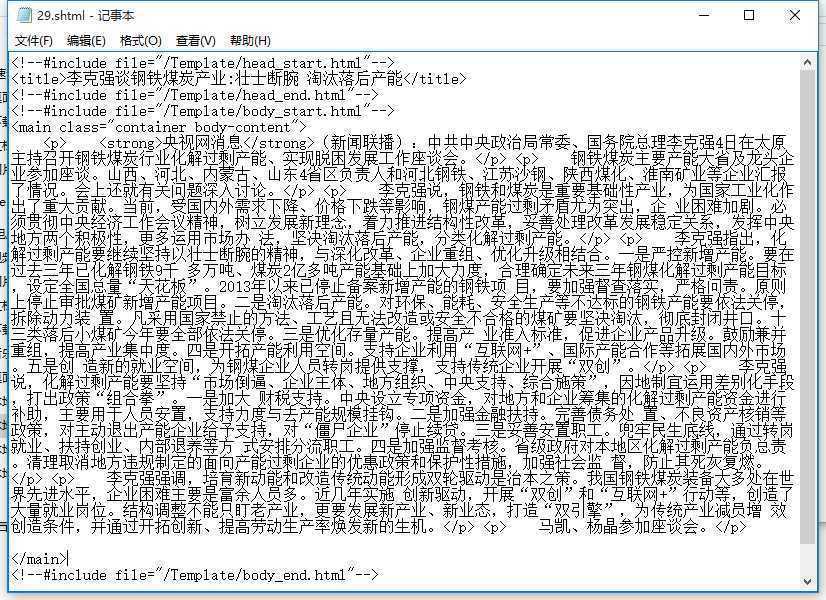
29.shtml中的内容如下:
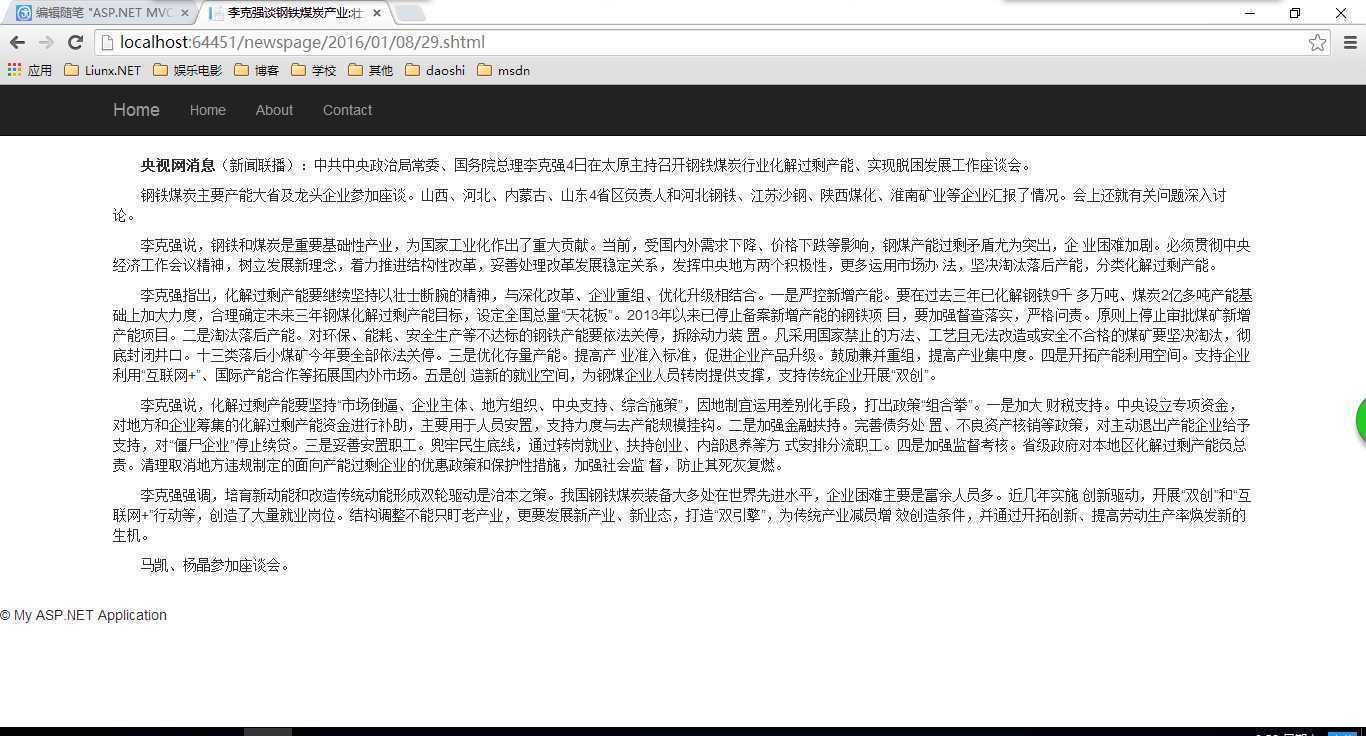
访问http:127.0.0.1/News/Detials/29 时即可访问29.shtml这个文件
原文:http://www.cnblogs.com/catcher1994/p/5115237.html