
前面我们分析到WifiDisplaySource会调用ANetworkSession的接口去创建一个socket,并在这个socket上监听是否有客户端的连接请求。先来看看Wifi Display规范的一些流程图:

从之前的一篇文章中,当ANetworkSession创建好RTSP的listen socket后,就会把它加入到selelct中等待对方的连接,那我们首先来看ANetworkSession的threadLoop方法:
void ANetworkSession::threadLoop() {

    int res = select(maxFd + 1, &rs, &ws, NULL, NULL /* tv */);

    {
        Mutex::Autolock autoLock(mLock);

        List<sp<Session> > sessionsToAdd;

        for (size_t i = mSessions.size(); res > 0 && i-- > 0;) {
            const sp<Session> &session = mSessions.valueAt(i);

            int s = session->socket();

            if (s < 0) {
                continue;
            }

            if (FD_ISSET(s, &rs) || FD_ISSET(s, &ws)) {
                --res;
            }

            if (FD_ISSET(s, &rs)) {
                if (session->isRTSPServer() || session->isTCPDatagramServer()) {
                    struct sockaddr_in remoteAddr;
                    socklen_t remoteAddrLen = sizeof(remoteAddr);

                    int clientSocket = accept(
                            s, (struct sockaddr *)&remoteAddr, &remoteAddrLen);

                    if (clientSocket >= 0) {
                        status_t err = MakeSocketNonBlocking(clientSocket);

                        if (err != OK) {

                        } else {
                            in_addr_t addr = ntohl(remoteAddr.sin_addr.s_addr);

                            ALOGI("incoming connection from %d.%d.%d.%d:%d "
                                  "(socket %d)",
                                  (addr >> 24),
                                  (addr >> 16) & 0xff,
                                  (addr >> 8) & 0xff,
                                  addr & 0xff,
                                  ntohs(remoteAddr.sin_port),
                                  clientSocket);

                            sp<Session> clientSession =
                                new Session(
                                        mNextSessionID++,
                                        Session::CONNECTED,
                                        clientSocket,
                                        session->getNotificationMessage());

                            clientSession->setMode(
                                    session->isRTSPServer()
                                        ? Session::MODE_RTSP
                                        : Session::MODE_DATAGRAM);

                            sessionsToAdd.push_back(clientSession);
                        }
                    } else {
                        ALOGE("accept returned error %d (%s)",
                              errno, strerror(errno));
                    }
                }
            }

        while (!sessionsToAdd.empty()) {
            sp<Session> session = *sessionsToAdd.begin();
            sessionsToAdd.erase(sessionsToAdd.begin());

            mSessions.add(session->sessionID(), session);

            ALOGI("added clientSession %d", session->sessionID());
        }
}ANetworkSession::Session::Session(
int32_t sessionID,
State state,
int s,
const sp<AMessage> ?ify)
: mSessionID(sessionID),
mState(state),
mMode(MODE_DATAGRAM),
mSocket(s),
mNotify(notify),
mSawReceiveFailure(false),
mSawSendFailure(false),
mUDPRetries(kMaxUDPRetries),
mLastStallReportUs(-1ll) {
if (mState == CONNECTED) {
struct sockaddr_in localAddr;
socklen_t localAddrLen = sizeof(localAddr);
int res = getsockname(
mSocket, (struct sockaddr *)&localAddr, &localAddrLen);
CHECK_GE(res, 0);
struct sockaddr_in remoteAddr;
socklen_t remoteAddrLen = sizeof(remoteAddr);
res = getpeername(
mSocket, (struct sockaddr *)&remoteAddr, &remoteAddrLen);
CHECK_GE(res, 0);
sp<AMessage> msg = mNotify->dup();
msg->setInt32("sessionID", mSessionID);
msg->setInt32("reason", kWhatClientConnected);
msg->setString("server-ip", localAddrString.c_str());
msg->setInt32("server-port", ntohs(localAddr.sin_port));
msg->setString("client-ip", remoteAddrString.c_str());
msg->setInt32("client-port", ntohs(remoteAddr.sin_port));
msg->post();
}
} case kWhatRTSPNotify:
{
int32_t reason;
CHECK(msg->findInt32("reason", &reason));
switch (reason) {
case ANetworkSession::kWhatError:
{
break;
}
case ANetworkSession::kWhatClientConnected:
{
int32_t sessionID;
CHECK(msg->findInt32("sessionID", &sessionID));
if (mClientSessionID > 0) {
ALOGW("A client tried to connect, but we already "
"have one.");
mNetSession->destroySession(sessionID);
break;
}
CHECK_EQ(mState, AWAITING_CLIENT_CONNECTION);
CHECK(msg->findString("client-ip", &mClientInfo.mRemoteIP));
CHECK(msg->findString("server-ip", &mClientInfo.mLocalIP));
if (mClientInfo.mRemoteIP == mClientInfo.mLocalIP) {
// Disallow connections from the local interface
// for security reasons.
mNetSession->destroySession(sessionID);
break;
}
CHECK(msg->findInt32(
"server-port", &mClientInfo.mLocalPort));
mClientInfo.mPlaybackSessionID = -1;
mClientSessionID = sessionID;
ALOGI("We now have a client (%d) connected.", sessionID);
mState = AWAITING_CLIENT_SETUP;
status_t err = sendM1(sessionID);
CHECK_EQ(err, (status_t)OK);
break;
}
case ANetworkSession::kWhatData:
{
break;
}
case ANetworkSession::kWhatNetworkStall:
{
break;
}
default:
TRESPASS();
}
break;
}这里的reason是kWhatClientConnected,跳过前面不必要的case语句。如果先前已经连上其它的Sink device,这里就先断开之前的连接;如果没有,将新的SessionID赋予给mClientSessionID,并更改状态为AWAITING_CLIENT_SETUP,接着去看sendM1消息,这时候就要开始WifiDisplay M1~M7消息的发送了。
下面列举M1~M7消息的格式,有兴趣的可以去对照代码分析,我们后面着重分析M6(SetUp)和M7(Play)两个消息。
M1 reqeust:
OPTIONS * RTSP/1.0
Date: Tue, 29 Fri 2014 02:41:24 +0000
Server: stagefright/1.2 (Linux;Android 4.4)
CSeq: 1
Require: org.wfa.wfd1.0
M1 respose:
RTSP/1.0 200 OK
CSeq: 1
Date: Fri, Jan 01 2014 09:02:37 GMT
Public: org.wfa.wfd1.0, GET_PARAMETER, SET_PARAMETER
M2 request:
OPTIONS * RTSP/1.0
CSeq: 2
Require: org.wfa.wfd1.0
M2 response:
RTSP/1.0 200 OK
Date: Tue, 29 Fri 2014 02:41:25 +0000
Server: stagefright/1.2 (Linux;Android 4.3)
CSeq: 2
Public: org.wfa.wfd1.0, SETUP, TEARDOWN, PLAY, PAUSE, GET_PARAMETER, SET_PARAMETER
M3 request:
GET_PARAMETER rtsp://localhost/wfd1.0 RTSP/1.0
Date: Tue, 29 Fri 2014 02:41:25 +0000
Server: stagefright/1.2 (Linux;Android 4.3)
CSeq: 2
Content-Type: text/parameters
Content-Length: 83
wfd_content_protection
wfd_video_formats
wfd_audio_codecs
wfd_client_rtp_ports
M3 response:
RTSP/1.0 200 OK
CSeq: 2
Content-Length: 124
Content-Type: text/parameters
wfd_audio_codecs: LPCM 00000003 00, AAC 00000007 00
wfd_video_formats: 00 00 02 02 0000FFFF 0FFFFFFF 00000FFF 00 0000 0000 01 none none
wfd_content_protection: none
wfd_client_rtp_ports: RTP/AVP/UDP;unicast 19990 0 mode=play
M4 request:
SET_PARAMETER rtsp://localhost/wfd1.0 RTSP/1.0
Date: Tue, 29 Fri 2014 02:41:25 +0000
Server: stagefright/1.2 (Linux;Android 4.3)
CSeq: 3
Content-Type: text/parameters
Content-Length: 247
wfd_video_formats: 00 00 02 02 00000020 00000000 00000000 00 0000 0000 00 none none
wfd_audio_codecs: AAC 00000001 00
wfd_presentation_URL: rtsp://192.168.5.200/wfd1.0/streamid=0 none
wfd_client_rtp_ports: RTP/AVP/UDP;unicast 19990 0 mode=play
M4 response:
RTSP/1.0 200 OK
CSeq: 3
M5 request:
SET_PARAMETER rtsp://localhost/wfd1.0 RTSP/1.0
Date: Tue, 29 Fri 2014 02:41:25 +0000
Server: stagefright/1.2 (Linux;Android 4.3)
CSeq: 4
Content-Type: text/parameters
Content-Length: 27
wfd_trigger_method: SETUP
M5 response:
RTSP/1.0 200 OK
CSeq: 4
M6 request:
SETUP rtsp://192.168.5.200/wfd1.0/streamid=0 RTSP/1.0
CSeq: 3
Transport: RTP/AVP/UDP;unicast;client_port=19990
M6 response:
RTSP/1.0 200 OK
Date: Tue, 29 Fri 2014 02:41:25 +0000
Server: stagefright/1.2 (Linux;Android 4.3)
CSeq: 3
Session: 988982966;timeout=30
Transport: RTP/AVP/UDP;unicast;client_port=19990;server_port=22220
我们先来看处理M6 request的方法,代码在onSetupRequest中:
status_t WifiDisplaySource::onSetupRequest(
        int32_t sessionID,
        int32_t cseq,
        const sp<ParsedMessage> &data) {
    CHECK_EQ(sessionID, mClientSessionID);
    if (mClientInfo.mPlaybackSessionID != -1) {
        sendErrorResponse(sessionID, "400 Bad Request", cseq);
        return ERROR_MALFORMED;
    }

    int32_t playbackSessionID = makeUniquePlaybackSessionID();

    sp<AMessage> notify = new AMessage(kWhatPlaybackSessionNotify, id());
    notify->setInt32("playbackSessionID", playbackSessionID);
    notify->setInt32("sessionID", sessionID);

    sp<PlaybackSession> playbackSession =
        new PlaybackSession(
                mNetSession, notify, mInterfaceAddr, mHDCP, mMediaPath.c_str());

    looper()->registerHandler(playbackSession);

    AString uri;
    data->getRequestField(1, &uri);

    if (strncasecmp("rtsp://", uri.c_str(), 7)) {
        sendErrorResponse(sessionID, "400 Bad Request", cseq);
        return ERROR_MALFORMED;
    }

    if (!(uri.startsWith("rtsp://") && uri.endsWith("/wfd1.0/streamid=0"))) {
        sendErrorResponse(sessionID, "404 Not found", cseq);
        return ERROR_MALFORMED;
    }

    RTPSender::TransportMode rtcpMode = RTPSender::TRANSPORT_UDP;
    if (clientRtcp < 0) {
        rtcpMode = RTPSender::TRANSPORT_NONE;
    }

    status_t err = playbackSession->init(
            mClientInfo.mRemoteIP.c_str(),
            clientRtp,
            rtpMode,
            clientRtcp,
            rtcpMode,
            mSinkSupportsAudio,
            mUsingPCMAudio,
            mSinkSupportsVideo,
            mChosenVideoResolutionType,
            mChosenVideoResolutionIndex,
            mChosenVideoProfile,
            mChosenVideoLevel);

    if (err != OK) {
        looper()->unregisterHandler(playbackSession->id());
        playbackSession.clear();
    }

    mClientInfo.mPlaybackSessionID = playbackSessionID;
    mClientInfo.mPlaybackSession = playbackSession;

    mState = AWAITING_CLIENT_PLAY;

    scheduleReaper();
    scheduleKeepAlive(sessionID);

    return OK;
}
跳过前面的关于RTSP回复消息的组织,这里还会创建一个PlaybackSession对象,并调用它的init方法做初始化。
根据前面的背景知识介绍,设备之间的交互将由Session来管理。在代码中,Session的概念由WifiDisplaySource的内部类PlaybackSession来表示。先来看和其相关的类图结构,如下图所示:
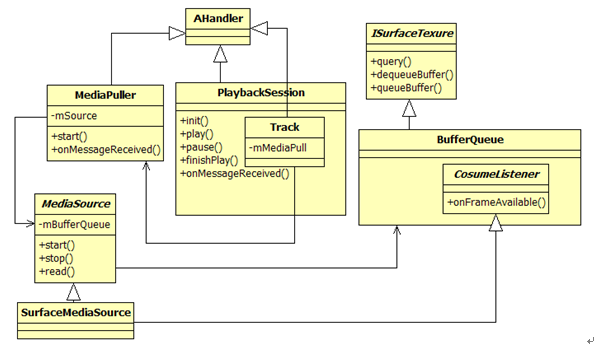
由上图可知:
那么mBufferQueue的数据来自什么地方呢?对,正是来自SurfaceFlinger。
当然,PlaybackSession拿到这些数据后还需要做编码,然后才能发送给远端设备。由于篇幅关系,本文就不再讨论这些问题了。
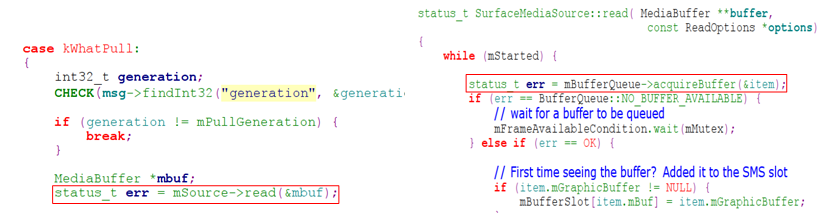
当双方设备准备就绪后,MediaPull会通过kWhatPull消息处理不断调用MediaSource的read函数。在SurfaceMediaSource实现的read函数中,来自SurfaceFlinger的混屏后的数据经由BufferQueue传递到MediaPull中。
Android WifiDisplay分析三:RTSP交互以及数据传输,布布扣,bubuko.com
Android WifiDisplay分析三:RTSP交互以及数据传输
原文:http://blog.csdn.net/lilian0118/article/details/23337289