首页 > Web开发 > 详细

VS2010 水晶报表的使用方法

时间:2016-01-16 07:13:35      阅读:134      评论:0      收藏:0      [点我收藏+]
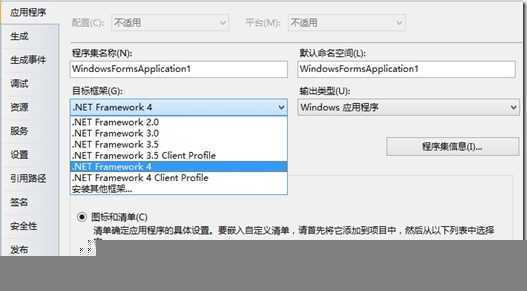
在VS2010中新建一个“Windows 窗体应用程序”项目,在该项目中添加一个水晶报表“CrystalReport1.rpt”,然后在项目上点击鼠标右键属性,将“目标框架”改为“.Net Framework 4”

技术分享

打开app.config文件,在“startup”节点一个“useLegacyV2RuntimeActivationPolicy="true"”属性

复制代码 代码如下:

<startup useLegacyV2RuntimeActivationPolicy="true">
    <supportedRuntime version="v4.0" sku=".NETFramework,Version=v4.0"/>
</startup>

在Form1窗体中,从工具箱拖出一个Crystal Report Viewer控件,双击Form窗体,是双击Form窗体,不是Crystal Report Viewer,在后台的Form_Load事件中写入如下代码:

复制代码 代码如下:

private void Form1_Load(object sender, EventArgs e)
        {
            string connStr = "Data Source=.\\SqlExpress;Initial Catalog=dbTest;User ID=sa;Password=test";
            SqlConnection conn = new SqlConnection(connStr);
            conn.Open();
            try
            {
                string sql = "SELECT * FROM Customer where email!=‘test@gmail.com‘";
                SqlDataAdapter sda = new SqlDataAdapter(sql, conn);
                DataSet ds = new DataSet();
                sda.Fill(ds, "tmpTable");

                string reportPath = System.Windows.Forms.Application.StartupPath + @"\CrystalReport1.rpt";
                ReportDocument rd = new ReportDocument();
                rd.Load(reportPath);
                rd.SetDataSource(ds.Tables[0].DefaultView);
                this.crystalReportViewer1.ReportSource = rd;
            }
            catch (Exception ex)
            {
                throw new Exception(ex.Message.ToString());
            }
            finally
            {
                conn.Close();
            }
        }

这样就OK了

技术分享

VS2010 水晶报表的使用方法

原文:http://www.jb51.net/article/39245.htm

(0)
(0)
   
举报
评论 一句话评论(0
关于我们 - 联系我们 - 留言反馈 - 联系我们:wmxa8@hotmail.com
© 2014 bubuko.com 版权所有
打开技术之扣,分享程序人生!