<!DOCTYPE html>
<html>
<meta name="content-type" content="text/html; charset=UTF-8">
<head>
<title>Calculator</title>
<!--将按键内容以字符串形式存储在文字框中当按钮为“=”时,调用eval方法计算结果然后将结果输出文字框中-->
<script type="text/javascript">
var numresult;
var str;
function onclicknum(nums) {
str = document.getElementById("nummessege");
str.value = str.value + nums;
}
function onclickclear() {
str = document.getElementById("nummessege");
str.value = "";
}
function onclickresult() {
str = document.getElementById("nummessege");
numresult = eval(str.value);
str.value = numresult;
}
</script>
</head>
<body bgcolor="affff" >
<!--定义按键表格,每个按键对应一个事件触发-->
<table border="1" align="center" bgColor="#bbff77"
style="height: 350px; width: 270px">
<tr>
<td colspan="4">
<input type="text" id="nummessege"
style="height: 90px; width: 350px; font-size: 50px" />
</td>
</tr>
<tr>
<td>
<input type="button" value="1" id="1" onclick="onclicknum(1)"
style="height: 70px; width: 90px; font-size: 35px">
</td>
<td>
<input type="button" value="2" id="2" onclick="onclicknum(2)"
style="height: 70px; width: 90px; font-size: 35px">
</td>
<td>
<input type="button" value="3" id="3" onclick="onclicknum(3)"
style="height: 70px; width: 90px; font-size: 35px">
</td>
<td>
<input type="button" value="+" id="add" onclick="onclicknum(‘+‘)"
style="height: 70px; width: 90px; font-size: 35px">
</td>
</tr>
<tr>
<td>
<input type="button" value="4" id="4" onclick="onclicknum(4)"
style="height: 70px; width: 90px; font-size: 35px">
</td>
<td>
<input type="button" value="5" id="5" onclick="onclicknum(5)"
style="height: 70px; width: 90px; font-size: 35px">
</td>
<td>
<input type="button" value="6" id="6" onclick="onclicknum(6)"
style="height: 70px; width: 90px; font-size: 35px">
</td>
<td>
<input type="button" value="-" id="sub" onclick="onclicknum(‘-‘)"
style="height: 70px; width: 90px; font-size: 35px">
</td>
</tr>
<tr>
<td>
<input type="button" value="7" id="7" onclick="onclicknum(7)"
style="height: 70px; width: 90px; font-size: 35px">
</td>
<td>
<input type="button" value="8" id="8" onclick="onclicknum(8)"
style="height: 70px; width: 90px; font-size: 35px">
</td>
<td>
<input type="button" value="9" id="9" onclick="onclicknum(9)"
style="height: 70px; width: 90px; font-size: 35px">
</td>
<td>
<input type="button" value="*" id="mul" onclick="onclicknum(‘*‘)"
style="height: 70px; width: 90px; font-size: 35px">
</td>
</tr>
<tr>
<td colspan="2">
<input type="button" value="0" id="0" onclick="onclicknum(0)"
style="height: 70px; width: 190px; font-size: 35px">
</td>
<td>
<input type="button" value="." id="point" onclick="onclicknum(‘.‘)"
style="height: 70px; width: 90px; font-size: 35px">
</td>
<td>
<input type="button" value="/" id="division"
onclick="onclicknum(‘/‘)"
style="height: 70px; width: 90px; font-size: 35px">
</td>
</tr>
<tr>
<td colspan="2">
<input type="button" value="Del" id="clear"
onclick="onclickclear()"
style="height: 70px; width: 190px; font-size: 35px" />
</td>
<td colspan="2">
<input type="button" value="=" id="result"
onclick="onclickresult()"
style="height: 70px; width: 190px; font-size: 35px" />
</td>
</tr>
</table>
</body>
</html>
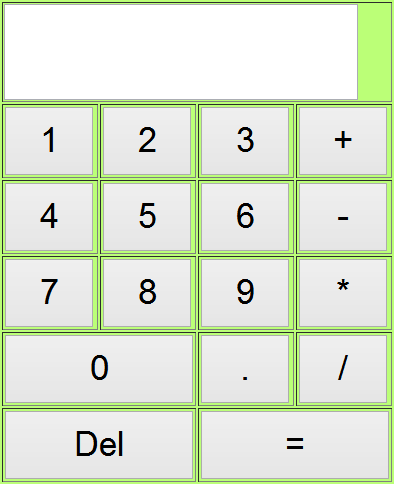
HTML实现简单计算器附详细思路
原文:http://www.jb51.net/web/213555.html
