
众所周知,Unity可以支持多种语言开发, C#, JS, Boo三种方式的开发, 能够很方便的集成一些外部插件,以便调用现有的动态链接库。学过C#的都知道C#可以生成一个dll供给其他的程序调用。那么基于C#开发的Unity也明显可以如此扩展,下面我们介绍下C#的Dll生成和调用。
1.新建C#类库项目。
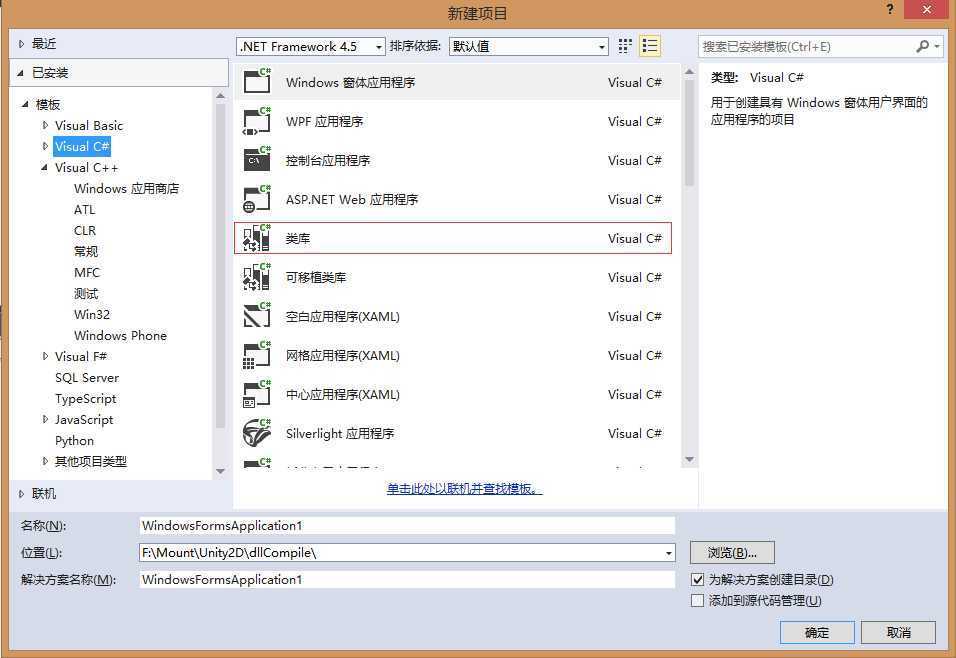
2.书写类方法
using System;
using System.Collections.Generic;
using System.Linq;
using System.Text;

namespace Test
{
    public class Dlltest
    {
        public bool checkResult()
        {
            return true;
        }

        public string getResult()
        {
            return "这是一个测试";
        }
    }
}
3.将项目属性 -> 应用程序 -> 目标框架:改为 .NET Framework 3.5或以下 。这一步很重要,因为Unity3D(当前的Unity3D版本是3.5版) 支持的 .Net 是3.5版。 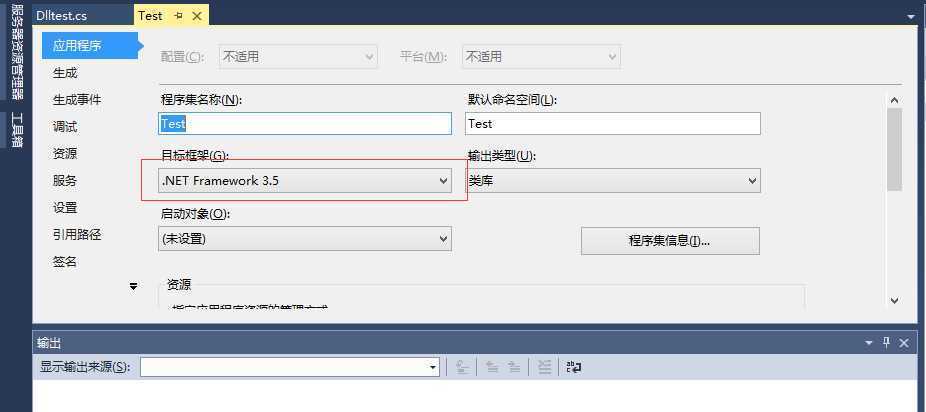
4.直接右击解决方案-生成解决方案-就可以生成你想要的DLL
5.把生成的DLL拷贝到Assets的任意目录下,我这边是放在了Assets/Plugins目录
6.代码中调用
using UnityEngine;
using System.Collections;
using Test;
using System.Runtime.InteropServices;

public class carMove : MonoBehaviour {

	// Use this for initialization
	void Start () {
            Dlltest test = new Dlltest();
            Debug.Log("我来测试下" + test.checkResult());
            Debug.Log("我来测试下" + test.getResult());
	}

	// Update is called once per frame
	void Update () {

	}
}
7.输出结果


本站文章为 宝宝巴士 SD.Team 原创,转载务必在明显处注明:(作者官方网站: 宝宝巴士 )
转载自【宝宝巴士SuperDo团队】原文链接: http://www.cnblogs.com/superdo/p/5148621.html
[Unity2d系列教程] 001.引用外部DLL - C#
原文:http://www.cnblogs.com/superdo/p/5148621.html