[首页]
[文章]
[教程]
首页
Web开发
Windows开发
编程语言
数据库技术
移动平台
系统服务
微信
设计
布布扣
其他
数据分析
首页
>
Web开发
> 详细
CSS3教程:边框属性border的极致应用
时间:
2016-01-22 10:10:52
阅读:
191
评论:
0
收藏:
0
[点我收藏+]
这里讨论的都是关于边框属性border的极致应用,这些应用虽说有些剑走偏门,但在一些特殊的场合,可能还是会用得上的,如果你对HTML代码有洁癖,有切肤之痛,并且认为冗余的标签影响到你的视觉神经,那么你可以权当一种业余欣赏。
作者:冰极峰
博客地址:http://www.cnblogs.com/binyong
这世界太疯狂,Border属性也搞模仿秀!
这里讨论的都是关于边框属性border的极致应用,这些应用虽说有些剑走偏门,但在一些特殊的场合,可能还是会用得上的,如果你对HTML代码有洁癖,有切肤之痛,并且认为冗余的标签影响到你的视觉神经,那么你可以权当一种业余欣赏。
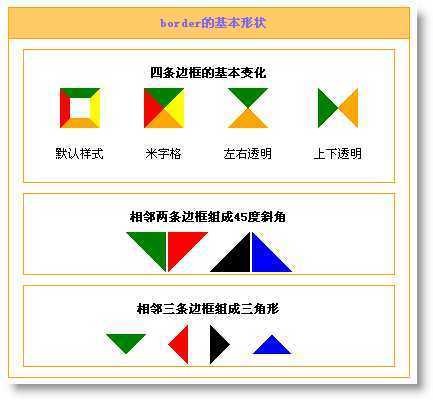
下面这个截图是border属性的几种基本变化,通过对这几种基本变化的延伸引用,你可以变化出各种丰富的案例出来:
图一
如我在另一篇文章《用div css模拟表格对角线》中说到的一样,这些变化其实就是基于如下的基本原理:
border-left:20px transparent dotted;
border-top:20px green solid;
border-right:20px transparent dotted;
border-bottom:20px orange solid;
width:0px;
height:0px;
overflow:hidden;
注意:transparent是用来透明的,并且要设置的线条的样式为dotted(点线)。宽高为0,就会只显示边框部分,然后用overflow来将多余部分截取掉,剩下的就是斜角内容了。
斜角的组合规律如下:
border-left和border-top组成从左上到右下的斜线 border-right和border-top组成从右上到左下的斜线 border-right和border-bottom组成从右下到左上的斜线 border-left和border-bottom组成从左下到右上的斜线
有了这些基本规律就可以变化无穷了,发挥你的想像力吧,我们来看看有些什么变化。
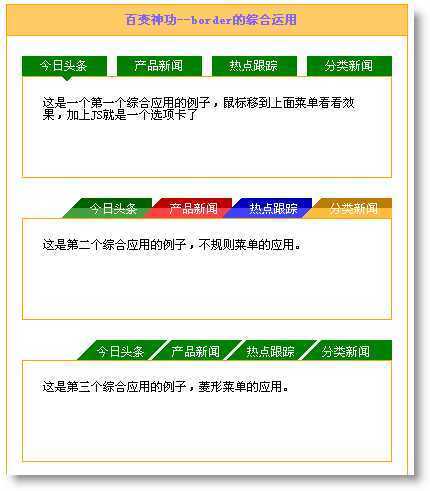
下图是应用这种原理变化出来的不规则选项卡,为了简少代码量,我没有加上js功能,你们可以自己试试。
PS:这些链接全部有翻滚状态,你可直接使用,已经做了兼容性测试。
图二
这里讨论的都是关于边框属性border的极致应用,这些应用虽说有些剑走偏门,但在一些特殊的场合,可能还是会用得上的,如果你对HTML代码有洁癖,有切肤之痛,并且认为冗余的标签影响到你的视觉神经,那么你可以权当一种业余欣赏。
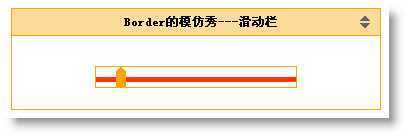
滑动块也是经常看到的,下面的截图二中模仿了一个时间滑动块功能,当然你还可以发挥的想像力,将一个滚动条也用这种方式作出来。在本图的右上角有两个相反的三角形,这种在一些需要折叠的面板中经常见,这个也是用Border模仿出来的。
图三
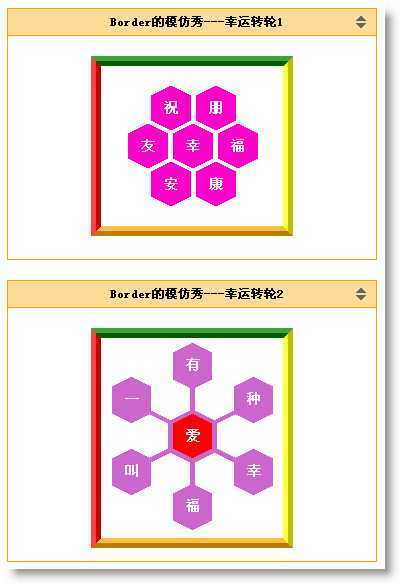
下面这两个东东我也不知道该将它取个什么名字,你可以叫它电话拨盘,可能现在只会在很早之前的电影中才能看了。我暂时将它取名为幸运转轮吧! :)
这种你可以将它用在登录页面中去。随你吧!!
PS:这里面的每个形状都是可以点击的,你可将它做成一个链接地址。
图四
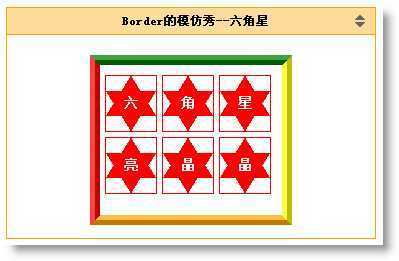
下面这种就是一种变态的做法了,本来我想模仿成五角星,结果歪打正着,成了这么一种形状。暂时就这样吧。我数学不好,关于五边形的算法不知如何计算,望知道的朋友交流一下。
图五
兼容性测试,在以下几种浏览器中正常工作:
IE6、IE7、FF3、Opera 9.63、傲游
直接下载看吧:
运行代码框
<!DOCTYPE html PUBLIC "-//W3C//DTD XHTML 1.0 Transitional//EN" "http://www.w3.org/TR/xhtml1/DTD/xhtml1-transitional.dtd"> <html xmlns="http://www.w3.org/1999/xhtml"> <head> <meta http-equiv="Content-Type" content="text/html; charset=utf-8" /> <title>Border属性的终极研究---看我七十二变(冰极峰:http://www.cnblogs.com/binyong)</title> <style type="text/css"> *{margin:0;padding:0;font-size:12px;} body{background:#555;} #wrapper{width:500px;margin:0 auto;border-left:4px #888 solid;border-right:4px #888 solid;background:#fff;padding-bottom:50px;} #corner{position:relative;} #corner em,#corner b,#corner strong,#corner i,#corner span{display:block;border-top:67px green solid;border-right:67px transparent dotted;width:0;height:0;overflow:hidden;} #corner b{border-width:65px;border-top-color:red;position:absolute;top:0;left:0;} #corner em{border-width:63px;border-top-color:orange;position:absolute;top:0;left:0;} #corner i{border-width:37px;border-top-color:orange;position:absolute;top:0;left:0;} #corner strong{border-width:35px;border-top-color:red;position:absolute;top:0;left:0;} #corner span{border-width:33px;border-top-color:#fff;position:absolute;top:0;left:0;} #corner a{position:absolute;display:block;width:10px;height:10px;font-size:12px;color:#fff;font-weight:bold; text-decoration:none;} #corner a#b1{left:34px;top:3px;} #corner a#b2{left:18px;top:18px;} #corner a#b3{left:3px;top:33px;} h1 {width:310px;height:100px;line-height:100px;color:#2f231a;font-size:16px;margin:0px auto;position:relative;} h1 b {color:#b2c63a;font-size:16px;font-style:normal;left:-1px;position:absolute;top:-1px;} h1 strong{position:absolute;top:25px;left:100px;height:22px;} /*盒子*/ .tab{width:400px;margin:0 auto;border:1px orange solid;margin-top:10px;text-align:center;} h2{border-bottom:1px orange solid;line-height:30px;padding-left:10px;background:#FFC966;color:#7C66FF;text-align:center;} .blog{background:#2f231a;} .blog a:link,.blog a:visited{color:#fff;} h3{text-align:center;line-height:26px;height:26px;} .photobox{border-left:10px red ridge;border-top:10px green ridge;border-right:10px yellow ridge;border-bottom:10px orange ridge;} .tab_pannel{width:380px;overflow:hidden;margin:20px auto;} .tab_content{border:1px orange solid;height:100px;width:368px;margin:0 auto;text-align:left;} /*基本形状----------------------------------------------------------------------------*/ .base{border:1px orange solid;padding-top:10px;width:370px;margin:0 auto;overflow:hidden;} .base b{width:0;height:0;overflow:hidden;margin-right:20px;display:block;} /*下三角形*/ .t1{border-left:20px #fff solid;border-top:20px green solid;border-right:20px #fff solid;border-bottom:0;} /*左三角形*/ .t2{border-top:20px #fff solid;border-right:20px red solid;border-bottom:20px #fff solid;border-left:0;overflow:hidden;} /*右三角形*/ .t3{border-top:20px #fff solid;border-left:20px #000 solid;border-bottom:20px #fff solid;border-right:0;} /*上三角形*/ .t4{border-left:20px #fff solid;border-bottom:20px blue solid;border-right:20px #fff solid;border-top:0;} /*基本形状*/ .tb_base{margin:0 auto;} .tb_base .s1{display:block;border-left:20px red solid;border-top:20px green solid;border-right:20px yellow solid;border-bottom:20px orange solid;width:0px;height:0px;overflow:hidden;margin:0 auto;} .tb_base .s2{display:block;border-left:10px red solid;border-top:10px green solid;border-right:10px yellow solid;border-bottom:10px orange solid;width:20px;height:20px;overflow:hidden;margin:0 auto;} .tb_base .s3{display:block;border-left:20px transparent dotted;border-top:20px green solid;border-right:20px transparent dotted;border-bottom:20px orange solid;width:0px;height:0px;overflow:hidden;margin:0 auto;} .tb_base .s3-1{display:block;border-top:20px transparent dotted;border-left:20px green solid;border-bottom:20px transparent dotted;border-right:20px orange solid;width:0px;height:0px;overflow:hidden;margin:0 auto;} .tb_base .s4{display:block;border-left:40px transparent dotted;border-top:40px green solid;width:0px;height:0px;overflow:hidden;} .tb_base .s5{display:block;border-right:40px transparent dotted;border-top:40px red solid;width:0px;height:0px;overflow:hidden;} .tb_base .s6{display:block;border-left:40px transparent dotted;border-bottom:40px #000 solid;width:0px;height:0px;overflow:hidden;} .tb_base .s7{display:block;border-bottom:40px blue solid;border-right:40px transparent dotted;width:0px;height:0px;overflow:hidden;} /*综合运用0*/ #menu1{list-style:none;width:380px;margin:0px auto;padding-left:5px;height:20px;} #menu1 li{float:left;width:85px;height:20px;line-height:20px;margin-right:10px;} #menu1 li a{position:relative;width:100%;display:block;background:green;text-decoration:none;text-align:center;color:#fff} #menu1 li a b{position:absolute;top:20px;left:40px;border-left:5px #fff solid;border-top:5px green solid;border-right:5px #fff solid;border-bottom:0;display:none;width:0;height:0;overflow:hidden;} #menu1 li a:hover{background:orange;} #menu1 li a:hover b{border-top:5px orange solid;display:block;} /*综合运用1-菱形菜单*/ p{padding:20px;} #other li a b{top:10px; right:20px;background:#fff;} #menu2{list-style:none;width:368px;height:20px;position:relative;left:6px;*left:0px;} #menu2 li{width:70px;float:left;} #menu2 li a{display:block;width:70px;border-left:20px transparent dotted;border-top:0;text-decoration:none;color:#fff;position:absolute;} #menu2 #m1 a{border-bottom:20px green groove;left:39px;} #menu2 #m2 a{border-bottom:20px red groove;left:119px;} #menu2 #m3 a{border-bottom:20px blue groove;left:199px;} #menu2 #m4 a{border-bottom:20px orange groove;left:279px;} #menu2 li a span{display:block;position:absolute;top:5px;left:8px;} #menu2 li a:hover{color:#00FFFF;}/**/ #menu2 #m1 a:hover{border-bottom:20px #CC9933 groove;} #menu2 #m2 a:hover{border-bottom:20px gray groove;} #menu2 #m3 a:hover{border-bottom:20px #FF00FF groove;} #menu2 #m4 a:hover{border-bottom:20px #99CC66 groove;} /*综合运用2-菱形菜单*/ #menu3{list-style:none;width:368px;height:20px;position:relative;left:6px;*left:0;} #menu3 li{width:90px;height::20px;line-height:20px; float:left; overflow:hidden;position:relative;} #menu3 li a{display:block;width:70px;height:0px;text-decoration:none;border-left:20px transparent dotted;border-bottom:20px green solid;border-top:0;position:relative;} #menu3 li a span{display:block;position:absolute;top:2px;left:0px;color:#fff;} #menu3 li a em{display:block;position:absolute; top:0px;left:50px;border-left:20px green solid;border-bottom:20px #fff solid;width:0;height:0;overflow:hidden;background:#fff;cursor:pointer;} #menu3 li a:hover{ border-bottom-color:orange;} #menu3 li a:hover span{background:orange;cursor:pointer;color:#0000CC;} #menu3 li a:hover em{border-left:20px orange solid;} #menu3 #m5{left:54px;} #menu3 #m6{left:39px;} #menu3 #m7{left:24px;} #menu3 #m8{left:9px;} /*滑动条*/ .box{width:200px;line-height:30px;margin:30px auto; position:relative;border:1px orange solid;} .sliderbg{display:block;border-bottom:5px #F30 solid;width:200px;height:2px;line-height:2px;position:absolute;top:8px;left:0px;} #sliderbar{width:10px;height:20px;margin-left:20px;} #sliderbar a{display:block;border-left:5px transparent dotted;border-right:5px transparent dotted;border-bottom:5px orange solid; width:0;height:0;position:relative;} #sliderbar a b{position:absolute;top:5px;left:-5px;display:block;width:10px;height:15px;background:orange;overflow:hidden;} #sliderbar a:hover{border-bottom:5px #00F solid;} #sliderbar a:hover b{background:#00F; cursor:pointer;} /*右边的上下三角形*/ .title{border-bottom:1px orange solid;line-height:26px;padding-left:10px;position:relative;overflow:hidden;background:#FFDB99;height:26px;} .title b{display:block;width:280px;line-height:26px;height:26px;padding-left:10px;float:left;} .title span a{display:block;width:0px;height:0px;float:left;overflow:hidden;position:absolute;border-left:5px transparent dotted;border-right:5px transparent dotted;} .title .up a{border-bottom:5px #666 solid;top:7px;right:10px;} .title .up a:hover{border-bottom:5px blue solid;} .title .down a{border-top:5px #666 solid;top:14px;right:10px;} .title .down a:hover{border-top:5px blue solid;} /*综合运用3---------------------------幸运转轮1*/ #menu4box{width:182px;height:160px;margin:20px auto;background:#fff;/*背景颜色值*/} #menu4{list-style:none;width:182px;height:20px;position:relative;margin:20px auto;} #menu4 li{position:absolute;} #menu4 li a{display:block;width:0;height:24px;border-top:10px transparent dotted;border-right:20px #FF00CC solid;border-bottom:10px transparent dotted;} #menu4 li a em{display:block;width:0;height:24px;border-top:10px transparent dotted;border-left:20px #FF00CC solid;border-bottom:10px transparent dotted;position:absolute;top:0;left:20px;cursor:pointer;} #menu4 li a b{display:block;width:20px;height:22px;position:absolute;top:15px;left:13px;font-size:14px;color:#fff;cursor:pointer;} #menu4 li a{text-decoration:none;} #menu4 li a:hover{border-right-color:#CC3300;} #menu4 li a:hover em{border-left-color:#CC3300;cursor:pointer;} #menu4 li a:hover b{color:#000000;cursor:pointer;} #m9{left:50px;} #m10{left:95px;} #m11{left:27px;top:38px;} #m12{left:72px;top:38px;} #m13{left:117px;top:38px;} #m14{left:50px;top:76px;} #m15{left:95px;top:76px;} /*综合运用4--------------------------幸运转轮2*/ #menu5box{position:relative;width:182px;height:200px;margin:20px auto;background:#fff;/*背景颜色值*/} #menu5{list-style:none;} .intbg{position:absolute;top:50px;left:40px;display:block;width:100px;height:98px;background:#CC66CC;/*线条颜色值*/} #menu5 li{position:absolute;} /*键*/ .out a{display:block;width:0;height:26px;border-top:10px transparent dotted;border-right:20px #CC66CC solid;border-bottom:10px transparent dotted;} .out a em{display:block;width:0;height:26px;border-top:10px transparent dotted;border-left:20px #CC66CC solid;border-bottom:10px transparent dotted;position:absolute;top:0;left:19px;cursor:pointer;} .out a b{display:block;width:20px;height:22px;position:absolute;top:15px;left:13px;font-size:14px;color:#fff;cursor:pointer;} .out a{text-decoration:none;} .out a:hover{border-right-color:#CC3300;} .out a:hover em{border-left-color:#CC3300;cursor:pointer;} .out a:hover b{color:#000000;cursor:pointer;} /*填充背景色*/ .int a{display:block;width:0;height:24px;border-top:10px transparent dotted;border-right:20px #fff solid;border-bottom:10px transparent dotted;} .int a em{display:block;width:0;height:24px;border-top:10px transparent dotted;border-left:20px #fff solid;border-bottom:10px transparent dotted;position:absolute;top:0;left:19px;} .int a b{display:block;width:20px;height:22px;position:absolute;top:15px;left:13px;} /*外面定位*/ #t1{left:72px;top:5px;} #t2{left:11px;top:39px;} #t3{left:133px;top:39px;} #t4{left:11px;top:111px;} #t5{left:133px;top:111px;} #t6{left:72px;top:146px;} /*里面定位*/ #f1{left:50px;top:38px;} #f2{left:94px;top:38px;} #f3{left:28px;top:76px;} #f4{left:72px;top:76px;} #f5{left:116px;top:76px;} #f6{left:50px;top:115px;} #f7{left:94px;top:115px;} /*中心圆*/ #f4 a{text-decoration:none;border-top:10px transparent dotted;border-right:20px #FF0000 solid;border-bottom:10px transparent dotted;} #f4 a em{display:block;border-top:10px transparent dotted;border-left:20px #FF0000 solid;border-bottom:10px transparent dotted;position:absolute;top:0;left:19px;cursor:pointer;} #f4 a:hover{border-right-color:#CC3300;} #f4 a:hover em{border-left-color:#CC3300;cursor:pointer;} #f4 a:hover b{font-size:14px;color:#fff;cursor:pointer;} #f4 a b{display:block;width:20px;height:22px;position:absolute;top:15px;left:13px;font-size:14px;color:#fff;cursor:pointer;} /*综合运用5-------------------------六角星*/ #menu6box{position:relative;width:182px;height:150px;margin:20px auto;background:#fff;} #menu6{list-style:none;padding-top:10px;} #menu6 li{width:50px;height:55px;border:1px red solid;position:relative;float:left;margin-left:5px;margin-bottom:5px;} #menu6 li a{display:block;border-left:25px transparent dotted;border-bottom:40px red solid;border-right:25px transparent dotted;width:0;height:0;margin:0 auto; text-decoration:none;} #menu6 li a b{display:block;border-left:25px transparent dotted;border-top:40px red solid;border-right:25px transparent dotted;width:0;height:0;position:absolute;top:15px;left:0px; z-index:1; cursor:pointer;} #menu6 li a em{display:block;width:20px;height:22px;position:absolute; z-index:2; top:20px;left:18px;font-size:14px;color:#fff; font-style:normal;font-weight:bold;cursor:pointer;} #menu6 li a:hover{border-bottom-color:#000099;} #menu6 li a:hover b{border-top-color:#000099;} #menu6 li a:hover em{color:orange;} </style> </head> <body> <div id="wrapper"> <div id="corner"><b></b><em></em><i></i><strong></strong><span></span> <a href="http://www.cnblogs.com/binyong" id="b1">冰</a> <a href="http://www.cnblogs.com/binyong" id="b2">极</a> <a href="http://www.cnblogs.com/binyong" id="b3">峰</a> </div> <h1>Border属性的终极研究---看我七十二变<b>Border属性的终极研究---看我七十二变</b><strong>原创:冰极峰</strong></h1> <h2 class="blog">新Blog地址:<a href="http://www.cnblogs.com/binyong">http://www.cnblogs.com/binyong</a></h2> <div class="tab" style="margin-top:30px;"> <h2>border的基本形状</h2> <div class="base" style="margin-top:10px;"> <h3>四条边框的基本变化</h3> <table class="tb_base"> <tr> <td> <span class="s2"></span><p>默认样式</p> </td> <td> <span class="s1"></span><p>米字格</p> </td> <td> <span class="s3"></span><p>左右透明</p> </td> <td> <span class="s3-1"></span><p>上下透明</p> </td> </tr> </table> </div> <div class="base" style="margin-top:10px;"> <h3>相邻两条边框组成45度斜角</h3> <table class="tb_base"> <tr> <td> <span class="s4"></span> </td> <td> <span class="s5"></span> </td> <td> <span class="s6"></span> </td> <td> <span class="s7"></span> </td> </tr> </table> </div> <div class="base" style="margin-top:10px;margin-bottom:10px;"> <h3>相邻三条边框组成三角形</h3> <table class="tb_base"> <tr> <td> <b class="t1"></b> </td> <td> <b class="t2"></b> </td> <td> <b class="t3"></b> </td> <td> <b class="t4"></b> </td> </tr> </table> </div> </div> <div class="tab"> <h2>百变神功--border的综合运用</h2> <div class="tab_pannel"> <ul id="menu1"> <li><a href="http://www.cnblogs.com/binyong" target="_blank">今日头条<b style="display:block;"></b></a></li> <li><a href="http://www.cnblogs.com/binyong" target="_blank">产品新闻<b></b></a></li> <li><a href="http://www.cnblogs.com/binyong" target="_blank">热点跟踪<b></b></a></li> <li id="other"><a href="http://www.cnblogs.com/binyong" target="_blank">分类新闻<b></b></a></li> </ul> <div class="tab_content"> <p>这是一个第一个综合应用的例子,鼠标移到上面菜单看看效果,加上JS就是一个选项卡了</p> </div> </div> <div class="tab_pannel"> <ul id="menu2"> <li id="m1"><a href="http://www.cnblogs.com/binyong" target="_blank"><span>今日头条</span></a></li> <li id="m2"><a href="http://www.cnblogs.com/binyong" target="_blank"><span>产品新闻</span></a></li> <li id="m3"><a href="http://www.cnblogs.com/binyong" target="_blank"><span>热点跟踪</span></a></li> <li id="m4"><a href="http://www.cnblogs.com/binyong" target="_blank"><span>分类新闻</span></a></li> </ul> <div class="tab_content"> <p>这是第二个综合应用的例子,不规则菜单的应用。</p> </div> </div> <div class="tab_pannel"> <ul id="menu3"> <li id="m5"><a href="http://www.cnblogs.com/binyong" target="_blank"><span>今日头条</span><em></em></a></li> <li id="m6"><a href="http://www.cnblogs.com/binyong" target="_blank"><span>产品新闻</span><em></em></a></li> <li id="m7"><a href="http://www.cnblogs.com/binyong" target="_blank"><span>热点跟踪</span><em></em></a></li> <li id="m8"><a href="http://www.cnblogs.com/binyong" target="_blank"><span>分类新闻</span></a></li> </ul> <div class="tab_content"> <p>这是第三个综合应用的例子,菱形菜单的应用。</p> </div> </div> <div class="tab_content" style="height:100px;margin-bottom:20px;"> <h3 class="title">Border的模仿秀---滑动栏 <span class="up"><a id="arrow" href="#none" title="我是border模仿的哟" onclick="closeW(‘context‘)"></a></span> <span class="down"><a id="arrow" href="#none" title="我也是用border模仿的哟" onclick="f_s(‘context‘)"></a></span> </h3> <div class="box"> <span class="sliderbg" ></span> <div id="sliderbar" title="我是border模仿"> <a href="#"><b></b></a> </div> </div> </div> <div class="tab_content" style="height:250px;"> <h3 class="title">Border的模仿秀---幸运转轮1 <span class="up"><a id="arrow" href="#none" title="我是border模仿的哟" onclick="closeW(‘context‘)"></a></span> <span class="down"><a id="arrow" href="#none" title="我也用是border模仿的哟" onclick="f_s(‘context‘)"></a></span> </h3> <div class="photobox" id="menu4box"> <ul id="menu4"> <li id="m9"><a href="http://www.cnblogs.com/binyong" target="_blank"><em></em><b>祝</b></a></li> <li id="m10"><a href="http://www.cnblogs.com/binyong" target="_blank"><em></em><b>朋</b></a></li> <li id="m11"><a href="http://www.cnblogs.com/binyong" target="_blank"><em></em><b>友</b></a></li> <li id="m12"><a href="http://www.cnblogs.com/binyong" target="_blank"><em></em><b>幸</b></a></li> <li id="m13"><a href="http://www.cnblogs.com/binyong" target="_blank"><em></em><b>福</b></a></li> <li id="m14"><a href="http://www.cnblogs.com/binyong" target="_blank"><em></em><b>安</b></a></li> <li id="m15"><a href="http://www.cnblogs.com/binyong" target="_blank"><em></em><b>康</b></a></li> </ul> </div> </div> <div class="tab_content" style="height:280px;margin-top:20px;"> <h3 class="title">Border的模仿秀---幸运转轮2 <span class="up"><a id="arrow" href="#none" title="我是border模仿的哟" onclick="closeW(‘context‘)"></a></span> <span class="down"><a id="arrow" href="#none" title="我也用是border模仿的哟" onclick="f_s(‘context‘)"></a></span> </h3> <div id="menu5box" class="photobox"> <span class="intbg"></span> <ul id="menu5"> <li class="int" id="f1"><a href="http://www.cnblogs.com/binyong" target="_blank"><em></em><b></b></a></li> <li class="int" id="f2"><a href="http://www.cnblogs.com/binyong" target="_blank"><em></em><b></b></a></li> <li class="int" id="f3"><a href="http://www.cnblogs.com/binyong" target="_blank"><em></em><b></b></a></li> <li class="int" id="f4"><a href="http://www.cnblogs.com/binyong" target="_blank"><em></em><b>爱</b></a></li> <li class="int" id="f5"><a href="http://www.cnblogs.com/binyong" target="_blank"><em></em><b></b></a></li> <li class="int" id="f6"><a href="http://www.cnblogs.com/binyong" target="_blank"><em></em><b></b></a></li> <li class="int" id="f7"><a href="http://www.cnblogs.com/binyong" target="_blank"><em></em><b></b></a></li> <li class="out" id="t1"><a href="http://www.cnblogs.com/binyong" target="_blank"><em></em><b>有</b></a></li> <li class="out" id="t2"><a href="http://www.cnblogs.com/binyong" target="_blank"><em></em><b>一</b></a></li> <li class="out" id="t3"><a href="http://www.cnblogs.com/binyong" target="_blank"><em></em><b>种</b></a></li> <li class="out" id="t4"><a href="http://www.cnblogs.com/binyong" target="_blank"><em></em><b>叫</b></a></li> <li class="out" id="t5"><a href="http://www.cnblogs.com/binyong" target="_blank"><em></em><b>幸</b></a></li> <li class="out" id="t6"><a href="http://www.cnblogs.com/binyong" target="_blank"><em></em><b>福</b></a></li> </ul> </div> </div> <div class="tab_content" style="height:230px;margin-top:20px;margin-bottom:20px;"> <h3 class="title">Border的模仿秀--六角星 <span class="up"><a id="arrow" href="#none" title="我是border模仿的哟" onclick="closeW(‘context‘)"></a></span> <span class="down"><a id="arrow" href="#none" title="我也用是border模仿的哟" onclick="f_s(‘context‘)"></a></span> </h3> <div id="menu6box" class="photobox"> <ul id="menu6"> <li><a href="http://www.cnblogs.com/binyong" id="b1" target="_blank"><b></b><em>六</em></a></li> <li><a href="http://www.cnblogs.com/binyong" id="b2" target="_blank"><b></b><em>角</em></a></li> <li><a href="http://www.cnblogs.com/binyong" id="b3" target="_blank"><b></b><em>星</em></a></li> <li><a href="http://www.cnblogs.com/binyong" id="b4" target="_blank"><b></b><em>亮</em></a></li> <li><a href="http://www.cnblogs.com/binyong" id="b5" target="_blank"><b></b><em>晶</em></a></li> <li><a href="http://www.cnblogs.com/binyong" id="b6" target="_blank"><b></b><em>晶</em></a></li> </ul> </div> </div> </div> </div> </body> </html>
[Ctrl A 全部选择 提示:你可先修改部分代码,再按运行]
CSS3教程:边框属性border的极致应用
原文:http://www.jb51.net/css/12293.html
踩
(
0
)
赞
(
0
)
举报
评论
一句话评论(
0
)
登录后才能评论!
分享档案
更多>
2021年09月23日 (328)
2021年09月24日 (313)
2021年09月17日 (191)
2021年09月15日 (369)
2021年09月16日 (411)
2021年09月13日 (439)
2021年09月11日 (398)
2021年09月12日 (393)
2021年09月10日 (160)
2021年09月08日 (222)
最新文章
更多>
2021/09/28 scripts
2022-05-27
vue自定义全局指令v-emoji限制input输入表情和特殊字符
2022-05-27
9.26学习总结
2022-05-27
vim操作
2022-05-27
深入理解计算机基础 第三章
2022-05-27
C++ string 作为形参与引用传递(转)
2022-05-27
python 加解密
2022-05-27
JavaScript-对象数组里根据id获取name,对象可能有children属性
2022-05-27
SQL语句——保持现有内容在后面增加内容
2022-05-27
virsh命令文档
2022-05-27
教程昨日排行
更多>
1.
list.reverse()
2.
Django Admin 管理工具
3.
AppML 案例模型
4.
HTML 标签列表(功能排序)
5.
HTML 颜色名
6.
HTML 语言代码
7.
jQuery 事件
8.
jEasyUI 创建分割按钮
9.
jEasyUI 创建复杂布局
10.
jEasyUI 创建简单窗口
友情链接
汇智网
PHP教程
插件网
关于我们
-
联系我们
-
留言反馈
- 联系我们:wmxa8@hotmail.com
© 2014
bubuko.com
版权所有
打开技术之扣,分享程序人生!