
转自 http://wsfdl.com/openstack/2016/01/14/Keystone-Federation-Identity.html
Keystone federation identity 涉及很多概念,安装配置复杂,官网的文档又不够清晰,下面 4 篇文章在安装配置方面阐述的非常详细。
关于 federation identity,维基百科的定义如下:
A federated identity is the means of linking a person‘s electronic identity and attributes, stored across multiple distinct identity management systems(IDM).
在多个认证管理系统互相信任的基础上,federation identity 允许多个认证管理系统联邦认证各个系统的用户身份。它最重要的一个功能就是实现单点登录(Single Sign On),用户仅需认证一次,便可访问这些互相授信的资源。比如 A 公司员工需使用 AWS 公有云,出于安全考虑,不希望在 AWS 的 IAM 创建员工账户信息,通过 federation identity 打通二者之间的用户授权和认证,A 公司员工只需在本公司完成身份认证即可访问 AWS 资源。我们把 A 公司称之为 Identity Provider(IDP), AWS 称之为 Service Provider(SP)。
以 SAML 协议为例,典型的认证流程分为 Redirect Bindings 和 Artifact/POST Bindings 两种。
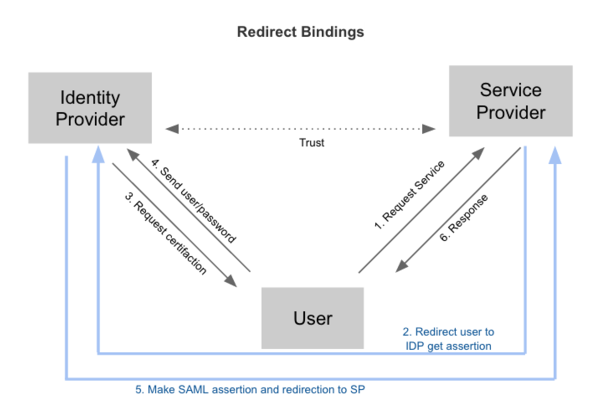
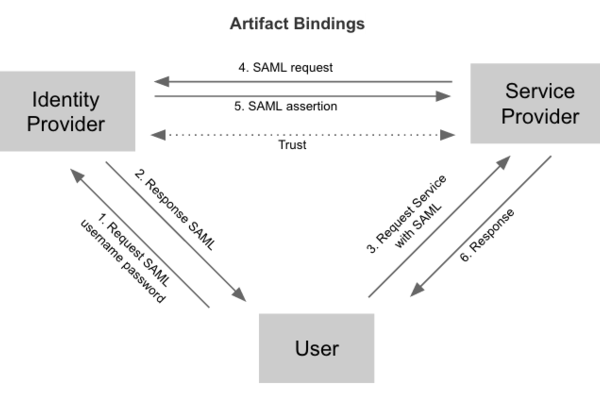
Federation identity 具有以下优点:
Federation identity 为 hybrid cloud 在用户管理层面提供了良好的解决方案。Keystone 从 Icehouse 开始逐步增加 federation identity 的功能,Icehouse 支持 Keystone 作为 Service Provider,Juno 版本新增了 Identity Provider,支持 SAML 和 OpenID 两种认证协议。OpenStack 作为云服务的解决方案,对外提供计算、存储和网络等服务,多数场景下 Keystone 常常作为服务端,对接其它的 Identity Provider,所以本节着重阐述 Service Provider 的原理和流程。首先先介绍 3 类重要的 API。
Mapping API: /OS-FEDERATION/mappings
管理 Identity Provider 里的用户和 Keystone 里的用户之间的映射规则,通过该 API,管理员可以管理 IDP 中用户访问 Service 的权限。比如 IDP 有用户 A,B,通过配置 mapping rule,可以允许 A 有权限而 B 无权限访问。
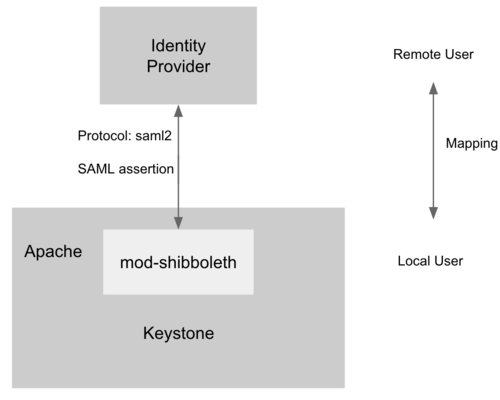
为了支持 Service Provider,Keystone 必须运行在 Apache HTTPD 上,mod-shibboleth 作为 apache plugin 支持 SAML 认证协议,完成了 Keystone 和 IDP 之间用户的身份认证,流程如下。
本节开始介绍如何安装配置 Keystone to Keystone Federation,重点参考了 it-is-time-to-play-with-keystone-to-keystone-federation-in-kilo(原文存在 2 处配置错误,本文已给予纠正)。 我们有两个服务器,分别作为 SP 和 IDP,二者均需按照官网的手册安装 Keystone。
更新 keystone.conf 如下配置:
[auth]
methods = external,password,token,oauth1,saml2
saml2 = keystone.auth.plugins.mapped.Mapped
Apache 新增如下配置:
Listen 5000
Listen 35357

<VirtualHost *:5000>
    WSGIScriptAliasMatch ^(/v3/OS-FEDERATION/identity_providers/.*?/protocols/.*?/auth)$ /var/www/cgi-bin/keystone/main/$1
     ......
</VirtualHost>

<VirtualHost *:35357>
    WSGIScriptAliasMatch ^(/v3/OS-FEDERATION/identity_providers/.*?/protocols/.*?/auth)$ /var/www/cgi-bin/keystone/admin/$1
      ......
</VirtualHost>

<Location /Shibboleth.sso>
    SetHandler shib
</Location>

<LocationMatch /v3/OS-FEDERATION/identity_providers/.*?/protocols/saml2/auth>
    ShibRequestSetting requireSession 1
    AuthType shibboleth
    ShibExportAssertion Off
    Require valid-user
</LocationMatch>
安装 Shibboleth:
apt-get install libapache2-mod-shib2
更新 /etc/shibboleth/attribute-map.xml 的以下配置项:
<Attribute name="openstack_user" id="openstack_user"/>
<Attribute name="openstack_roles" id="openstack_roles"/>
<Attribute name="openstack_project" id="openstack_project"/>
<Attribute name="openstack_user_domain" id="openstack_user_domain"/>
<Attribute name="openstack_project_domain" id="openstack_project_domain"/>
更新 /etc/shibboleth/shibboleth2.xml 的以下配置项:
<SSO entityID="http://idp:5000/v3/OS-FEDERATION/saml2/idp">
    SAML2 SAML1
</SSO>

<MetadataProvider type="XML" uri="http://idp:5000/v3/OS-FEDERATION/saml2/metadata"/>
启动 shibboleth 并重启 apache:
shib-keygen
service apache2 restart
查看 shibboleth 是否正常运行
unbuntu@SP:~# a2enmod shib2
Module shib2 already enabled
安装 xmlsec1 和 pysaml2:
sudo apt-get install xmlsec1
sudo pip install pysaml2
更新 keystone.conf 的如下配置:
[saml]
certfile=/etc/keystone/ssl/certs/ca.pem
keyfile=/etc/keystone/ssl/private/cakey.pem
idp_entity_id=http://idp:5000/v3/OS-FEDERATION/saml2/idp
idp_sso_endpoint=http://idp:5000/v3/OS-FEDERATION/saml2/sso
idp_metadata_path=/etc/keystone/keystone_idp_metadata.xml
生成 DIP 的 metadata 并重启 apache HTTPD:
keystone-manage saml_idp_metadata > /etc/keystone/keystone_idp_metadata.xml
service apache2 restart
import os

from keystoneclient import session as ksc_session
from keystoneclient.auth.identity import v3
from keystoneclient.v3 import client as keystone_v3

try:
    # Used for creating the ADMIN user
    OS_PASSWORD = ‘123456‘
    OS_USERNAME = ‘admin‘
    # This will vary according to the entity:
    # the IdP or the SP
    OS_AUTH_URL = ‘http://sp:35357/v3‘
    OS_PROJECT_NAME = ‘admin‘
    OS_DOMAIN_NAME = ‘default‘
except KeyError as e:
    raise SystemExit(‘%s environment variable not set.‘ % e)

def client_for_admin_user():
    auth = v3.Password(auth_url=OS_AUTH_URL,
                       username=OS_USERNAME,
                       password=OS_PASSWORD,
                       user_domain_name=OS_DOMAIN_NAME,
                       project_name=OS_PROJECT_NAME,
                       project_domain_name=OS_DOMAIN_NAME)
    session = ksc_session.Session(auth=auth)
    return keystone_v3.Client(session=session)

# Used to execute all admin actions
client = client_for_admin_user()

def create_domain(client, name):
    try:
         d = client.domains.create(name=name)
    except:
         d = client.domains.find(name=name)
    return d


def create_group(client, name, domain):
    try:
         g = client.groups.create(name=name, domain=domain)
    except:
         g = client.groups.find(name=name)
    return g


def create_role(client, name):
    try:
        r = client.roles.create(name=name)
    except:
        r = client.roles.find(name=name)
    return r


print(‘\nCreating domain1‘)
domain1 = create_domain(client, ‘domain1‘)

print(‘\nCreating group1‘)