
截图如下:
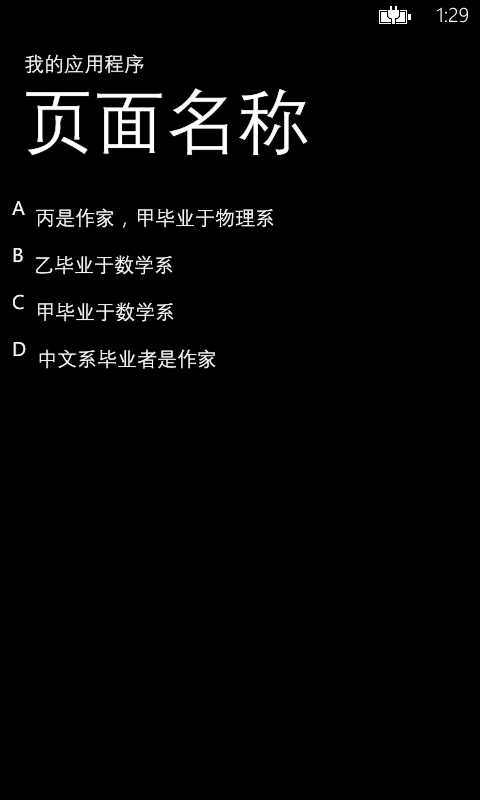
1、实现Converter 获取到listbox,并得到listitem在listbox中的index
public
class ItemContainerToZIndexConverter : IValueConverter { public
object Convert(object
value, Type targetType, object
parameter, System.Globalization.CultureInfo culture) { var
itemContainer = (DependencyObject)value; var
itemsControl = Tool.FindAncestor<ListBox>(itemContainer); int
index = itemsControl.ItemContainerGenerator.IndexFromContainer(itemContainer); switch
(index) { case
0: return
"A"; case
1: return
"B"; case
2: return
"C"; case
3: return
"D"; } return
null; } public
object ConvertBack(object
value, Type targetType, object
parameter, System.Globalization.CultureInfo culture) { throw
new NotSupportedException(); } } public
static class Tool { public
static T FindAncestor<T>(this
DependencyObject obj) where
T : DependencyObject { var
tmp = VisualTreeHelper.GetParent(obj); while
(tmp != null
&& !(tmp is
T)) { tmp = VisualTreeHelper.GetParent(tmp); } return
(T)tmp; } } |
2、<Style x:Key="ListBoxItemStyle1" TargetType="ListBoxItem">
使用数据绑定<TextBlock Text="{Binding RelativeSource={RelativeSource Mode=TemplatedParent}, Converter={StaticResource converter}}"/>
|
1
2
3
4
5
6
7
8
9
10
11
12
13
14
15
16
17
18
19
20
21
22
23
24
25
26
27
28
29
30
31
32
33
34
35
36
37
38
39
40
41
42
43
44
45
46
47
48
49
50
51
52
53
54 |
<Style x:Key="ListBoxItemStyle1"
TargetType="ListBoxItem"> <Setter Property="Background"
Value="Transparent"/> <Setter Property="BorderThickness"
Value="0"/> <Setter Property="BorderBrush"
Value="Transparent"/> <Setter Property="Padding"
Value="0"/> <Setter Property="HorizontalContentAlignment"
Value="Left"/> <Setter Property="VerticalContentAlignment"
Value="Top"/> <Setter Property="Template"> <Setter.Value> <ControlTemplate TargetType="ListBoxItem"> <Border x:Name="LayoutRoot"
BorderBrush="{TemplateBinding BorderBrush}"
BorderThickness="{TemplateBinding BorderThickness}"
Background="{TemplateBinding Background}"
HorizontalAlignment="{TemplateBinding HorizontalAlignment}"
VerticalAlignment="{TemplateBinding VerticalAlignment}"> <VisualStateManager.VisualStateGroups> <VisualStateGroup x:Name="CommonStates"> <VisualState x:Name="Normal"/> <VisualState x:Name="MouseOver"/> <VisualState x:Name="Disabled"> <Storyboard> <ObjectAnimationUsingKeyFrames Storyboard.TargetProperty="Background"
Storyboard.TargetName="LayoutRoot"> <DiscreteObjectKeyFrame KeyTime="0"
Value="{StaticResource TransparentBrush}"/> </ObjectAnimationUsingKeyFrames> <DoubleAnimation Duration="0"
To=".5"
Storyboard.TargetProperty="Opacity"
Storyboard.TargetName="ContentContainer"/> </Storyboard> </VisualState> </VisualStateGroup> <VisualStateGroup x:Name="SelectionStates"> <VisualState x:Name="Unselected"> <Storyboard> <ObjectAnimationUsingKeyFrames Storyboard.TargetProperty="Foreground"
Storyboard.TargetName="ContentContainer"> <DiscreteObjectKeyFrame KeyTime="0"
Value="White"></DiscreteObjectKeyFrame> </ObjectAnimationUsingKeyFrames> </Storyboard> </VisualState> <VisualState x:Name="Selected"> <Storyboard> <ObjectAnimationUsingKeyFrames Storyboard.TargetProperty="Foreground"
Storyboard.TargetName="ContentContainer"> <DiscreteObjectKeyFrame KeyTime="0"
Value="Blue"/> </ObjectAnimationUsingKeyFrames> </Storyboard> </VisualState> </VisualStateGroup> </VisualStateManager.VisualStateGroups> <Grid> <Grid.ColumnDefinitions> <ColumnDefinition Width="auto"/> <ColumnDefinition Width="*"/> </Grid.ColumnDefinitions> <TextBlock Text="{Binding RelativeSource={RelativeSource Mode=TemplatedParent}, Converter={StaticResource converter}}"/> <ContentControl Grid.Column="1"
x:Name="ContentContainer"
ContentTemplate="{TemplateBinding ContentTemplate}"
Content="{TemplateBinding Content}"
Foreground="{TemplateBinding Foreground}"
HorizontalContentAlignment="{TemplateBinding HorizontalContentAlignment}"
Margin="{TemplateBinding Padding}"
VerticalContentAlignment="{TemplateBinding VerticalContentAlignment}"/> </Grid> </Border> </ControlTemplate> </Setter.Value> </Setter> </Style> |
3、ListBox中 ItemContainerStyle="{StaticResource ListBoxItemStyle1}
获取listboxitem在ListBox中的index并转换成abcd(数据绑定),布布扣,bubuko.com
获取listboxitem在ListBox中的index并转换成abcd(数据绑定)
原文:http://www.cnblogs.com/fatlin/p/3667777.html