
1、编写分页存储过程
USE [Contacts]
GO
create procedure [dbo].[GetPageData]
(@startIndex int,
@endIndex int
)
as
begin
with temptbl as (
SELECT ROW_NUMBER() OVER (ORDER BY contact.id )AS Row, contact.id,name,phone,email,groupname from contact inner join contactgroup on contact.groupid=contactgroup.id )
SELECT * FROM temptbl where Row between @startIndex and @endIndex
end
GO
2、设计窗体
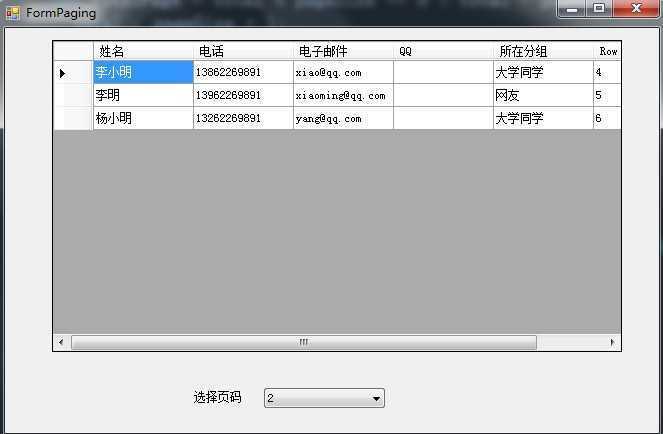
3、编写代码
public partial class FormPaging : Form
{
//每页显示的记录数
int pageSize = 3;
//当前页码
int page=1;
public FormPaging()
{
InitializeComponent();
}
//获取总的记录数
int GetRecordCount()
{
string sql = "select count(*) from contact";
return Convert.ToInt32(SqlDbHelper.ExecuteScalar(sql));
}
void Fill(int page)
{
string sql = "GetPageData";//分页存储过程名称
int startIndex = (page - 1) * pageSize + 1;
int endIndex = page * pageSize;
SqlParameter[] sp ={
new SqlParameter("@startIndex",startIndex),
new SqlParameter("@endIndex", endIndex)
};
DataTable dt = SqlDbHelper.ExecuteDataTable(sql, CommandType.StoredProcedure, sp);
dgvContactList.DataSource = dt;
}
private void FormPaging_Load(object sender, EventArgs e)
{
BindCombox();
Fill(page);
}
//用页数填充下拉框
private void BindCombox()
{
int total = GetRecordCount();
//计算总的页数
int totalPage = total % pageSize == 0 ? total / pageSize : total / pageSize + 1;
for (int i = 1; i <=totalPage; i++)
{
comboBox1.Items.Add(i);
}
}
//根据用户选择的当前页码,绑定DataGridView控件
private void comboBox1_SelectedIndexChanged(object sender, EventArgs e)
{
page = Convert.ToInt32(comboBox1.Text);
Fill(page);
}
}
原文:http://www.cnblogs.com/zhouhb/p/5171152.html