FastDFS4 + Ubuntu12安装及部署
1、 安装libevent
如果需要使用http进行下载,需要安装这个组件。
2、 安装fastdfs
3、 配置fastdfs
4、 安装nginx
问题4.1:安装nginx启动后访问原先资源URL出现404错误
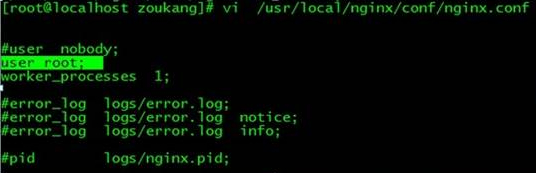
sudo gedit /nginx安装目录/conf/nginx.conf
在nginx.conf添加“user root;”并保存,重启nginx服务后OK
问题4.2:8090端口被占用
nginx: [emerg] bind() to 0.0.0.0:8090 failed (98: Address already in use)
nginx: [emerg] bind() to 0.0.0.0:8090 failed (98: Address already in use)
nginx: [emerg] bind() to 0.0.0.0:8090 failed (98: Address already in use)
nginx: [emerg] bind() to 0.0.0.0:8090 failed (98: Address already in use)
nginx: [emerg] bind() to 0.0.0.0:8090 failed (98: Address already in use)
nginx: [emerg] still could not bind()
#killall -9 nginx
// 中断nginx进程
# /nginx安装目录/sbin/nginx -s reload
// 重启nginx
问题4.3:nginx 403 Forbidden
nginx不允许访问请求的资源。可能的原因:
1.网站禁止特定的用户访问所有内容,例:网站屏蔽某个ip访问。
2.访问禁止目录浏览的目录,例:设置autoindex off后访问目录。
3.用户访问只能被内网访问的文件。
案例:在location{allow:all;},我按照网上的例子一直设置为127.0.0.1,导致本机访问没有问题,但是局域网内电脑访问时始终报错。
5、 开机启动
6、 测试上传
7、 在c#中上传文件
下载FastDFS .net Client
https://code.google.com/p/fastdfs/downloads/detail?name=FastDFS_Client_Dotnet.rar&can=2&q=
附:官方安装说明
#step 1. download FastDFS source package and unpack it
tar xzf FastDFS_v1.x.tar.gz
#for example:
tar xzf FastDFS_v1.11.tar.gz
#step 2. enter the FastDFS dir
cd FastDFS
#step 3. make all
./make.sh
#step 4. make install
./make.sh install
#step 5. edit/modify the config file of tracker and storage
#step 6. run server programs
#start the tracker server:
/usr/local/bin/fdfs_trackerd <tracker_conf_filename>
#start the storage server:
/usr/local/bin/fdfs_storaged <storage_conf_filename>
#step 7. run test program
#run the client test program:
/usr/local/bin/fdfs_test <storage_conf_filename> <operation>
#for example, upload a file:
/usr/local/bin/fdfs_test conf/storage.conf upload /usr/include/stdlib.h
#step 8. run monitor program
#run the monitor program:
/usr/local/bin/fdfs_monitor <storage_conf_filename>
FastDFS4和Ubuntu12安装及部署步骤
原文:http://www.jb51.net/os/Ubuntu/157336.html
