
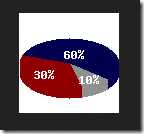
1、利用php gd库的函数绘制3D扇形统计图
<?php
header("content-type","text/html;charset=utf-8");
/*扇形统计图*/
$image = imagecreatetruecolor(100, 100);    /*创建画布*/
/*设置画布需要的颜色*/
$white = imagecolorallocate($image,0xff,0xff,0xff);
$gray = imagecolorallocate($image, 0xc0, 0xc0, 0xc0);
$darkgray = imagecolorallocate($image, 0x90, 0x90, 0x90);
$navy = imagecolorallocate($image, 0x00, 0x00, 0x80);
$darknavy = imagecolorallocate($image, 0x00, 0x00, 0x50);
$red = imagecolorallocate($image, 0xff, 0x00, 0x00);
$darkred = imagecolorallocate($image, 0x90, 0x00, 0x00);
/*填充背景色*/
imagefill($image, 0, 0, $white);
/*3D制作*/
for($i = 60; $i > 50; $i--)
{
imagefilledarc($image, 50, $i, 100, 50, -160, 40, $darknavy, IMG_ARC_PIE);
imagefilledarc($image, 50, $i, 100, 50, 40, 75, $darkgray, IMG_ARC_PIE);
imagefilledarc($image, 50, $i, 100, 50, 75, 200, $darkred, IMG_ARC_PIE);
}
/*画椭圆弧并填充*/
imagefilledarc($image, 50, 50, 100, 50, -160, 40, $darknavy, IMG_ARC_PIE);
imagefilledarc($image, 50, 50, 100, 50, 40, 75, $darkgray, IMG_ARC_PIE);
imagefilledarc($image, 50, 50, 100, 50, 75, 200, $darkred, IMG_ARC_PIE);
/*画字符串*/
imagestring($image, 3, 15, 55, "30%", $white);
imagestring($image, 3, 45, 35, "60%", $white);
imagestring($image, 3, 60, 60, "10%", $white);
/*输出图像*/
header("content-type:image/png");
imagepng($image);
/*释放资源*/
imagedestroy($image);
?>
效果:
2、对图片进行缩放
<div>
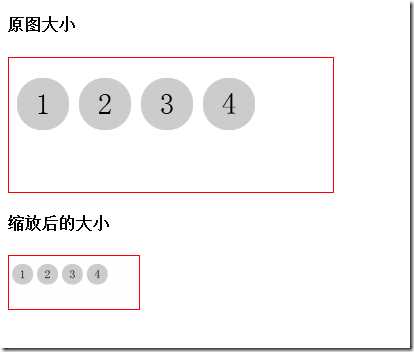
<h4>原图大小</h4>
<img src="1.png">
</div>
<?php
header("content-type","text/html;charset=utf-8");
/*
*图片缩放
*@param string $filename   图片的url
*@param int    $width      设置图片缩放的最大宽度
*@param int    $height     设置图片缩放的最大高度
*/
function thumb($filename,$width=130,$height=130)
{
/*获取原图的大小*/
list($width_orig,$height_orig) = getimagesize($filename);
/*根据参数$width和$height,换算出等比例的高度和宽度*/
if($width && ($width_orig < $height_orig))
{
$width = ($height / $height_orig) * $width_orig;
}
else
{
$height = ($width / $width_orig) * $height_orig;
}
/*以新的大小创建画布*/
$image_p = imagecreatetruecolor($width, $height);
/*获取图像资源*/
$image = imagecreatefrompng($filename);
/*使用imagecopyresampled缩放*/
imagecopyresampled($image_p, $image, 0, 0, 0, 0, $width, $height, $width_orig, $height_orig);
/*保存缩放后的图片和命名*/
imagepng($image_p,‘test.png‘);
/*释放资源*/
imagedestroy($image_p);
imagedestroy($image);
}
/*调用函数*/
thumb(‘1.png‘);
?>
<div>
<h4>缩放后的大小</h4>
<img src="test.png">
</div>
效果:
原文:http://www.jb51.net/article/56595.htm