
1、安装Spring Tool Sui
登录http://spring.io/tools/sts/all 下载所需的Spring Tool Suit安装包
下载完成后
Eclipse --- Help--- Install new Sofware
点击Add按钮 ,再点击Archive 选择你刚刚下载的zip文件
选择带有“Spring IDE”字样的项,一个4个:
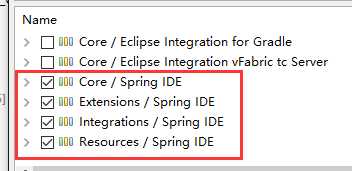
最好取消联网更新,否则会很慢

2、加Maven
参考http://projects.spring.io/spring-framework/
<dependencies>
    <dependency>
        <groupId>org.springframework</groupId>
        <artifactId>spring-context</artifactId>
        <version>4.2.4.RELEASE</version>
    </dependency>
</dependencies>
3、范例
src下新建Spring Bean Configuration File,命名applicationContext.xml
<?xml version="1.0" encoding="UTF-8"?>
<beans xmlns="http://www.springframework.org/schema/beans"
    xmlns:xsi="http://www.w3.org/2001/XMLSchema-instance"
    xsi:schemaLocation="http://www.springframework.org/schema/beans http://www.springframework.org/schema/beans/spring-beans.xsd">
    <!-- 配置bean -->
    <bean id="helloWorld" class="com.mycompany.app.my_webapp.HelloWorld">
    <property name="name" value="Colin2"></property>
    </bean>
</beans>
原文:http://www.cnblogs.com/sysout/p/5191313.html