
Shaders are small programs that execute on the GPU, and loading them can take some time. Each individual GPU program typically does not take much time to load, but shaders often have a lot of “variants” internally.
着色器是在GPU上运行的小程序,载入它们须要一些时间。每一个独立的GPU程序一般不须要多少时间载入,可是着色器经常有非常多内在的“变体”。
For example, the Standard shader, if fully compiled, ends up being many thousands of slightly different GPU programs. This creates two potential problems:
比方。标准着色器假设全然编译。会生成几千个不同的小GPU程序。
这会造成两个潜在的问题:
While building the game, Unity can detect that some of the internal shader variants are not used by the game, and skip them from build data. Build-time stripping is done for:
生成游戏包时,Unity能够检測到某些内在着色器变体没有被使用,然后忽略它们。生成时去除可用于:
#pragma shader_feature. If none of the used materials use a particular variant, then it is not included into the build. Seeinternal
shader variants documentation. Out of built-in shaders, the Standard shader uses this.假设你想改变这个行为,请參考文档图形设置。
Combination of the above often substantially cuts down on shader data size. For example, a fully compiled Standard shader would take several hundred megabytes, but in typical projects it often ends up taking just a couple megabytes (and is often compressed further by the application packaging process).
以上方式的结合能够大大降低着色器数据的大小。
比方,全然编译的标准着色器有几百兆,可是在一般的project中经常仅仅有几兆(并且app打包时会被进一步压缩)。
Under all default settings, Unity loads the shaderlab Shader object into memory, but does not create the internal shader variants until they are actually needed.
默认设置下,Unity载入shaderlab着色器对象到内存中,可是内部着色器变体直到被真正用到的时候才创建。
This means that shader variants that are included into the game build can still potentially be used, but there’s no memory or load time cost paid until they are needed. For example, shaders always include a variant to handle point lights with shadows, but if you never end up using a point light with shadows in your game, then there’s no point in loading this particular variant.
这意味着打进游戏包中的着色器变体潜在的可能被用到,可是在用到之前没有占用内存或者消耗时间载入。比方,着色器经常包括一个处理点光源阴影的变体,可是假设你的游戏里从来没实用到点光源阴影,那么载入这个变体就不是必需。
One downside of this default behavior, however, is a possible hiccup for when some shader variant is needed for the first time - since a new GPU program code has to be loaded into the graphics driver. This is often undesirable during gameplay, so Unity has ShaderVariantCollection assets to help solve that.
然而,这样的默认行为的一个弊端是一些着色器变体第一次被用到的时候可能会出现卡顿(hiccup)——由于须要载入一个新的GPU程序代码到图形驱动。
在游戏中这是不能接受的。所以Unity有一个叫ShaderVariantCollection的资源来帮助解决问题。
ShaderVariantCollection is an asset that is basically a list of Shaders, and for each of them, a list of Pass types and shader keyword combinations to load.
ShaderVariantCollection基本上是一个着色器列表资源,每次载入一个由通道类型和着色器keyword组合的列表。
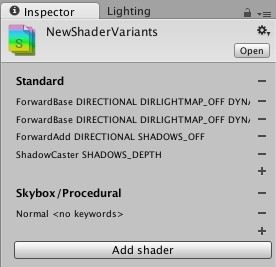
To help with creating these assets based on actually used shaders and their variants, the editor can track which shaders and their variants are actually used. In Graphics Settings, there is a button to create a new ShaderVariantCollection out of currently tracked shaders, or to clear the currently tracked shader list.
为了帮助创建这些基于被真正用到的着色器和它们变体的资源,编辑器能够追踪哪些着色器和它们的变体被真正用到了。
当前追踪着色器的图形设置检视器上,有一个button能够创建一个新的ShaderVariantCollection。也能够清除当前追踪的着色器列表。

Once you have some ShaderVariantCollection assets, you can set for these variants to be automatically preloaded while loading the game (under Preloaded Shaders list in Graphics Settings), or you can preload an individual shader variant collection from a script. See ShaderVariantCollection scripting class.
一旦有了一些ShaderVariantCollection资源。你能够设置这些着色器变体在载入游戏时自己主动预载入(在图形设置的预载入着色器列表下)。或者你也能够用脚本预载入一个独立的着色器变体。
參考ShaderVariantCollection脚本类。
原文:http://www.cnblogs.com/gcczhongduan/p/5207334.html