
1.什么是推送通知
2.推送通知的5种形式
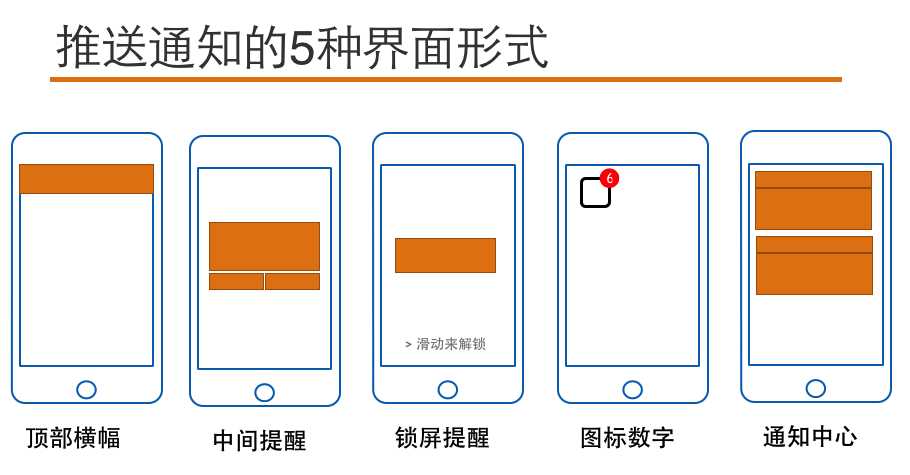
3.推送通知的特点
4.远程推送通知
5.远程通知的实现基础
6.远程推送的实现原理
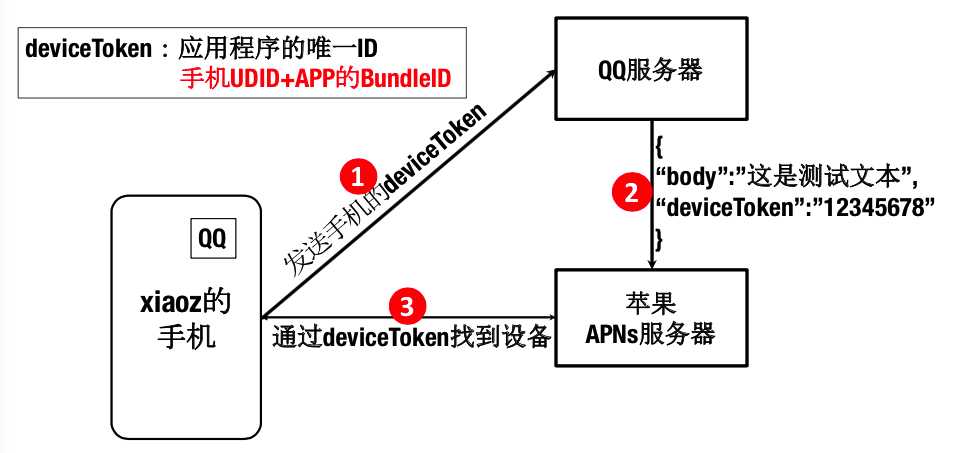
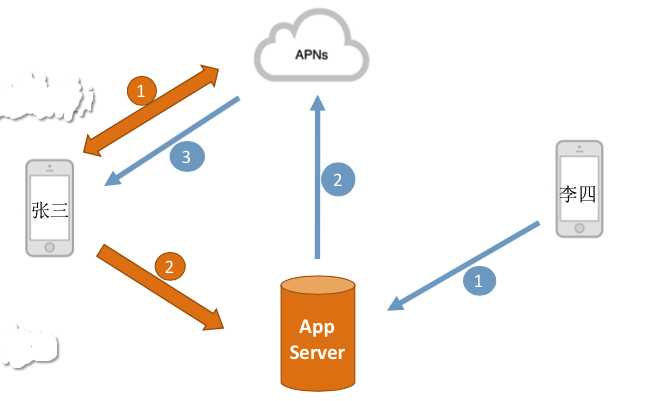
7.实现远程推送功能的前提
8.实现远程推送功能的步骤
9.远程推送的具体实现过程
10.远程推送过程中AppDelegate中所要响应的方法
下面的方法都是写在AppDelegate.m文件中
/*
 1.有一种打开,叫做点击图标后的打开
 2.还有一种打开,叫做 点击了 通知 之后的打开
 当通过 点击通知  这种方法打开应用程序,执行didFinishLaunching方法时,launchOptions
 参数中,就存着通知发来的消息,也就是 类似于
 didReceiveRemote方法中的那个userInfo
*/
- (BOOL)application:(UIApplication *)application didFinishLaunchingWithOptions:(NSDictionary *)launchOptions {
    if ([UIDevice currentDevice].systemVersion.doubleValue <= 8.0) {
        //向服务器发请求,要注册推送功能,以此获取到服务器返回的deviceToken
        //type 用来说明 支持的通知形式
        //如 横幅 声音  角标
        [application registerForRemoteNotificationTypes:UIRemoteNotificationTypeBadge|UIRemoteNotificationTypeSound|UIRemoteNotificationTypeAlert];
    }else{
        UIUserNotificationSettings *settings = [UIUserNotificationSettings settingsForTypes:UIUserNotificationTypeBadge| UIUserNotificationTypeSound|UIUserNotificationTypeAlert  categories:nil];
        [application registerUserNotificationSettings:settings];
        //申请使用通知
        [application registerForRemoteNotifications];
    }
    NSDictionary *userInfo = launchOptions[UIApplicationLaunchOptionsRemoteNotificationKey];
    UILabel *label = [[UILabel alloc]init];
    label.frame = CGRectMake(0, 40, 300, 200);
    label.numberOfLines = 0;
    label.textColor = [UIColor whiteColor];
    label.font = [UIFont systemFontOfSize:24];
    label.backgroundColor = [UIColor blueColor];
    label.text =[NSString stringWithFormat:@"%@",userInfo];
    [self.window.rootViewController.view addSubview:label];
    return YES;
}

//只要获取到用户同意,则服务器端返回deviceToken
//会自动执行下面的方法
//1417f54c c7f0adb0 48e3558f 2b8a8bad 0a6a5152 54af017e 32137cda 8cbdb9d0
- (void)application:(UIApplication *)application didRegisterForRemoteNotificationsWithDeviceToken:(NSData *)deviceToken {
    NSLog(@"%@",deviceToken);
}

/*
 用户点击了通知,进入到应用程序中,需要捕获到这个时机
 从而决定这一次的进入应用程序,到底要显示或执行什么动作,下面的方法就会在点击通知时自动调用
*/
/*
 1.应用程序在前台时:通知到,该方法自动执行
 2.应用程序在后台且没有退出时:通知到,只有点击了通知查看时,该方法自动执行
 3.应用程序退出:通知到,点击查看通知,不会执行下面的didReceive方法,而是只执行didFinishLauncing方法
*/
- (void)application:(UIApplication *)application didReceiveRemoteNotification:(NSDictionary *)userInfo {
    //NSLog(@"%@",userInfo);
    //为了测试在应用程序退出后,该方法是否执行
    //所以往第一个界面上添加一个label,看标签是否会显示一些内容
    UILabel *label = [[UILabel alloc]init];
    label.frame = CGRectMake(0, 250, 300, 200);
    label.numberOfLines = 0;
    label.textColor = [UIColor whiteColor];
    label.font = [UIFont systemFontOfSize:24];
    label.backgroundColor = [UIColor grayColor];
    label.text =[NSString stringWithFormat:@"%@",userInfo];
    [self.window.rootViewController.view addSubview:label];
}

/*
 此方法是新的用于响应远程推送通知的方法
 1.如果应用程序在后台,则通知到,点击查看,该方法自动执行
 2.如果应用程序在前台,则通知到,该方法自动执行
 3.如果应用程序被关闭,则通知到,点击查看,先执行didFinish方法,再执行该方法
 4.可以开启后台刷新数据的功能
   step1:点击target-->Capabilities-->Background Modes-->Remote Notification勾上
   step2:在给APNs服务器发送的要推送的信息中,添加一组字符串如:
    {"aps":{"content-available":"999","alert":"bbbbb.","badge":1}}
    其中content-availabel就是为了配合后台刷新而添加的内容,999可以随意定义
*/
- (void)application:(UIApplication *)application didReceiveRemoteNotification:(NSDictionary *)userInfo fetchCompletionHandler:(void (^)(UIBackgroundFetchResult))completionHandler {
    UILabel *label = [[UILabel alloc]init];
    label.frame = CGRectMake(0, 250, 300, 200);
    label.numberOfLines = 0;
    label.textColor = [UIColor whiteColor];
    label.font = [UIFont systemFontOfSize:24];
    label.backgroundColor = [UIColor grayColor];
    label.text =[NSString stringWithFormat:@"%@",userInfo];
    [self.window.rootViewController.view addSubview:label];
    //NewData就是使用新的数据 更新界面,响应点击通知这个动作
    completionHandler(UIBackgroundFetchResultNewData);
}
11.PushMeBaby
无法拿到证书的路径:http://www.cnblogs.com/czq1989/p/5312146.html
demo:https://github.com/TigerCui/RemoteNotificationDemo.git
原文:http://www.cnblogs.com/czq1989/p/5098871.html