
UIAlertController *alert = [UIAlertController alertControllerWithTitle:@"请输入团购信息" message:nil preferredStyle:UIAlertControllerStyleAlert];
[alert addAction:[UIAlertAction actionWithTitle:@"取消" style:UIAlertActionStyleCancel handler:nil]];
[alert addAction:[UIAlertAction actionWithTitle:@"确定" style:UIAlertActionStyleDestructive handler:nil]];
[alert addTextFieldWithConfigurationHandler:^(UITextField *textField) {
      textField.placeholder = @"请输入团购名字";
  }];
[alert addTextFieldWithConfigurationHandler:^(UITextField *textField) {
      textField.placeholder = @"请输入团购价格";
  }];
[self presentViewController:alert animated:YES completion:nil];
最终效果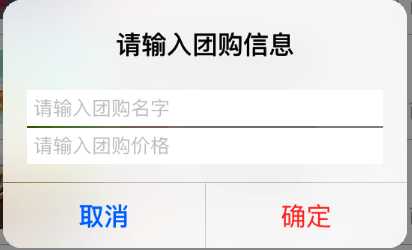
原文:http://www.cnblogs.com/luoze/p/5467943.html