
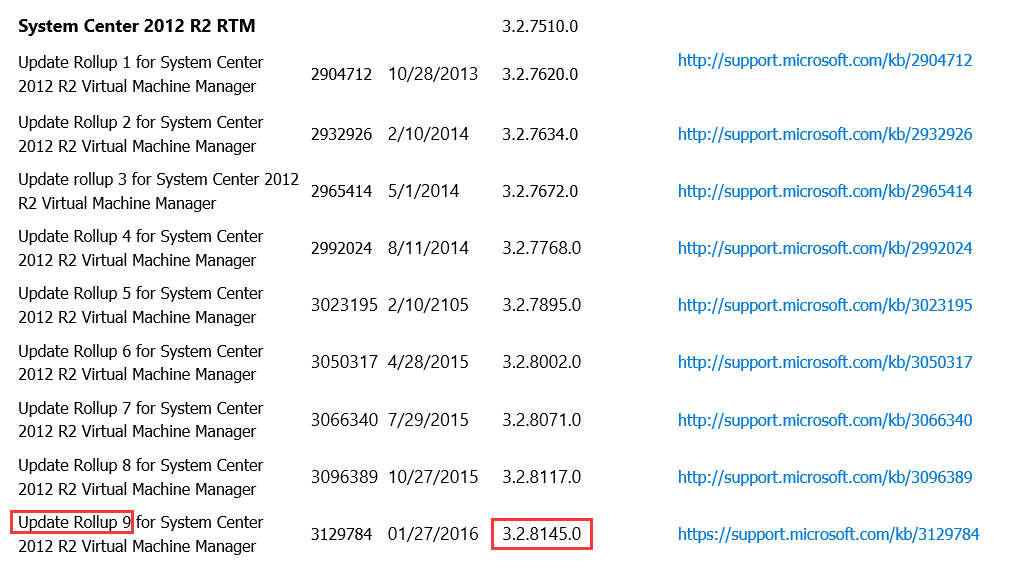
Sometimes we need to view or determine the Cumulative update for software installed
ok view the following screenshot

we serarch on the Internet
https://support.microsoft.com/en-us/kb/2627355
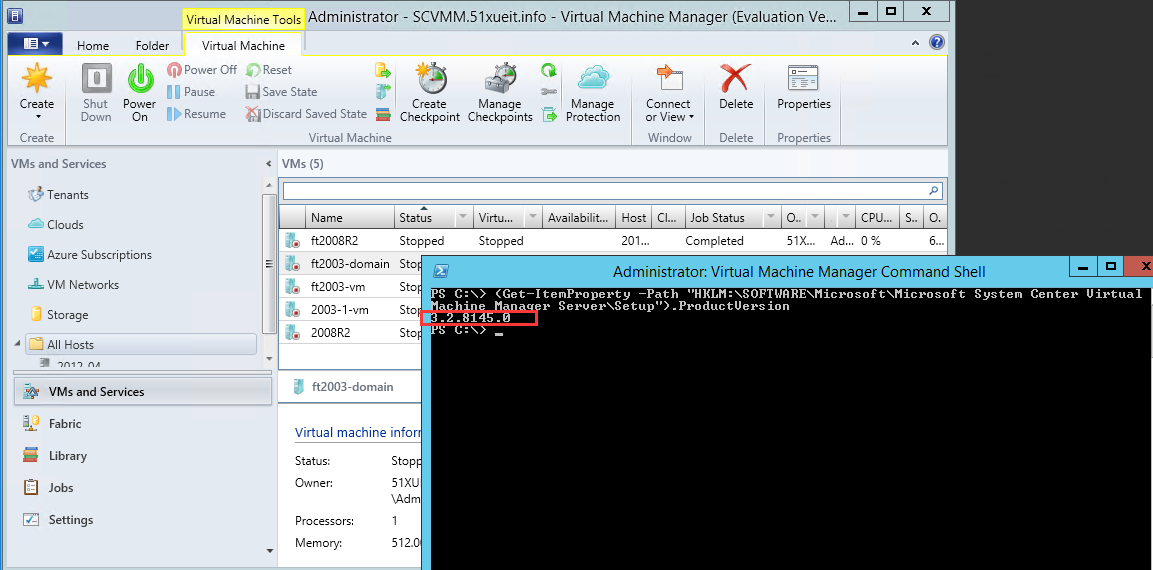
We can use powershll to get the version of scvmm
(Get-ItemProperty -Path "HKLM:\SOFTWARE\Microsoft\Microsoft System Center Virtual Machine Manager Server\Setup").ProductVersion
What is RTM version
http://www.webopedia.com/TERM/R/RTM.html
Short for release to manufacturing, the version of a software product that is given to manufacturers to bundle into future versions of their hardware products. RTM versions are typically released to manufacturers before they are released to the general public so that the manufacturers can work out any bugs the software may encounter with hardware devices. The release of an RTM version does not necessarily mean that the creators have worked out all the problems with the software; there still may be more versions of the product before it is released to the general public.
SCVMM-07 How to view the Cumulative update for software installed
原文:http://10500561.blog.51cto.com/10490561/1772476