
TypeScript allows you to emit decorator metadata which enables more powerful features through reflection. This lesson show you how decorators and reflection fit together and how to configure your own decorators to use reflection.
For now, if we look at the compiled file:
var __decorate = (this && this.__decorate) || function (decorators, target, key, desc) {
    var c = arguments.length, r = c < 3 ? target : desc === null ? desc = Object.getOwnPropertyDescriptor(target, key) : desc, d;
    if (typeof Reflect === "object" && typeof Reflect.decorate === "function") r = Reflect.decorate(decorators, target, key, desc);
    else for (var i = decorators.length - 1; i >= 0; i--) if (d = decorators[i]) r = (c < 3 ? d(r) : c > 3 ? d(target, key, r) : d(target, key)) || r;
    return c > 3 && r && Object.defineProperty(target, key, r), r;
};
function addAge(age) {
    return function (targetClass) {
        return (function () {
            function class_1() {
                this.age = age;
                this.name = new targetClass().name;
            }
            return class_1;
        }());
    };
}
var Person = (function () {
    function Person() {
        this.name = "Johnn";
    }
    Person = __decorate([
        addAge(30)
    ], Person);
    return Person;
}());
var john = new Person();
console.log(john); // {name: "Johnn", age: 30}
It decorates addAge to Person class.
Now if we enable "emitDecoratorMetadata" in tsconfig.json:
{
    "compilerOptions": {
        "rootDir": "src",
        "module": "commonjs",
        "target": "es5",
        "noImplicitAny": false,
        "sourceMap": false,
        "outDir": "./dist",
        "noEmitOnError": true,
        "experimentalDecorators": true,
        "emitDecoratorMetadata": true
    },
    "exclude": [
        "node_modules",
        "typings/main",
        "typings/main.d.ts"
    ]
}
Compile the files again, now we get:
var Person = (function () {
    function Person() {
        this.name = "Johnn";
    }
    Person = __decorate([
        addAge(30),
        __metadata(‘design:paramtypes‘, [])
    ], Person);
    return Person;
}());
It also add metadata.
Install:
npm install reflect-metadata crypto --save
Index.html:
<script>
    System.config({
        packages: {
            "dist": {
                "defaultExtension": "js",
                "main": "main"
            },
            "rxjs": {
                "defaultExtension": "js"
            }
        },
        map: {
            "lodash": "https://npmcdn.com/lodash@4.13.1",
            "rxjs": "node_modules/rxjs",
            "reflect-metadata": "node_modules/reflect-metadata/Reflect.js",
            "crypto": "node_modules/crypto/sha1.js",
        }
    });

    System.import("dist")
</script>
main.ts:
import ‘reflect-metadata‘;


function example(){
    return function(targetClass){
        const types = Reflect.getMetadata(‘design:paramtypes‘, targetClass);
        console.log(types);
        return targetClass
    }
}

@example()
class Person{
    constructor(name: string, age: number){

    }
}
new Person("John", 10);
So in the example() fucntion, we console log out types, it will show:
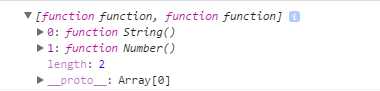
That means we were able to make it generic, so that any class that comes through into this example decorator, we can look up its types and then use those types to modify or pass into the constructor, and return the class decorated however we want.
[TypeScript] Reflection and Decorator Metadata
原文:http://www.cnblogs.com/Answer1215/p/5574234.html