
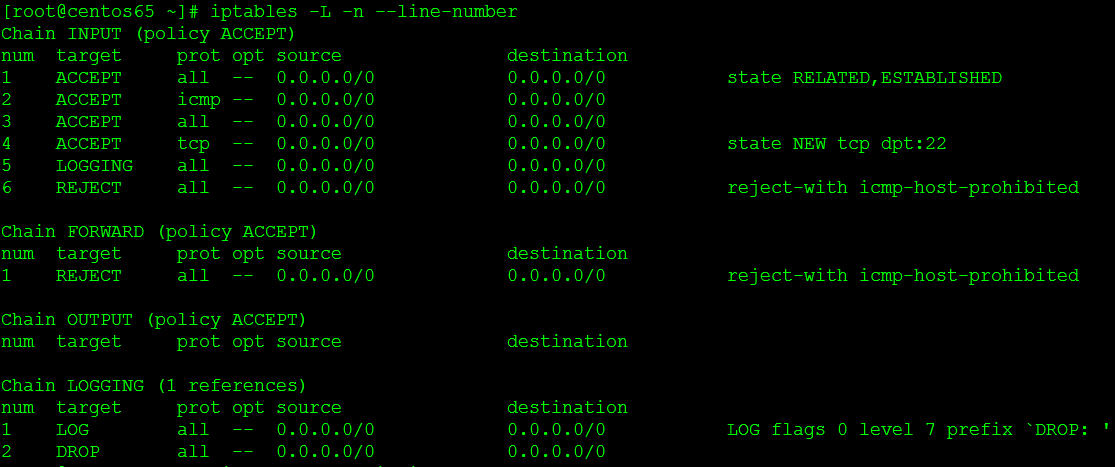
1. First, add a new chain with a reasonable name:
iptables -N LOGGING
2. Next, insert a rule at the appropriate point (hence me using --line-numbers above). You could replace the existing REJECT at line 5 in its entirety as its functionality will be moved into the LOGGING chain (where I change it to a DROP anyway):
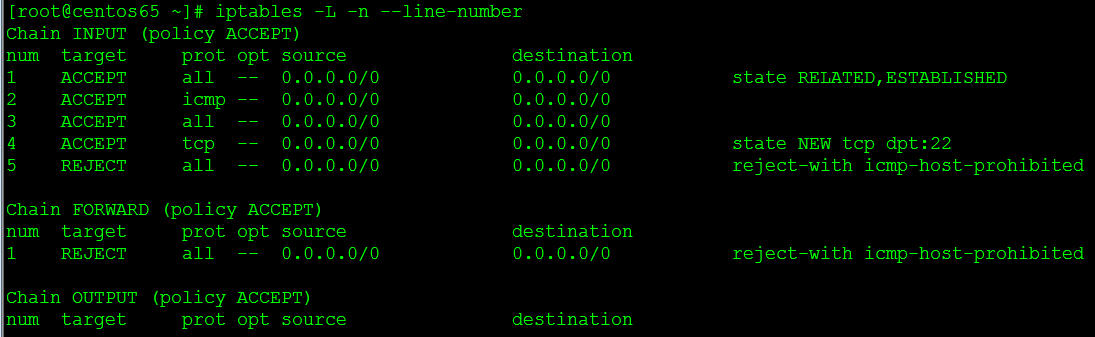
iptables -I INPUT 5 -j LOGGING
3. Add the actual logging rule next
iptables -A LOGGING -j LOG --log-prefix "DROP: " --log-level 7
iptables -A LOGGING -j DROP
service iptables save
service iptables restart
4. vi /etc/rsyslog.conf
kern.debug /var/log/iptables.log
service rsyslog restart
5. vi /etc/logrotate.d/syslog
add /var/log/iptables.log to list of filenames
本文出自 “Ilovecat(个人笔记)” 博客,请务必保留此出处http://hj192837.blog.51cto.com/655995/1795268
原文:http://hj192837.blog.51cto.com/655995/1795268