0.使用多线程下载会提升文件下载的速度,那么多线程下载文件的过程是:
(1)首先获得下载文件的长度,然后设置本地文件的长度
HttpURLConnection.getContentLength();
RandomAccessFile file = new RandomAccessFile("QQWubiSetup.exe","rwd");
file.setLength(filesize);//设置本地文件的长度
(2)根据文件长度和线程数计算每条线程下载的数据长度和下载位置。
如:文件的长度为6M,线程数为3,那么,每条线程下载的数据长度为2M,每条线程开始下载的位置如下图所示。
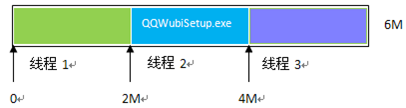
例如10M大小,使用3个线程来下载,
线程下载的数据长度 (10%3 == 0 ? 10/3:10/3+1) ,第1,2个线程下载长度是4M,第三个线程下载长度为2M
下载开始位置:线程id*每条线程下载的数据长度 = ?
下载结束位置:(线程id+1)*每条线程下载的数据长度-1=?
(3)使用Http的Range头字段指定每条线程从文件的什么位置开始下载,下载到什么位置为止,
如:指定从文件的2M位置开始下载,下载到位置(4M-1byte)为止
代码如下:HttpURLConnection.setRequestProperty("Range", "bytes=2097152-4194303");
(4)保存文件,使用RandomAccessFile类指定每条线程从本地文件的什么位置开始写入数据。
RandomAccessFile threadfile = new
RandomAccessFile("QQWubiSetup.exe ","rwd");
threadfile.seek(2097152);//从文件的什么位置开始写入数据
1.多线程下载的核心代码示例
- public class MulThreadDownload
- {
-
-
-
-
- public
static void main(String[] args)
- {
- String path = "http://net.hoo.com/QQWubiSetup.exe";
- try
- {
- new MulThreadDownload().download(path,
3);
- }
- catch (Exception e)
- {
- e.printStackTrace();
- }
- }
-
-
-
-
-
- public static String getFilename(String path)
- {
- return path.substring(path.lastIndexOf(‘/‘)+1);
- }
-
-
-
-
-
- public
void download(String path, int threadsize)
throws Exception
- {
- URL url = new URL(path);
- HttpURLConnection conn = (HttpURLConnection)url.openConnection();
- conn.setRequestMethod("GET");
- conn.setConnectTimeout(5 *
1000);
-
- int filelength = conn.getContentLength();
-
- String filename = getFilename(path);
- File saveFile = new File(filename);
- RandomAccessFile accessFile = new RandomAccessFile(saveFile,
"rwd");
-
- accessFile.setLength(filelength);
- accessFile.close();
-
- int block = filelength%threadsize==0? filelength/threadsize : filelength/threadsize+1;
- for(int threadid=0 ; threadid < threadsize ; threadid++){
- new DownloadThread(url, saveFile, block, threadid).start();
- }
- }
-
- private
final class DownloadThread
extends Thread
- {
- private URL url;
- private File saveFile;
- private
int block;
- private int threadid;
- public DownloadThread(URL url, File saveFile,
int block, int threadid)
- {
- this.url = url;
- this.saveFile = saveFile;
- this.block = block;
- this.threadid = threadid;
- }
- @Override
- public
void run()
- {
-
-
- int startposition = threadid * block;
- int endposition = (threadid +
1 ) * block - 1;
- try
- {
- RandomAccessFile accessFile = new RandomAccessFile(saveFile,
"rwd");
-
- accessFile.seek(startposition);
- HttpURLConnection conn = (HttpURLConnection)url.openConnection();
- conn.setRequestMethod("GET");
- conn.setConnectTimeout(5 *
1000);
- conn.setRequestProperty("Range",
"bytes="+ startposition+ "-"+ endposition);
- InputStream inStream = conn.getInputStream();
- byte[] buffer =
new byte[1024];
- int len =
0;
- while( (len=inStream.read(buffer)) != -1 )
- {
- accessFile.write(buffer, 0, len);
- }
- inStream.close();
- accessFile.close();
- System.out.println("线程id:"+ threadid+
"下载完成");
- }
- catch (Exception e)
- {
- e.printStackTrace();
- }
- }
- }
- }
2.多线程断点下载功能,这里把断点数据保存到数据库中:注意代码注释的理解
(0)主Activity,关键点使用Handler更新进度条与开启线程下载避免ANR
若不使用Handler却要立即更新进度条数据,可使用:
//resultView.invalidate(); UI线程中立即更新进度条方法
//resultView.postInvalidate(); 非UI线程中立即更新进度条方法
-
-
-
-
-
- public class DownloadActivity
extends Activity
- {
- private EditText downloadpathText;
- private TextView resultView;
- private ProgressBar progressBar;
-
- @Override
- public
void onCreate(Bundle savedInstanceState)
- {
- super.onCreate(savedInstanceState);
- setContentView(R.layout.main);
-
- downloadpathText = (EditText) this.findViewById(R.id.downloadpath);
- progressBar = (ProgressBar) this.findViewById(R.id.downloadbar);
- resultView = (TextView) this.findViewById(R.id.result);
- Button button = (Button) this.findViewById(R.id.button);
- button.setOnClickListener(new View.OnClickListener()
- {
- @Override
- public
void onClick(View v)
- {
-
- String path = downloadpathText.getText().toString();
-
- if(Environment.getExternalStorageState().equals(Environment.MEDIA_MOUNTED))
- {
-
- download(path, Environment.getExternalStorageDirectory());
- }
- else
- {
- Toast.makeText(DownloadActivity.this, R.string.sdcarderror,
1).show();
- }
- }
- });
- }
-
-
-
-
-
-
-
-
-
- private
void download(final String path,
final File savedir)
- {
-
- new Thread(new Runnable()
- {
- @Override
- public
void run()
- {
- FileDownloader loader = new FileDownloader(DownloadActivity.this, path, savedir,
3);
-
- progressBar.setMax(loader.getFileSize());
- try
- {
- loader.download(new DownloadProgressListener()
- {
-
-
-
-
- @Override
- public
void onDownloadSize(int size)
- {
-
- Message msg = new Message();
-
- msg.what = 1;
- msg.getData().putInt("size", size);
-
- handler.sendMessage(msg);
- }
- });
- }
- catch (Exception e)
- {
-
- handler.obtainMessage(-1).sendToTarget();
-
-
-
-
-
-
- }
- }
- }).start();
- }
-
-
-
-
-
- private Handler handler =
new Handler()
- {
-
- @Override
- public
void handleMessage(Message msg)
- {
- switch (msg.what)
- {
- case
1:
-
- progressBar.setProgress(msg.getData().getInt("size"));
- float num = (float)progressBar.getProgress()/(float)progressBar.getMax();
- int result = (int)(num*100);
-
-
- resultView.setText(result+ "%");
-
- if(progressBar.getProgress()==progressBar.getMax())
- {
- Toast.makeText(DownloadActivity.this, R.string.success,
1).show();
- }
- break;
- case -1:
- Toast.makeText(DownloadActivity.this, R.string.error,
1).show();
- break;
- }
- }
- };
-
- }
(1)下载类:
注意计算每条线程的下载长度与下载起始位置的方法
- public class DownloadThread
extends Thread
- {
- private
static final String TAG =
"DownloadThread";
- private File saveFile;
- private URL downUrl;
- private int block;
-
- private int threadId = -1;
-
- private int downLength;
- private
boolean finish = false;
- private FileDownloader downloader;
- public DownloadThread(FileDownloader downloader, URL downUrl, File saveFile,
int block, int downLength,
int threadId)
- {
- this.downUrl = downUrl;
- this.saveFile = saveFile;
- this.block = block;
- this.downloader = downloader;
- this.threadId = threadId;
- this.downLength = downLength;
- }
-
- @Override
- public void run()
- {
-
- if(downLength < block)
- {
- try
- {
- HttpURLConnection http = (HttpURLConnection) downUrl.openConnection();
- http.setConnectTimeout(5 *
1000);
- http.setRequestMethod("GET");
- http.setRequestProperty("Accept",
"image/gif, image/jpeg, image/pjpeg, image/pjpeg, application/x-shockwave-flash, application/xaml+xml, application/vnd.ms-xpsdocument, application/x-ms-xbap, application/x-ms-application, application/vnd.ms-excel, application/vnd.ms-powerpoint,
application/msword, */*");
- http.setRequestProperty("Accept-Language",
"zh-CN");
- http.setRequestProperty("Referer", downUrl.toString());
- http.setRequestProperty("Charset",
"UTF-8");
-
- int startPos = block * (threadId -
1) + downLength;
-
- int endPos = block * threadId -1;
-
- http.setRequestProperty("Range",
"bytes=" + startPos + "-"+ endPos);
- http.setRequestProperty("User-Agent",
"Mozilla/4.0 (compatible; MSIE 8.0; Windows NT 5.2; Trident/4.0; .NET CLR 1.1.4322; .NET CLR 2.0.50727; .NET CLR 3.0.04506.30; .NET CLR 3.0.4506.2152; .NET CLR 3.5.30729)");
- http.setRequestProperty("Connection",
"Keep-Alive");
-
- InputStream inStream = http.getInputStream();
- byte[] buffer =
new byte[1024];
- int offset =
0;
- print("Thread " +
this.threadId + " start download from position "+ startPos);
- RandomAccessFile threadfile = new RandomAccessFile(this.saveFile,
"rwd");
- threadfile.seek(startPos);
- while ((offset = inStream.read(buffer,
0, 1024)) != -1)
- {
- threadfile.write(buffer, 0, offset);
- downLength += offset;
- downloader.update(this.threadId, downLength);
- downloader.append(offset);
- }
- threadfile.close();
- inStream.close();
- print("Thread " +
this.threadId + " download finish");
-
- this.finish =
true;
- }
- catch (Exception e)
- {
- this.downLength = -1;
- print("Thread "+
this.threadId+ ":"+ e);
- }
- }
- }
-
- private static
void print(String msg)
- {
- Log.i(TAG, msg);
- }
-
- /**
- * 下载是否完成
- * @return
- */
- public
boolean isFinish()
- {
- return finish;
- }
-
-
-
-
-
- public long getDownLength()
- {
- return downLength;
- }
文件下载器,使用
-
-
-
-
-
-
-
-
-
-
-
-
-
-
-
- public class FileDownloader
- {
- private static
final String TAG = "FileDownloader";
- private Context context;
- private FileService fileService;
-
- private int downloadSize =
0;
-
- private int fileSize =
0;
-
- private DownloadThread[] threads;
-
- private File saveFile;
-
- private Map<Integer, Integer> data =
new ConcurrentHashMap<Integer, Integer>();
-
- private int block;
-
- private String downloadUrl;
-
- public int getThreadSize()
- {
- return threads.length;
- }
-
-
-
-
- public int getFileSize()
- {
- return fileSize;
- }
-
-
-
-
- protected synchronized
void append(int size)
- {
- downloadSize += size;
- }
-
-
-
-
-
- protected
synchronized void update(int threadId,
int pos)
- {
- this.data.put(threadId, pos);
- this.fileService.update(this.downloadUrl,
this.data);
- }
-
-
-
-
-
-
- public FileDownloader(Context context, String downloadUrl, File fileSaveDir,
int threadNum)
- {
- try
- {
- this.context = context;
- this.downloadUrl = downloadUrl;
- fileService = new FileService(this.context);
- URL url = new URL(this.downloadUrl);
- if(!fileSaveDir.exists()) fileSaveDir.mkdirs();
- this.threads =
new DownloadThread[threadNum];
- HttpURLConnection conn = (HttpURLConnection) url.openConnection();
- conn.setConnectTimeout(5*1000);
- conn.setRequestMethod("GET");
- conn.setRequestProperty("Accept",
"image/gif, image/jpeg, image/pjpeg, image/pjpeg, application/x-shockwave-flash, application/xaml+xml, application/vnd.ms-xpsdocument, application/x-ms-xbap, application/x-ms-application, application/vnd.ms-excel, application/vnd.ms-powerpoint,
application/msword, */*");
- conn.setRequestProperty("Accept-Language",
"zh-CN");
- conn.setRequestProperty("Referer", downloadUrl);
- conn.setRequestProperty("Charset",
"UTF-8");
- conn.setRequestProperty("User-Agent",
"Mozilla/4.0 (compatible; MSIE 8.0; Windows NT 5.2; Trident/4.0; .NET CLR 1.1.4322; .NET CLR 2.0.50727; .NET CLR 3.0.04506.30; .NET CLR 3.0.4506.2152; .NET CLR 3.5.30729)");
- conn.setRequestProperty("Connection",
"Keep-Alive");
- conn.connect();
- printResponseHeader(conn);
- if (conn.getResponseCode()==200)
- {
-
- this.fileSize = conn.getContentLength();
- if (this.fileSize <=
0) throw
new RuntimeException("Unkown file size ");
-
- String filename = getFileName(conn);
-
- this.saveFile =
new File(fileSaveDir, filename);
-
- Map<Integer, Integer> logdata = fileService.getData(downloadUrl);
-
- if(logdata.size()>0)
- {
-
- for(Map.Entry<Integer, Integer> entry : logdata.entrySet())
- data.put(entry.getKey(), entry.getValue());
- }
-
- if(this.data.size()==this.threads.length)
- {
- for (int i =
0; i < this.threads.length; i++)
- {
- this.downloadSize +=
this.data.get(i+1);
- }
- print("已经下载的长度"+
this.downloadSize);
- }
-
- this.block = (this.fileSize %
this.threads.length)==0?
this.fileSize / this.threads.length :
this.fileSize / this.threads.length +
1;
- }
- else
- {
- throw
new RuntimeException("server no response ");
- }
- }
- catch (Exception e)
- {
- print(e.toString());
- throw
new RuntimeException("don‘t connection this url");
- }
- }
- /**
- * 获取文件名
- */
- private String getFileName(HttpURLConnection conn)
- {
- String filename = this.downloadUrl.substring(this.downloadUrl.lastIndexOf(‘/‘) +
1);
- if(filename==null ||
"".equals(filename.trim())){
- for (int i =
0;; i++) {
- String mine = conn.getHeaderField(i);
- if (mine ==
null) break;
- if("content-disposition".equals(conn.getHeaderFieldKey(i).toLowerCase())){
- Matcher m = Pattern.compile(".*filename=(.*)").matcher(mine.toLowerCase());
- if(m.find())
return m.group(1);
- }
- }
- filename = UUID.randomUUID()+ ".tmp";
- }
- return filename;
- }
-
-
-
-
-
-
-
- public int download(DownloadProgressListener listener)
throws Exception{
- try
- {
-
- RandomAccessFile randOut = new RandomAccessFile(this.saveFile,
"rw");
- if(this.fileSize>0) randOut.setLength(this.fileSize);
- randOut.close();
- URL url = new URL(this.downloadUrl);
- if(this.data.size() !=
this.threads.length)
- {
- this.data.clear();
- for (int i =
0; i < this.threads.length; i++)
- {
-
- this.data.put(i+1,
0);
- }
- }
-
- for (int i =
0; i < this.threads.length; i++)
- {
- int downLength =
this.data.get(i+1);
-
- if(downLength <
this.block && this.downloadSize<this.fileSize)
- {
- this.threads[i] =
new DownloadThread(this, url,
this.saveFile, this.block,
this.data.get(i+1), i+1);
- this.threads[i].setPriority(7);
- this.threads[i].start();
- }
- else
- {
- this.threads[i] =
null;
- }
- }
- this.fileService.save(this.downloadUrl,
this.data);
-
- boolean notFinish =
true;
-
- while (notFinish)
- {
- Thread.sleep(900);
-
- notFinish = false;
- for (int i =
0; i < this.threads.length; i++)
- {
-
- if (this.threads[i] !=
null && !this.threads[i].isFinish())
- {
-
- notFinish = true;
-
- if(this.threads[i].getDownLength() == -1)
- {
- this.threads[i] =
new DownloadThread(this, url,
this.saveFile, this.block,
this.data.get(i+1), i+1);
- this.threads[i].setPriority(7);
- this.threads[i].start();
- }
- }
- }
-
- if(listener!=null) listener.onDownloadSize(this.downloadSize);
- }
-
- fileService.delete(this.downloadUrl);
- }
- catch (Exception e)
- {
- print(e.toString());
- throw
new Exception("file download fail");
- }
- return
this.downloadSize;
- }
-
-
-
-
-
-
- public
static Map<String, String> getHttpResponseHeader(HttpURLConnection http) {
- Map<String, String> header = new LinkedHashMap<String, String>();
- for (int i =
0;; i++) {
- String mine = http.getHeaderField(i);
- if (mine ==
null) break;
- header.put(http.getHeaderFieldKey(i), mine);
- }
- return header;
- }
-
-
-
-
- public static
void printResponseHeader(HttpURLConnection http)
- {
- Map<String, String> header = getHttpResponseHeader(http);
- for(Map.Entry<String, String> entry : header.entrySet())
- {
- String key = entry.getKey()!=null ? entry.getKey()+
":" : "";
- print(key+ entry.getValue());
- }
- }
- public interface DownloadProgressListener
- {
- public
void onDownloadSize(int size);
- }
(2)文件操作,断点数据库存储
- public class DBOpenHelper
extends SQLiteOpenHelper
- {
- private
static final String DBNAME =
"itcast.db";
- private static
final int VERSION =
1;
-
- public DBOpenHelper(Context context)
- {
- super(context, DBNAME,
null, VERSION);
- }
-
- @Override
- public void onCreate(SQLiteDatabase db)
- {
- db.execSQL("CREATE TABLE IF NOT EXISTS filedownlog (id integer primary key autoincrement, downpath varchar(100), threadid INTEGER, downlength INTEGER)");
- }
- @Override
- public
void onUpgrade(SQLiteDatabase db, int oldVersion,
int newVersion)
- {
- db.execSQL("DROP TABLE IF EXISTS filedownlog");
- onCreate(db);
- }
- }
-
**
-
-
-
- public class FileService
- {
- private DBOpenHelper openHelper;
- public FileService(Context context)
- {
- openHelper = new DBOpenHelper(context);
- }
-
-
-
-
-
- public Map<Integer, Integer> getData(String path)
- {
- SQLiteDatabase db = openHelper.getReadableDatabase();
- Cursor cursor = db.rawQuery("select threadid, downlength from filedownlog where downpath=?",
new String[]{path});
- Map<Integer, Integer> data = new HashMap<Integer, Integer>();
- while(cursor.moveToNext())
- {
- data.put(cursor.getInt(0), cursor.getInt(1));
- }
- cursor.close();
- db.close();
- return data;
- }
-
-
-
-
-
- public void save(String path, Map<Integer, Integer> map)
- {
- SQLiteDatabase db = openHelper.getWritableDatabase();
- db.beginTransaction();
- try
- {
- for(Map.Entry<Integer, Integer> entry : map.entrySet())
- {
- db.execSQL("insert into filedownlog(downpath, threadid, downlength) values(?,?,?)",
- new Object[]{path, entry.getKey(), entry.getValue()});
- }
- db.setTransactionSuccessful();
- }
- finally
- {
- db.endTransaction();
- }
- db.close();
- }
-
-
-
-
-
- public void update(String path, Map<Integer, Integer> map)
- {
- SQLiteDatabase db = openHelper.getWritableDatabase();
- db.beginTransaction();
- try{
- for(Map.Entry<Integer, Integer> entry : map.entrySet()){
- db.execSQL("update filedownlog set downlength=? where downpath=? and threadid=?",
- new Object[]{entry.getValue(), path, entry.getKey()});
- }
- db.setTransactionSuccessful();
- }finally{
- db.endTransaction();
- }
- db.close();
- }
-
-
-
-
- public
void delete(String path)
- {
- SQLiteDatabase db = openHelper.getWritableDatabase();
- db.execSQL("delete from filedownlog where downpath=?",
new Object[]{path});
- db.close();
- }
- }
