首页 > 移动平台 > 详细

Android Handler 消息循环机制

时间:2016-08-21 19:43:35      阅读:198      评论:0      收藏:0      [点我收藏+]

前言

一问起Android应用程序的入口,很多人会说是Activity中的onCreate方法,也有人说是ActivityThread中的静态main方法。因为Java虚拟机在运行的时候会自动加载指定类的静态共有main方法,因此个人更倾向于第二种说法。

  1. public final class ActivityThread { 
  2. ...... 
  3. public static void main(String[] args) { 
  4. ...... 
  5. Looper.prepareMainLooper(); 
  6. ActivityThread thread = new ActivityThread(); 
  7. thread.attach(false); 
  8. if (sMainThreadHandler == null) { 
  9. sMainThreadHandler = thread.getHandler(); 
  10. } 
  11. ...... 
  12. Looper.loop(); 
  13. throw new RuntimeException("Main thread loop unexpectedly exited"); 
  14. } 
  15. } 

我们注意到这段代码,先调用Looper的prepareMainLooper()方法,新建一个ActivityThread,然后再获取MainThreadHander,最后调用Looper.loop()方法,程序就一直在loop方法中循环。Looper,Handler之间有何关系?请看下文。

程序的消息循环

  1. class test { 
  2. public static void main (String[] args) { 
  3. System.out.println("hello world!"); 
  4. } 
  5. } 

上述小程序就是一个任务,虚拟机启用一个线程执行完该任务后,程序就结束了。为了保证程序不立即退出,一般都会写一个循环

  1. class test { 
  2. public static void main (String[] args) { 
  3. while (hasNextMessage()) { 
  4. msg = getMessage() ;  
  5. handleMessage(msg) ; 
  6. } 
  7. } 
  8. } 

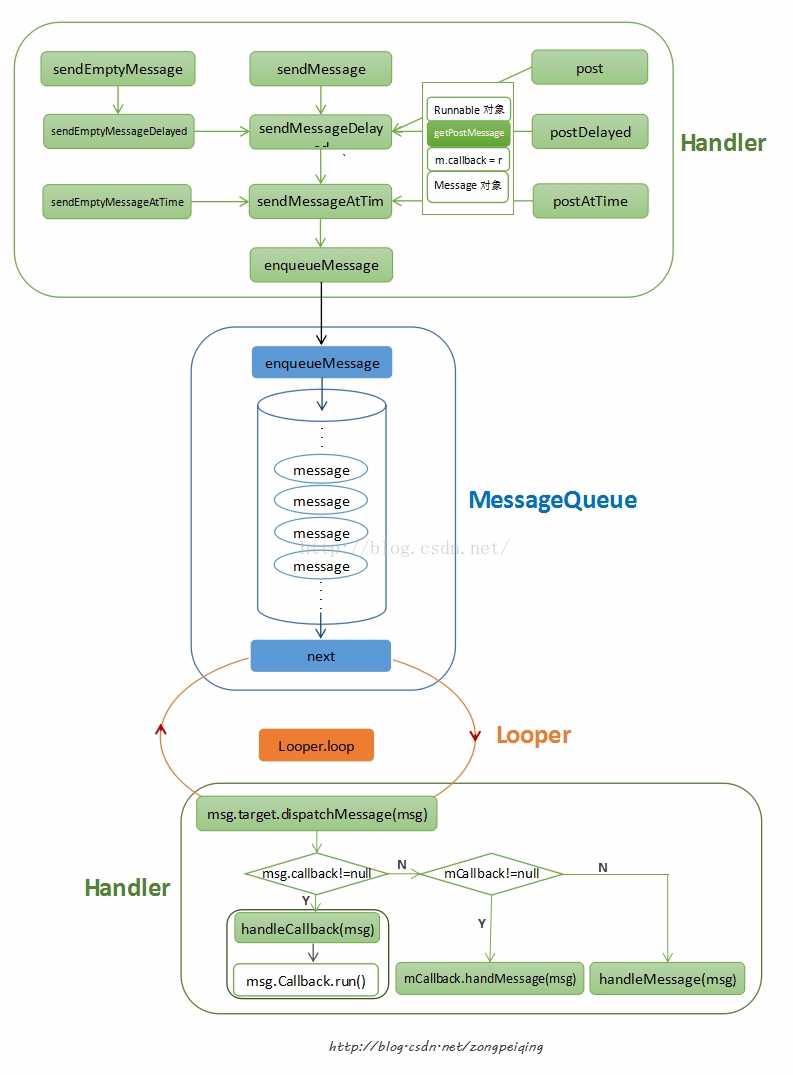
系统不断从getMessage获取消息,再通过handleMessage来处理消息。这种基于消息的循环模型在许多的系统框架中都有实现。比如iOS系统中的RunLoop,再比如windows系统中的消息队列,windows系统会为每一个UI线程分配一个消息队列,发生输入事件后,windows将事件转换为一个"消息"发送给系统消息队列,操作系统有一个专门的线程从系统消息队列中取出消息,分发给各个UI线程的输入消息队列中。Android中的应用系统框架也不例外,也有一套自己的消息循环机制,这套机制是靠Looper、Handler、MessageQueue来共同完成的。
原理

技术分享

p1.jpg

图片来自zongpeiqing的CSDN博客。Looper负责消息循环(例子中的while语句),Handler负责发送和处理消息,MessageQueue则负责管理消息(消息的增加和移除)。不管是sendMessage还是sendMessageDelay或是View.post方法,或是上面列出的没列出的发送消息的方法,最终都会包装成一条消息Message(这条消息由Handler发出),然后调用MessageQuque的enqueueMessage方法把消息放到消息队列MessageQueue中。而Looper则会不停地查看MessageQueue中是否有新消息msg,有新消息就会调用新消息msg.target.handleMessage()去处理消息,否则会一直阻塞。msg.target实际上是Handler对象。因此,Handler发送的消息,最终也是由Handler来处理。

问题

Q1: Handler是怎么在不同线程之间切换的?

  1. public final class Looper { 
  2. ...... 
  3. public static void loop() { 
  4. final Looper me = myLooper(); 
  5. if (me == null) { 
  6. throw new RuntimeException("No Looper; Looper.prepare() wasn‘t called on this thread."); 
  7. } 
  8. final MessageQueue queue = me.mQueue; 
  9. ........ 
  10. for (;;) { 
  11. Message msg = queue.next(); // might block 
  12. if (msg == null) { 
  13. // No message indicates that the message queue is quitting. 
  14. return; 
  15. } 
  16. ...... 
  17. msg.target.dispatchMessage(msg); 
  18. ...... 
  19. msg.recycleUnchecked(); 
  20. } 
  21. } 
  22. } 
  1. public class Handler { 
  2. /* 
  3. * Set this flag to true to detect anonymous, local or member classes 
  4. * that extend this Handler class and that are not static. These kind 
  5. * of classes can potentially create leaks. 
  6. */ 
  7. private static final boolean FIND_POTENTIAL_LEAKS = false; 
  8. private static final String TAG = "Handler"; 
  9.  
  10. /** 
  11. * Callback interface you can use when instantiating a Handler to avoid 
  12. * having to implement your own subclass of Handler. 
  13. * 
  14. * @param msg A {@link android.os.Message Message} object 
  15. * @return True if no further handling is desired 
  16. */ 
  17. public interface Callback { 
  18. public boolean handleMessage(Message msg); 
  19. } 
  20.  
  21. /** 
  22. * Subclasses must implement this to receive messages. 
  23. */ 
  24. public void handleMessage(Message msg) { 
  25. } 
  26.  
  27. /** 
  28. * Handle system messages here. 
  29. */ 
  30. public void dispatchMessage(Message msg) { 
  31. if (msg.callback != null) { 
  32. handleCallback(msg); 
  33. } else { 
  34. if (mCallback != null) { 
  35. if (mCallback.handleMessage(msg)) { 
  36. return; 
  37. } 
  38. } 
  39. handleMessage(msg); 
  40. } 
  41. } 
  42. } 

首先在线程1新建一个handler,在线程2 新建一条消息msg,然后在线程2调用hander.sendMessage(msg),因为在handler的处理逻辑handleMessage()方法是放在线程1的,因此在线程2中调用了hander.sendMessage(msg),MessagQueue插入了这条消息,Looper发现有新消息,然后取出新消息,调用msg.target.dispatchMessage(msg),上面已经说到,target其实是hander,这样便成功地切换到线程1的handleMessage逻辑上来了。最常见的例子就是在Activity中声明一个Handler,然后异步线程去请求网络,再通过网络更新UI。可以参考这里。

Q2: 上面的模型中,为何不直接使用Handler来循环消息?

这个问题仁者见仁,智者见智,这只是一种实现消息循环的方法之一,而不是唯一方法。不是说一定要用Looper。

Q3: 需要注意的点?

使用Looper前一定要调用Looper.prepare生成线程内(TheadLocal存储)的Looper实例,然后才能调用Looper.loop()实现消息循环。下面是一个非主线程中Looper和Handler演示例子,此时整个线程是不会自动停止的,会一直阻塞,直到调用了Looper.quit()方法才会停止。(下面代码仅仅是为了演示,没有做任何事)

  1. new Thread("example-1") { 
  2. Handler handler = new Handler() { 
  3. @Override 
  4. public void handleMessage(Message msg) { 
  5. // 自己的处理逻辑 
  6. if (条件满足) { 
  7. Looper.quit() ; //退出消息循环,结束线程 
  8. } 
  9. } 
  10. } ; 
  11. @Override 
  12. public void run() { 
  13. Looper.prepare(); 
  14. // do something.... 
  15. Message msg = Message.obtain(); 
  16. msg.what = ... 
  17. msg.obj = ... 
  18. ....... 
  19. handler.sendMessage(msg); 
  20. Looper.loop(); 
  21. } 
  22. }.start() ; 

Q4: 为何ActivityThread中的Looper.loop()没有阻塞主线程?

。。。。。

参考

《Android开发艺术探索》

Android Handler 消息循环机制

原文:http://www.cnblogs.com/jasonkent27/p/5793225.html

踩
(0)
赞
(0)
   
举报
评论 一句话评论(0)
关于我们 - 联系我们 - 留言反馈 - 联系我们:wmxa8@hotmail.com
© 2014 bubuko.com 版权所有
打开技术之扣,分享程序人生!