
settings.py,
ALLOWED_HOSTS = [‘*‘]

INSTALLED_APPS = [
    ‘django.contrib.admin‘,
    ‘django.contrib.auth‘,
    ‘django.contrib.contenttypes‘,
    ‘django.contrib.sessions‘,
    ‘django.contrib.messages‘,
    ‘django.contrib.staticfiles‘,
    ‘app01‘,
]

MIDDLEWARE = [
    ‘django.middleware.security.SecurityMiddleware‘,
    ‘django.contrib.sessions.middleware.SessionMiddleware‘,
    ‘django.middleware.common.CommonMiddleware‘,
    # ‘django.middleware.csrf.CsrfViewMiddleware‘,
    ‘django.contrib.auth.middleware.AuthenticationMiddleware‘,
    ‘django.contrib.messages.middleware.MessageMiddleware‘,
    ‘django.middleware.clickjacking.XFrameOptionsMiddleware‘,
]

STATICFILES_DIRS = (
    os.path.join(BASE_DIR,‘static‘)
)
urls.py,
url(r‘^upload/‘, views.upload),
views.py,
import os

def upload(request):
    if request.method == ‘POST‘:
        username = request.POST.get(‘username‘,None)
        img = request.FILES.get(‘img‘,None)
#图片不是字符串,所以用wb模式写入
        f = open(os.path.join(‘static/img/‘,img.name),‘wb‘)
        for chun in img.chunks():
            f.write(chun)
        f.close()
        print(username,img)

    return render(request,‘upload.html‘)
upload.html,
<!DOCTYPE html>
<html lang="en">
<head>
    <meta charset="UTF-8">
    <title>Title</title>
</head>
<body>
    <form class="form-file" action="/upload/" method="post" enctype="multipart/form-data">
        <input type="text" name="username" />
        <input type="file" name="img" />
        <input type="submit" value="submit" />

    </form>
</body>
</html>
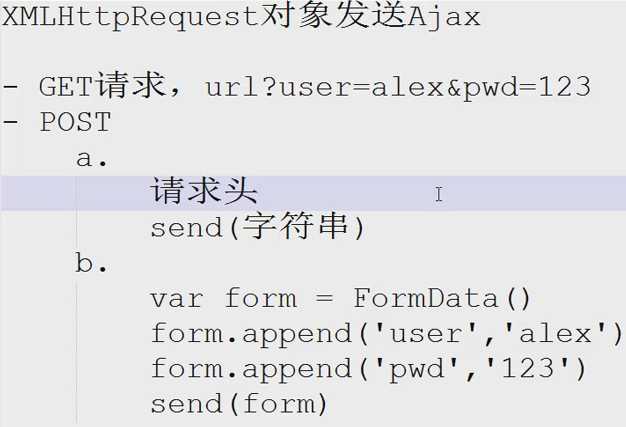
原生Ajax的作用,比如手机app,好多都是走的移动流量,那导入一个jquery.js文件就得1m,每次执行每次都导入每次都消耗1m流量,就不如用原生Ajax更合适了。
原文:http://www.cnblogs.com/fuckily/p/6237096.html