
 1 import paramiko
 2 import MySQLdb
 3 conn = MySQLdb.connect(host=‘192.168.1.101‘,user=‘root‘,passwd=‘123‘,db=‘host‘)
 4 cur = conn.cursor(cursorclass=MySQLdb.cursors.DictCursor)
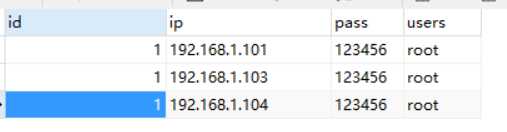
 5 reCout = cur.execute(‘select pass,users,ip,name from  host,user WHERE `user`.name = "root" and `user`.id=`host`.id‘)
 6 nRet = cur.fetchall()
 7 conn.commit()
 8 cur.close()
 9 conn.close()
10 for i in  nRet:
11     hosts = i[‘ip‘]
12     users = i [‘users‘]
13     passs = i[‘pass‘]
14     print hosts,users,passs
15     transport = paramiko.Transport((hosts, 22))
16     transport.connect(username=users, password=passs)
17     ssh = paramiko.SSHClient()
18     ssh._transport = transport
19     stdin, stdout, stderr = ssh.exec_command(‘ls /root‘)
20     print stdout.read()
21     transport.close()
数据表
2.以组的方式批量管理
import paramiko
import MySQLdb
conn = MySQLdb.connect(host=‘192.168.1.101‘,user=‘root‘,passwd=‘123‘,db=‘host‘)
cur = conn.cursor(cursorclass=MySQLdb.cursors.DictCursor)
reCout = cur.execute(‘select pass,users,ip,name from  host,user WHERE `user`.name = "admin" and `user`.id=`host`.id‘)
nRet = cur.fetchall()
conn.commit()
cur.close()
conn.close()
for i in  nRet:
    hosts = i[‘ip‘]
    #users = i [‘users‘]
    groups =i[‘name‘]
    passs = i[‘pass‘]
    print hosts,groups,passs
    transport = paramiko.Transport((hosts, 22))
    transport.connect(username=groups, password=passs)
    ssh = paramiko.SSHClient()
    ssh._transport = transport
    stdin, stdout, stderr = ssh.exec_command(‘ls /home/‘)
    print stdout.read()
    transport.close()
数据结构
主机列表

组列表
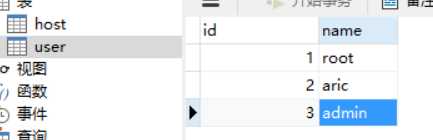
组列表的id为主机列表id的外键
查询语句
select pass,users,ip,name from host,user WHERE `user`.name = "admin" and `user`.id=`host`.id
原文:http://www.cnblogs.com/guigujun/p/6240098.html