
直接贴代码了:
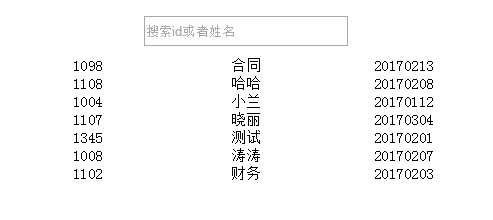
先上输入前的样子:
<style>
#example{margin:100px auto;width:600px;}
.show{margin:10px;}
#searchText{display: block;margin:0 auto 10px;height:24px;line-height: 24px;width:200px;}
.content ul li{text-align: center;}
.content ul li span{display: inline-block;width:150px;font-size:15px;color:#000;}
</style>
</head>
<body>
<div id="example">
    <input type="text" id="searchText" placeholder="搜索id或者姓名" v-model="searchData"/>
    <div class="content">
        <ul>
            <li v-for="item in items | filterBy searchData in ‘id‘ ‘name‘ | orderBy ‘name‘ ‘-1‘">
                <span>{{item.id}}</span>
                <span>{{item.name}}</span>
                <span>{{item.time}}</span>
            </li>
        </ul>
    </div>
</div>
<script>
    var example1 = new Vue({
      el: ‘#example‘,
      data: {
          searchData:‘‘,
        items: [
            {id:‘1008‘,name:‘涛涛‘,time:‘20170207‘},
            {id:‘1098‘,name:‘合同‘,time:‘20170213‘},
            {id:‘1107‘,name:‘晓丽‘,time:‘20170304‘},
            {id:‘1004‘,name:‘小兰‘,time:‘20170112‘},
            {id:‘1102‘,name:‘财务‘,time:‘20170203‘},
            {id:‘1108‘,name:‘哈哈‘,time:‘20170208‘},
            {id:‘1345‘,name:‘测试‘,time:‘20170201‘},
        ]
      },
       ready:function(){

        },
        watch:{
            items:{
                handler:function(val,oldval){

                },
                deep:true
            }
        },

        methods:{

        }
    })
</script>
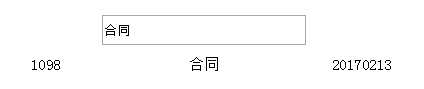
当在输入框中输入‘合同‘,得到结果如图:
vuejs通过filterBy,orderBy实现搜索筛选,降序排序数据实例
原文:http://www.cnblogs.com/moqiutao/p/6383318.html