
var webpack = require(‘webpack‘);
var HtmlWebpackPlugin = require(‘html-webpack-plugin‘);

module.exports = {
	entry:  __dirname + "/app/Greeter.js",
	output: {
		path: __dirname + "/build",
		filename: "bundle.js"
	},
	devServer:{
		contentBase:"./public",
		historyApiFallback:true,
		inline:true
	},
	module:{
		loaders:[
			{
				test:/\.json$/,
				loader:"json-loader"
			},
			{
				test:/\.js$/,
				exclude:/node_modules/,
				loader:‘babel-loader‘
			},
			{
				test:/\.css$/,
				loader:‘style-loader!css-loader?modules‘
			}
		]
	},
	plugins:[
		new webpack.BannerPlugin("copyright suyan"),
		new HtmlWebpackPlugin({
			template:__dirname + "/app/index.tmpl.html",
			title:‘htmlwebpackplugin title test‘
		})
	]
}template:表示模板 title:生成的html文档的标题,配置该项,它并不会替换指定模板文件中的title元素的内容,html模板文件中使用模板引擎语法 来获取该配置项值才可以
<!DOCTYPE html>
<html>
<head>
	<meta charset="utf-8">
	<meta http-equiv="X-UA-Compatible" content="IE=edge">
	<title><%= htmlWebpackPlugin.options.title %></title>
	<link rel="stylesheet" href="">
</head>
<body>
	<div id="root"></div>
</body>
</html>
<!DOCTYPE html>
<html>
<head>
	<meta charset="utf-8">
	<meta http-equiv="X-UA-Compatible" content="IE=edge">
	<title>htmlwebpackplugin title test</title>
	<link rel="stylesheet" href="">
</head>
<body>
	<div id="root"></div>
<script type="text/javascript" src="bundle.js"></script></body>
</html>
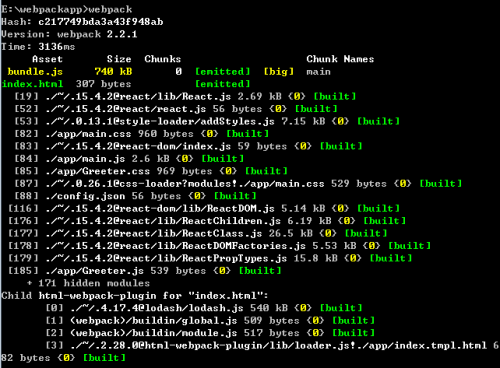
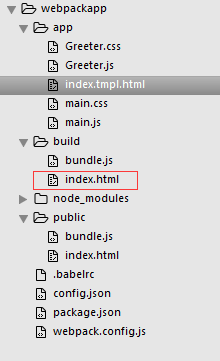
index.html文件就是通过我们的模板文件index.tmpl.html生成的,在我们的webpack.config.js文件中,我们使用了HtmlWebpa
ckPlugin插件,在插件配置项中我们配置了title:‘htmlwebpackplugin title test‘,再看我们生成的index.html文件的<titl
e>这个标签中的内容正是我们在webpack.config.js中配置的内容.在模板文件中我们使用了<%=htmlWebpackPlugin.options.t
itle %>来获取配置文件中的title值.
本文出自 “素颜” 博客,请务必保留此出处http://suyanzhu.blog.51cto.com/8050189/1899356
原文:http://suyanzhu.blog.51cto.com/8050189/1899356