
#include <windows.h>

#include <gl/gl.h>
#include <gl/glaux.h>

#include <math.h>
#define pi 3.1415926

#pragma comment (lib, "opengl32.lib")
#pragma comment (lib, "glu32.lib")
#pragma comment (lib, "glaux.lib")

#pragma comment( linker, "/subsystem:\"windows\" /entry:\"mainCRTStartup\"" )

void init()
{
      glClearColor(0.0,0.0,0.0,1.0);
}


float r=0,g=0,b=0;
float x=0.0f,y=0.0f,r0=0.0f,r1=0.0f,a=0.0f;

void CALLBACK draw()
{
	if(rand()%5==0)
	{glClear(GL_COLOR_BUFFER_BIT);
     	Sleep(300);
	}

        glColor3f(r,g,b);
        glBegin(GL_LINE_LOOP);
		double angl;
		double k,p;

		for(int i=0;i<5;i++)
		{
			angl = a/180*pi;
			k=(double)x+r1*cos(angl);
	     	p=(double)y+r1*sin(angl);
            glVertex2f(k,p);
            a=a+36;
            angl = a/180*pi;
	    	k=(double)x+r0*cos(angl);
		    p=(double)y+r0*sin(angl);
            glVertex2f(k,p);
		    a=a+36;
		}


     glEnd();
     glFinish();
}

void CALLBACK change()
{
	int i;


	i=rand()%100+1;
    r0 = (float)i+4;
	r1 = r0/2.5;

	r = rand()%200 / 200.0f;
	g = rand()%200/ 200.0f;
	b = rand()%200/ 200.0f;

	a=float(rand()%360);

	x=float(rand()%500);
	y=float(rand()%500);

	draw();
}
void main()
{
    auxInitDisplayMode(AUX_SINGLE|AUX_RGBA);
    auxInitPosition(100,100,500,500);
    auxInitWindow("CGOpenGL");

    init();
	auxIdleFunc(change);
    auxMainLoop(draw);
}
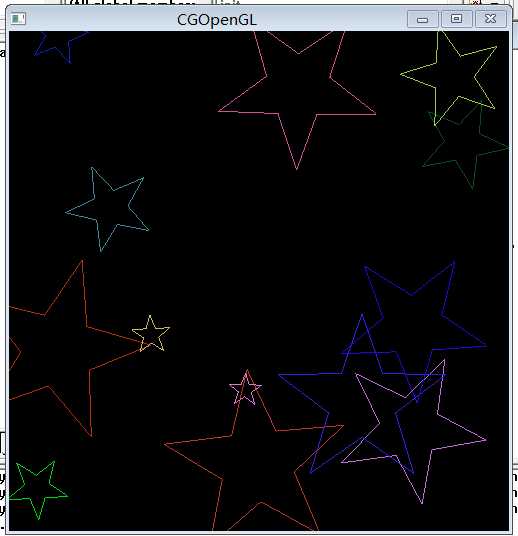
原文:http://www.cnblogs.com/jiangnanyanyuchen/p/6664448.html