
//包装函数
module.exports = function(grunt){
//任务配置,所有插件的配置信息
grunt.initConfig({
//获取package.json的信息
pkg:grunt.file.readJSON(‘package.json‘)
})
//告诉grunt当我们在终端中输入grunt时需要做些什么(注意先后顺序)
grunt.registerTask(‘default‘,[]);
}
uglify:{
option:{
stripBanners:true,
banner:‘/*!<%=pkg.name%>-<%=pkg.version%>.js <%- grunt.template.today("yyyy-mm-dd") %> */\n‘
},
build:{
src:‘src/test.js‘,
dest:‘build/<%=pkg.name%>-<%=pkg.version%>.js.min.js‘
}
}
grunt.loadNpmTasks(‘grunt-contrib-uglify‘);
grunt.registerTask(‘default‘,[‘uglify‘]);
jshint:{
options:{
jshintrc:‘.jshintrc‘
},
build:[ ‘Gruntfile.js‘,‘src/*.js‘]

}
{
"boss":false,
"curly":true,
"eqeqeq":true,
"eqnull":true,
"expr":true,
"immed":true,
"newcap":true,
"noempty":true
}
cssmin: {
  options : {
  compatibility : ‘ie8‘, //设置兼容模式
  noAdvanced : true //取消高级特性
  },
  minify: {
  expand: true,
  cwd: ‘web/css/‘,
  src: [‘*.css‘, ‘!*.min.css‘],
  dest: ‘dist/resource/web/css‘,
  ext: ‘.css‘
  }

}
htmlmin: {
options: {
removeComments: true,
collapseWhitespace: true
},
dist: {
files: [
{expand: true,cwd: ‘web‘,src: ‘*.html‘,dest: ‘web/dist/partials‘},
{expand: true,cwd: ‘web/partials‘,src: ‘**/*.html‘,dest: ‘web/dist/partials‘}
]
}
copy:{
  build:{
    cwd:‘resource‘, //cwd只想源文件的目录都是相对的,和src制定源文件类似
    src:[‘**‘], //**是一个通配符,用来匹配Grunt任何文件
    dest:‘build‘, //dest是Grunt用来输出结果任务的
    expand:true
      }
}
clean:{
build:{
src:[‘build‘]
}
},
----grunt_test1项目目录及Gruntfile.js配置-------------------
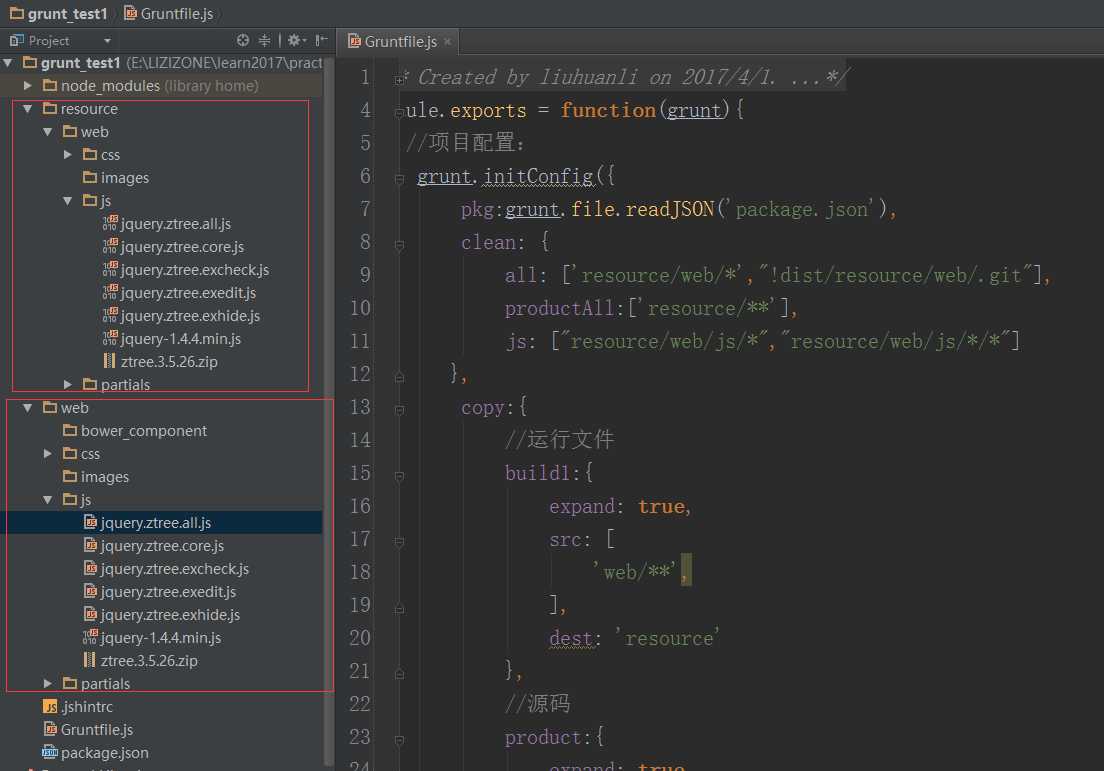
/**
 * Created by liuhuanli on 2017/4/1.
 */
module.exports = function(grunt){
   //项目配置:
    grunt.initConfig({
        pkg:grunt.file.readJSON(‘package.json‘),
        clean: {
            all: [‘resource/web/*‘,"!dist/resource/web/.git"],
            productAll:[‘resource/**‘],
            js: ["resource/web/js/*","resource/web/js/*/*"]
       },
        copy:{
            //运行文件
            build1:{
                expand: true,
                src: [
                    ‘web/**‘,
                ],
                dest: ‘resource‘
            },
            //源码
            product:{
                expand: true,
                src: [
                    ‘web/js/**‘,
                    ‘web/css/**‘,
                    ‘web/images/**‘,
                    ‘web/partials/**‘,
                    ‘web/bower_components/**‘,
                    ‘web/*.html‘
                ],
                dest: ‘resource‘
            }
        },
        watch:{
            css:{
                files:[
                    ‘resource/web/css/*.css‘
                ]
            },
            js:{
                files:[‘resource/web/js/*.js‘, ‘resource/Gruntfile.js‘],

                tasks:[‘jshint‘]
            }

        },
        jshint:{
            options:{
                jshintrc:‘.jshintrc‘
            },
            all:[‘resource/Gruntfile.js‘,‘resource/web/js/*.js‘]
        },
        uglify:{
            options:{
                banner:‘/*! <%= pkg.name %> <%= grunt.template.today("yyyy-mm-dd") %>  */\n‘
            },

            js0: {
                files: {‘resource/web/js/jquery.ztree.all.js‘:[‘web/js/jquery.ztree.all.js‘]}
            },
            js1: {
                files: {‘resource/web/js/jquery.ztree.core.js‘:[‘web/js/jquery.ztree.core.js‘]}
            },
            js2: {
                files: {‘resource/web/js/jquery.ztree.excheck.js‘:[‘web/js/jquery.ztree.excheck.js‘]}
            },
            js3: {
                files: {‘resource/web/js/jquery.ztree.exedit.js‘:[‘web/js/jquery.ztree.exedit.js‘]}
            },
            js4: {
                files: {‘resource/web/js/jquery.ztree.exhide.js‘:[‘web/js/jquery.ztree.exhide.js‘]}
            }
        },
        //压缩css
        cssmin: {
            options : {
                compatibility : ‘ie8‘, //设置兼容模式
                noAdvanced : true //取消高级特性
            },
            minify: {
                expand: true,
                cwd: ‘web/css‘,
                src: [‘*.css‘, ‘!*.min.css‘],
                dest: ‘resource/web/css‘,
                ext: ‘.css‘
            },
            minifyMetro: {
                expand: true,
                cwd: ‘web/css/metroStyle‘,
                src: [‘*.css‘, ‘!*.min.css‘],
                dest: ‘resource/web/css/metroStyle‘,
                ext: ‘.css‘
            }
        },
        // 压缩html
        htmlmin: {
            options: {
                removeComments: true,
                collapseWhitespace: true
            },
            dist: {
                files: [
                    {expand: true,cwd: ‘web‘,src: ‘*.html‘,dest: ‘dist/resource/web‘},
                    {expand: true,cwd: ‘web/partials‘,src: ‘**/*.html‘,dest: ‘resource/web/partials‘}
                ]
            }
        }
    });
    //加载插件
    grunt.loadNpmTasks(‘grunt-contrib-watch‘);
    grunt.loadNpmTasks(‘grunt-contrib-jshint‘);
    grunt.loadNpmTasks(‘grunt-contrib-cssmin‘);
    grunt.loadNpmTasks(‘grunt-contrib-htmlmin‘);
    grunt.loadNpmTasks(‘grunt-contrib-uglify‘);
    grunt.loadNpmTasks(‘grunt-contrib-copy‘);
    grunt.loadNpmTasks(‘grunt-contrib-clean‘);
    grunt.registerTask(‘cleanAll‘, [‘clean:all‘]);
    grunt.registerTask(‘default‘,[
        ‘clean:productAll‘,
        ‘clean:all‘,
        ‘copy:product‘,
        ‘cssmin‘,
        ‘htmlmin‘,
        ‘uglify‘,
        ‘watch‘
        //‘jshint‘,

    ]);
}
当你安装以上插件成功后,观察你的package.json文件
devDependencies 下有内容如下所示:
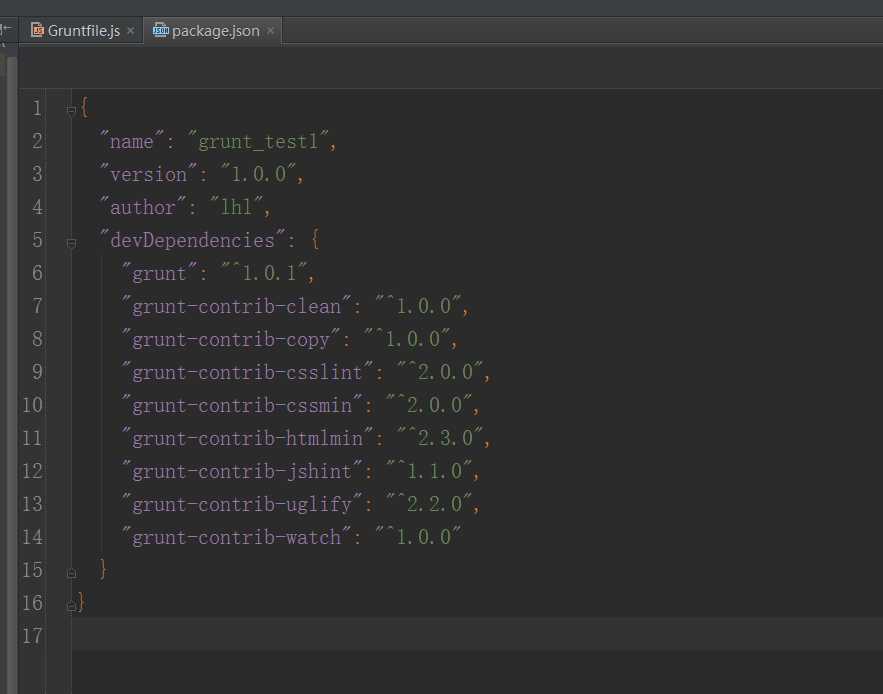
如果是团队开发用一样的插件版本,只需要把package.json文件拷到项目目录下,npm install 就能自动安装package.json文件中devDependencies下
的插件
原文:http://www.cnblogs.com/lizimeme/p/6679283.html