
模块,用一砣代码实现了某个功能的代码集合。
类似于函数式编程和面向过程编程,函数式编程则完成一个功能,其他代码用来调用即可,提供了代码的重用性和代码间的耦合。而对于一个复杂的功能来,可能需要多个函数才能完成(函数又可以在不同的.py文件中),n个 .py 文件组成的代码集合就称为模块。
如:os 是系统相关的模块;file是文件操作相关的模块
内置模块
1?OS
用于提供系统级别的操作
os.getcwd() 获取当前工作目录,即当前python脚本工作的目录路径
os.chdir("dirname")  改变当前脚本工作目录;相当于shell下cd
os.curdir  返回当前目录: (‘.‘)
os.pardir  获取当前目录的父目录字符串名:(‘..‘)
os.makedirs(‘dirname1/dirname2‘)    可生成多层递归目录
os.removedirs(‘dirname1‘)    若目录为空,则删除,并递归到上一级目录,如若也为空,则删除,依此类推
os.mkdir(‘dirname‘)    生成单级目录;相当于shell中mkdir dirname
os.rmdir(‘dirname‘)    删除单级空目录,若目录不为空则无法删除,报错;相当于shell中rmdir dirname
os.listdir(‘dirname‘)    列出指定目录下的所有文件和子目录,包括隐藏文件,并以列表方式打印
os.remove()  删除一个文件
os.rename("oldname","newname")  重命名文件/目录
os.stat(‘path/filename‘)  获取文件/目录信息
os.sep    输出操作系统特定的路径分隔符,win下为"\\",Linux下为"/"
os.linesep    输出当前平台使用的行终止符,win下为"\t\n",Linux下为"\n"
os.pathsep    输出用于分割文件路径的字符串
os.name    输出字符串指示当前使用平台。win->‘nt‘; Linux->‘posix‘
os.system("bash command")  运行shell命令,直接显示
os.environ  获取系统环境变量
os.path.abspath(path)  返回path规范化的绝对路径
os.path.split(path)  将path分割成目录和文件名二元组返回
os.path.dirname(path)  返回path的目录。其实就是os.path.split(path)的第一个元素
os.path.basename(path)  返回path最后的文件名。如何path以/或\结尾,那么就会返回空值。即os.path.split(path)的第二个元素
os.path.exists(path)  如果path存在,返回True;如果path不存在,返回False
os.path.isabs(path)  如果path是绝对路径,返回True
os.path.isfile(path)  如果path是一个存在的文件,返回True。否则返回False
os.path.isdir(path)  如果path是一个存在的目录,则返回True。否则返回False
os.path.join(path1[, path2[, ...]])  将多个路径组合后返回,第一个绝对路径之前的参数将被忽略
os.path.getatime(path)  返回path所指向的文件或者目录的最后存取时间
os.path.getmtime(path)  返回path所指向的文件或者目录的最后修改时间
更多模块访问:https://docs.python.org/2/library/os.html?highlight=os#module-os
二、sys
用于提供对解释器相关的操作
sys.argv           命令行参数List,第一个元素是程序本身路径
sys.exit(n)        退出程序,正常退出时exit(0)
sys.version        获取Python解释程序的版本信息
sys.maxint         最大的Int值
sys.path           返回模块的搜索路径,初始化时使用PYTHONPATH环境变量的值
sys.platform       返回操作系统平台名称
sys.stdout.write(‘please:‘)
val = sys.stdin.readline()[:-1]
三、hashlib
用于加密相关的操作,代替了md5模块和sha模块,主要提供SHA1,SHA224,SHA256,SHA384,SHA512,MD5算法
废弃
MD5
import md5
hash = md5.new()
hash.update(‘admin‘)
print hash.hexdigest()
SHA
import sha

hash = sha.new()
hash.update(‘admin‘)
print hash.hexdigest()
用于序列化的两个模块
Json模块提供了四个功能:dumps、dump、loads、load
pickle模块提供了四个功能:dumps、dump、loads、load
例:
import pickle
data = {‘k1’:123,’k2’:Hello}
#pickle.dumps 将数据通过特殊的形式转换为只有python语言认识的字符串
p_str =pickle.dumps(data)
print(p_str)
#pickle.dump将数据通过特殊的形式转换为只有python语言认识的字符串,并写入文件
with open(‘D:\result.pk’,’w’) as fp:
pickle.dump(data,fp)
import json
#json.dumps将数据通过特殊的形式转换为所有程序语言都认识的字符串
j_str = json.dumps(data)
print(j_str)
import commands
result = commands.getoutput(‘cmd‘)
result = commands.getstatus(‘cmd‘)
result = commands.getstatusoutput(‘cmd’)
以上执行shell命令的相关的模块和函数的功能均在 subprocess 模块中实现,并提供了更丰富的功能。
call
执行命令,返回状态码
|
1
2
|
ret = subprocess.call(["ls", "-l"], shell=False)
ret = subprocess.call("ls -l", shell=True)
|
shell = True ,允许 shell 命令是字符串形式
check_call
执行命令,如果执行状态码是 0 ,则返回0,否则抛异常
|
1
2
|
subprocess.check_call(["ls", "-l"])
subprocess.check_call("exit 1", shell=True)
|
check_output
执行命令,如果状态码是 0 ,则返回执行结果,否则抛异常
|
1
2
|
subprocess.check_output(["echo", "Hello World!"])
subprocess.check_output("exit 1", shell=True)
|
subprocess.Popen(...)
用于执行复杂的系统命令
参数:
import subprocess
ret1 = subprocess.Popen(["mkdir","t1"])
ret2 = subprocess.Popen("mkdir t2", shell=True)
终端输入的命令分为两种:
import subprocess
obj = subprocess.Popen("mkdir t3", shell=True, cwd=‘/home/dev’,)
代码2
import subprocess

obj = subprocess.Popen(["python"], stdin=subprocess.PIPE, stdout=subprocess.PIPE, stderr=subprocess.PIPE)
obj.stdin.write(‘print 1 \n ‘)
obj.stdin.write(‘print 2 \n ‘)
obj.stdin.write(‘print 3 \n ‘)
obj.stdin.write(‘print 4 \n ‘)
obj.stdin.close()

cmd_out = obj.stdout.read()
obj.stdout.close()
cmd_error = obj.stderr.read()
obj.stderr.close()
代码三
print cmd_out
print cmd_error
import subprocess

obj = subprocess.Popen(["python"], stdin=subprocess.PIPE, stdout=subprocess.PIPE, stderr=subprocess.PIPE)
obj.stdin.write(‘print 1 \n ‘)
obj.stdin.write(‘print 2 \n ‘)
obj.stdin.write(‘print 3 \n ‘)
obj.stdin.write(‘print 4 \n ‘)

out_error_list = obj.communicate()
print out_error_list
代码四
import subprocess

obj = subprocess.Popen(["python"], stdin=subprocess.PIPE, stdout=subprocess.PIPE, stderr=subprocess.PIPE)
out_error_list = obj.communicate(‘print "hello"‘)
print out_error_list
更多在这里:https://docs.python.org/2/library/subprocess.html?highlight=subprocess#frequently-used-arguments
六、shutil
高级的 文件、文件夹、压缩包 处理模块
shutil.copyfileobj(fsrc, fdst[, length])
将文件内容拷贝到另一个文件中,可以部分内容
def copyfileobj(fsrc, fdst, length=16*1024):
    """copy data from file-like object fsrc to file-like object fdst"""
    while 1:
        buf = fsrc.read(length)
        if not buf:
            break
        fdst.write(buf)
shutil.copyfile(src, dst)
拷贝文件
def copyfile(src, dst):
    """Copy data from src to dst"""
    if _samefile(src, dst):
        raise Error("`%s` and `%s` are the same file" % (src, dst))

    for fn in [src, dst]:
        try:
            st = os.stat(fn)
        except OSError:
            # File most likely does not exist
            pass
        else:
            # XXX What about other special files? (sockets, devices...)
            if stat.S_ISFIFO(st.st_mode):
                raise SpecialFileError("`%s` is a named pipe" % fn)

    with open(src, ‘rb‘) as fsrc:
        with open(dst, ‘wb‘) as fdst:
            copyfileobj(fsrc, fdst)
shutil.copymode(src, dst)
仅拷贝权限。内容、组、用户均不变
def copymode(src, dst):
    """Copy mode bits from src to dst"""
    if hasattr(os, ‘chmod‘):
        st = os.stat(src)
        mode = stat.S_IMODE(st.st_mode)
        os.chmod(dst, mode)
shutil.copystat(src, dst)
拷贝状态的信息,包括:mode bits, atime, mtime, flags
def copystat(src, dst):
    """Copy all stat info (mode bits, atime, mtime, flags) from src to dst"""
    st = os.stat(src)
    mode = stat.S_IMODE(st.st_mode)
    if hasattr(os, ‘utime‘):
        os.utime(dst, (st.st_atime, st.st_mtime))
    if hasattr(os, ‘chmod‘):
        os.chmod(dst, mode)
    if hasattr(os, ‘chflags‘) and hasattr(st, ‘st_flags‘):
        try:
            os.chflags(dst, st.st_flags)
        except OSError, why:
            for err in ‘EOPNOTSUPP‘, ‘ENOTSUP‘:
                if hasattr(errno, err) and why.errno == getattr(errno, err):
                    break
            else:
                raise
shutil.copy(src, dst)
拷贝文件和权限
def copy(src, dst):
    """Copy data and mode bits ("cp src dst").

    The destination may be a directory.

    """
    if os.path.isdir(dst):
        dst = os.path.join(dst, os.path.basename(src))
    copyfile(src, dst)
    copymode(src, dst)
shutil.copy2(src, dst)
拷贝文件和状态信息
def copy2(src, dst):
    """Copy data and all stat info ("cp -p src dst").

    The destination may be a directory.

    """
    if os.path.isdir(dst):
        dst = os.path.join(dst, os.path.basename(src))
    copyfile(src, dst)
    copystat(src, dst)
shutil.ignore_patterns(*patterns)
shutil.copytree(src, dst, symlinks=False, ignore=None)
递归的去拷贝文件
例如:copytree(source, destination, ignore=ignore_patterns(‘*.pyc‘, ‘tmp*’))
def ignore_patterns(*patterns):
    """Function that can be used as copytree() ignore parameter.

    Patterns is a sequence of glob-style patterns
    that are used to exclude files"""
    def _ignore_patterns(path, names):
        ignored_names = []
        for pattern in patterns:
            ignored_names.extend(fnmatch.filter(names, pattern))
        return set(ignored_names)
    return _ignore_patterns

def copytree(src, dst, symlinks=False, ignore=None):
    """Recursively copy a directory tree using copy2().

    The destination directory must not already exist.
    If exception(s) occur, an Error is raised with a list of reasons.

    If the optional symlinks flag is true, symbolic links in the
    source tree result in symbolic links in the destination tree; if
    it is false, the contents of the files pointed to by symbolic
    links are copied.

    The optional ignore argument is a callable. If given, it
    is called with the `src` parameter, which is the directory
    being visited by copytree(), and `names` which is the list of
    `src` contents, as returned by os.listdir():

        callable(src, names) -> ignored_names

    Since copytree() is called recursively, the callable will be
    called once for each directory that is copied. It returns a
    list of names relative to the `src` directory that should
    not be copied.

    XXX Consider this example code rather than the ultimate tool.

    """
    names = os.listdir(src)
    if ignore is not None:
        ignored_names = ignore(src, names)
    else:
        ignored_names = set()

    os.makedirs(dst)
    errors = []
    for name in names:
        if name in ignored_names:
            continue
        srcname = os.path.join(src, name)
        dstname = os.path.join(dst, name)
        try:
            if symlinks and os.path.islink(srcname):
                linkto = os.readlink(srcname)
                os.symlink(linkto, dstname)
            elif os.path.isdir(srcname):
                copytree(srcname, dstname, symlinks, ignore)
            else:
                # Will raise a SpecialFileError for unsupported file types
                copy2(srcname, dstname)
        # catch the Error from the recursive copytree so that we can
        # continue with other files
        except Error, err:
            errors.extend(err.args[0])
        except EnvironmentError, why:
            errors.append((srcname, dstname, str(why)))
    try:
        copystat(src, dst)
    except OSError, why:
        if WindowsError is not None and isinstance(why, WindowsError):
            # Copying file access times may fail on Windows
            pass
        else:
            errors.append((src, dst, str(why)))
    if errors:
        raise Error, errors
shutil.rmtree(path[, ignore_errors[, onerror]])
递归的去删除文件
def rmtree(path, ignore_errors=False, onerror=None):
    """Recursively delete a directory tree.

    If ignore_errors is set, errors are ignored; otherwise, if onerror
    is set, it is called to handle the error with arguments (func,
    path, exc_info) where func is os.listdir, os.remove, or os.rmdir;
    path is the argument to that function that caused it to fail; and
    exc_info is a tuple returned by sys.exc_info().  If ignore_errors
    is false and onerror is None, an exception is raised.

    """
    if ignore_errors:
        def onerror(*args):
            pass
    elif onerror is None:
        def onerror(*args):
            raise
    try:
        if os.path.islink(path):
            # symlinks to directories are forbidden, see bug #1669
            raise OSError("Cannot call rmtree on a symbolic link")
    except OSError:
        onerror(os.path.islink, path, sys.exc_info())
        # can‘t continue even if onerror hook returns
        return
    names = []
    try:
        names = os.listdir(path)
    except os.error, err:
        onerror(os.listdir, path, sys.exc_info())
    for name in names:
        fullname = os.path.join(path, name)
        try:
            mode = os.lstat(fullname).st_mode
        except os.error:
            mode = 0
        if stat.S_ISDIR(mode):
            rmtree(fullname, ignore_errors, onerror)
        else:
            try:
                os.remove(fullname)
            except os.error, err:
                onerror(os.remove, fullname, sys.exc_info())
    try:
        os.rmdir(path)
    except os.error:
        onerror(os.rmdir, path, sys.exc_info())
shutil.move(src, dst)
递归的去移动文件
def move(src, dst):
    """Recursively move a file or directory to another location. This is
    similar to the Unix "mv" command.

    If the destination is a directory or a symlink to a directory, the source
    is moved inside the directory. The destination path must not already
    exist.

    If the destination already exists but is not a directory, it may be
    overwritten depending on os.rename() semantics.

    If the destination is on our current filesystem, then rename() is used.
    Otherwise, src is copied to the destination and then removed.
    A lot more could be done here...  A look at a mv.c shows a lot of
    the issues this implementation glosses over.

    """
    real_dst = dst
    if os.path.isdir(dst):
        if _samefile(src, dst):
            # We might be on a case insensitive filesystem,
            # perform the rename anyway.
            os.rename(src, dst)
            return

        real_dst = os.path.join(dst, _basename(src))
        if os.path.exists(real_dst):
            raise Error, "Destination path ‘%s‘ already exists" % real_dst
    try:
        os.rename(src, real_dst)
    except OSError:
        if os.path.isdir(src):
            if _destinsrc(src, dst):
                raise Error, "Cannot move a directory ‘%s‘ into itself ‘%s‘." % (src, dst)
            copytree(src, real_dst, symlinks=True)
            rmtree(src)
        else:
            copy2(src, real_dst)
            os.unlink(src)
shutil.make_archive(base_name, format,...)
创建压缩包并返回文件路径,例如:zip、tar
def make_archive(base_name, format, root_dir=None, base_dir=None, verbose=0,
                 dry_run=0, owner=None, group=None, logger=None):
    """Create an archive file (eg. zip or tar).

    ‘base_name‘ is the name of the file to create, minus any format-specific
    extension; ‘format‘ is the archive format: one of "zip", "tar", "bztar"
    or "gztar".

    ‘root_dir‘ is a directory that will be the root directory of the
    archive; ie. we typically chdir into ‘root_dir‘ before creating the
    archive.  ‘base_dir‘ is the directory where we start archiving from;
    ie. ‘base_dir‘ will be the common prefix of all files and
    directories in the archive.  ‘root_dir‘ and ‘base_dir‘ both default
    to the current directory.  Returns the name of the archive file.

    ‘owner‘ and ‘group‘ are used when creating a tar archive. By default,
    uses the current owner and group.
    """
    save_cwd = os.getcwd()
    if root_dir is not None:
        if logger is not None:
            logger.debug("changing into ‘%s‘", root_dir)
        base_name = os.path.abspath(base_name)
        if not dry_run:
            os.chdir(root_dir)

    if base_dir is None:
        base_dir = os.curdir

    kwargs = {‘dry_run‘: dry_run, ‘logger‘: logger}

    try:
        format_info = _ARCHIVE_FORMATS[format]
    except KeyError:
        raise ValueError, "unknown archive format ‘%s‘" % format

    func = format_info[0]
    for arg, val in format_info[1]:
        kwargs[arg] = val

    if format != ‘zip‘:
        kwargs[‘owner‘] = owner
        kwargs[‘group‘] = group

    try:
        filename = func(base_name, base_dir, **kwargs)
    finally:
        if root_dir is not None:
            if logger is not None:
                logger.debug("changing back to ‘%s‘", save_cwd)
            os.chdir(save_cwd)

    return filename
shutil 对压缩包的处理是调用 ZipFile 和 TarFile 两个模块来进行的,详细:
import zipfile
zipfile压缩解压
# 压缩
z = zipfile.ZipFile(‘laxi.zip‘, ‘w‘)
z.write(‘a.log‘)
z.write(‘data.data‘)
z.close()

# 解压
z = zipfile.ZipFile(‘laxi.zip‘, ‘r‘)
z.extractall()
z.close()
tarfile压缩解压
import tarfile

# 压缩
tar = tarfile.open(‘your.tar‘,‘w‘)
tar.add(‘/Users/wupeiqi/PycharmProjects/bbs2.zip‘, arcname=‘bbs2.zip‘)
tar.add(‘/Users/wupeiqi/PycharmProjects/cmdb.zip‘, arcname=‘cmdb.zip‘)
tar.close()

# 解压
tar = tarfile.open(‘your.tar‘,‘r‘)
tar.extractall()  # 可设置解压地址
tar.close()
七、ConfigParser
用于对特定的配置进行操作,当前模块的名称在 python 3.x 版本中变更为 configparser。
import ConfigParserconfig = ConfigParser.ConfigParser()config.read(‘i.cfg‘)# ########## 读 ###########secs = config.sections()#print secs#options = config.options(‘group2‘)#print options#item_list = config.items(‘group2‘)#print item_list#val = config.get(‘group1‘,‘key‘)#val = config.getint(‘group1‘,‘key‘)# ########## 改写 ###########sec = config.remove_section(‘group1‘)#config.write(open(‘i.cfg‘, "w"))#sec = config.has_section(‘wupeiqi‘)#sec = config.add_section(‘wupeiqi‘)#config.write(open(‘i.cfg‘, "w"))#config.set(‘group2‘,‘k1‘,11111)#config.write(open(‘i.cfg‘, "w"))#config.remove_option(‘group2‘,‘age‘)#config.write(open(‘i.cfg‘, "w”)) 用于便捷记录日志且线程安全的模块
|
1
2
3
4
5
6
7
8
9
10
11
12
13
14
|
import logginglogging.basicConfig(filename=‘log.log‘, format=‘%(asctime)s - %(name)s - %(levelname)s -%(module)s: %(message)s‘, datefmt=‘%Y-%m-%d %H:%M:%S %p‘, level=10)logging.debug(‘debug‘)logging.info(‘info‘)logging.warning(‘warning‘)logging.error(‘error‘)logging.critical(‘critical‘)logging.log(10,‘log‘) |
对于等级:
|
1
2
3
4
5
6
7
8
|
CRITICAL = 50FATAL = CRITICALERROR = 40WARNING = 30WARN = WARNINGINFO = 20DEBUG = 10NOTSET = 0 |
只有大于当前日志等级的操作才会被记录。
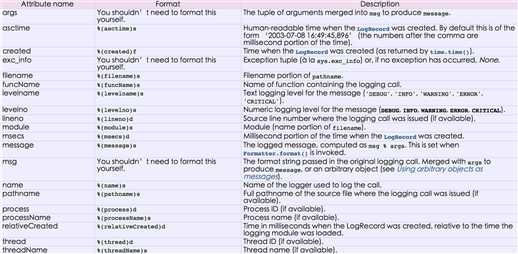
对于格式,有如下属性可是配置:
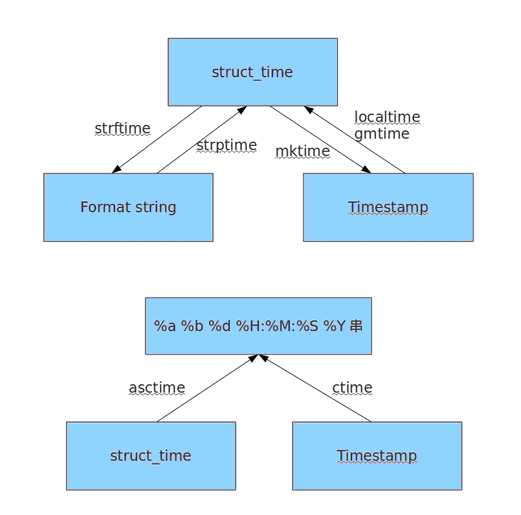
时间相关的操作,时间有三种表示方式:
print time.time()print time.mktime(time.localtime()) print time.gmtime() #可加时间戳参数print time.localtime() #可加时间戳参数print time.strptime(‘2014-11-11‘, ‘%Y-%m-%d‘) print time.strftime(‘%Y-%m-%d‘) #默认当前时间print time.strftime(‘%Y-%m-%d‘,time.localtime()) #默认当前时间print time.asctime()print time.asctime(time.localtime())print time.ctime(time.time()) import datetime‘‘‘datetime.date:表示日期的类。常用的属性有year, month, daydatetime.time:表示时间的类。常用的属性有hour, minute, second, microseconddatetime.datetime:表示日期时间datetime.timedelta:表示时间间隔,即两个时间点之间的长度timedelta([days[, seconds[, microseconds[, milliseconds[, minutes[, hours[, weeks]]]]]]])strftime("%Y-%m-%d")‘‘‘import datetimeprint datetime.datetime.now()print datetime.datetime.now() - datetime.timedelta(days=5)
十、re
re模块用于对python的正则表达式的操作。
字符:
. 匹配除换行符以外的任意字符
\w 匹配字母或数字或下划线或汉字
\s 匹配任意的空白符
\d 匹配数字
\b 匹配单词的开始或结束
^ 匹配字符串的开始
$ 匹配字符串的结束
次数:
* 重复零次或更多次
+ 重复一次或更多次
? 重复零次或一次
{n} 重复n次
{n,} 重复n次或更多次
{n,m} 重复n到m次
IP:
^(25[0-5]|2[0-4]\d|[0-1]?\d?\d)(\.(25[0-5]|2[0-4]\d|[0-1]?\d?\d)){3}$
手机号:
^1[3|4|5|8][0-9]\d{8}$
1、match(pattern, string, flags=0)
从起始位置开始根据模型去字符串中匹配指定内容,匹配单个
import re

obj = re.match(‘\d+‘, ‘123uuasf‘)
if obj:
    print obj.group()

2、search(pattern, string, flags=0)
根据模型去字符串中匹配指定内容,匹配单个
import re

obj = re.search(‘\d+‘, ‘u123uu888asf‘)
if obj:
    print obj.group()
3、group和groups

a = "123abc456"
print re.search("([0-9]*)([a-z]*)([0-9]*)", a).group()

print re.search("([0-9]*)([a-z]*)([0-9]*)", a).group(0)
print re.search("([0-9]*)([a-z]*)([0-9]*)", a).group(1)
print re.search("([0-9]*)([a-z]*)([0-9]*)", a).group(2)

print re.search("([0-9]*)([a-z]*)([0-9]*)", a).groups()
4、findall(pattern, string, flags=0)
上述两中方式均用于匹配单值,即:只能匹配字符串中的一个,如果想要匹配到字符串中所有符合条件的元素,则需要使用 findall。
import re

obj = re.findall(‘\d+‘, ‘fa123uu888asf‘)
print obj
5、sub(pattern, repl, string, count=0, flags=0)
用于替换匹配的字符串
content = "123abc456"
new_content = re.sub(‘\d+‘, ‘sb‘, content)
# new_content = re.sub(‘\d+‘, ‘sb‘, content, 1)
print new_content
相比于str.replace功能更加强大
6、split(pattern, string, maxsplit=0, flags=0)
根据指定匹配进行分组
content = "‘1 - 2 * ((60-30+1*(9-2*5/3+7/3*99/4*2998+10*568/14))-(-4*3)/(16-3*2) )‘"
new_content = re.split(‘\*‘, content)
# new_content = re.split(‘\*‘, content, 1)
print new_content
content = "‘1 - 2 * ((60-30+1*(9-2*5/3+7/3*99/4*2998+10*568/14))-(-4*3)/(16-3*2) )‘"
new_content = re.split(‘[\+\-\*\/]+‘, content)
# new_content = re.split(‘\*‘, content, 1)
print new_content
inpp = ‘1-2*((60-30 +(-40-5)*(9-2*5/3 + 7 /3*99/4*2998 +10 * 568/14 )) - (-4*3)/ (16-3*2))‘
inpp = re.sub(‘\s*‘,‘‘,inpp)
new_content = re.split(‘\(([\+\-\*\/]?\d+[\+\-\*\/]?\d+){1}\)‘, inpp, 1)
print new_content
相比于str.split更加强大
计算器原码:http://www.cnblogs.com/wupeiqi/articles/4949995.html
十一、random
随机数
mport random
print random.random()
print random.randint(1,2)
print random.randrange(1,10)
随机验证码实例:
import randomcheckcode = ‘‘for i in range(4): current = random.randrange(0,4) if current != i: temp = chr(random.randint(65,90)) else: temp = random.randint(0,9) checkcode += str(temp)print checkcode原文:http://www.cnblogs.com/TaleG/p/6685170.html