
wxml:
<view class="section">
<view class="section__title">flex-direction: row</view>
<view class="flex-wrp" style="display:flex;flex-direction:row;">
<view class="flex-item bc_green">1</view>
<view class="flex-item bc_red">2</view>
<view class="flex-item bc_blue">3</view>
</view>
</view>
<view class="section">
<view class="section__title">flex-direction: column</view>
<view class="flex-wrp" style="flex-direction:column;display:flex;">
<view class="flex-item bc_green">1</view>
<view class="flex-item bc_red">2</view>
<view class="flex-item bc_blue">3</view>
</view>
</view>
wxss
.bc_green{background-color: green;width: 20%;text-align: center;}
.bc_red{background-color: red;width: 20%;text-align: center;}
.bc_blue{background-color: blue;width: 20%;text-align: center;}
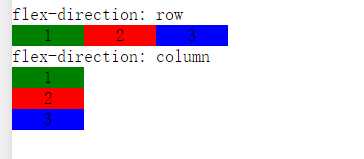
注意:view的display是默认的block,要修改成flex才行
原文:http://www.cnblogs.com/SunSong/p/6924607.html