
享元模式 : “使用共享以高效地支持大量的细粒度对象”。
享元模式和单例模式有很多相似的地方,其不同的地方在于:
① , 单例模式在类的内部实现了类的共享,而享元模式是在类的外部实现了类的共享。
② , 享元模式可生成大量相似的对象 , 而单例模式只能生成大量相同的对象。
好了,进入正题 ,  ,想在用C#代码来实现及解释享元模式:
第一点 : 既然享元模式要实现大量的相似的对象,势必要使用OPO的三大特性之一的继承模式。本节以游戏三种粒子为例( 圆形 circular , 三角形 triangle , 矩形 rectangle )
各个粒子的基类( 抽象类 )
using System;
using System.Collections.Generic;
using System.Linq;
using System.Runtime.CompilerServices;
using System.Text;
using System.Threading;
namespace FlyweightDemo.demo
{
    /// <summary>
    /// 粒子的抽象类
    /// </summary>
    public abstract class BaseParticle
    {
        protected Type_Particle _type;
        public BaseParticle( Type_Particle type )
        {
            this._type = type;
            Thread.Sleep(1000);//模拟初始化的时间
            Console.WriteLine("初始化{0}成功!" , ParticleType.description( this._type));
        }
        public abstract void Show();
    }
}
Thread.Sleep(1000);//模拟初始化的时间 , 所有粒子的初始化时间都比较长
Type_Particle 实际上是一个枚举 , ParticleType.description获得此枚举的描述->如[Description("圆形")]的圆形
using System;
using System.Collections.Generic;
using System.ComponentModel;
using System.Linq;
using System.Reflection;
using System.Text;
namespace FlyweightDemo.demo
{
    /// <summary>
    /// 粒子形状的枚举
    /// </summary>
    public enum Type_Particle : uint
    {
        [Description("圆形")]
        circular = 0,
        [Description("三角形")]
        triangle = 1,
        [Description("矩形")]
        rectangle = 2
    }
    /// <summary>
    /// 粒子枚举管理类
    /// </summary>
    public static class ParticleType
    {
        /// <summary>
        /// 获取描述信息
        /// </summary>
        /// <param name="en"></param>
        /// <returns></returns>
        public static string description(this Enum en)
        {
            Type type = en.GetType();
            MemberInfo[] memInfo = type.GetMember(en.ToString());
            if (memInfo != null && memInfo.Length > 0)
            {
                object[] attrs = memInfo[0].GetCustomAttributes(typeof(System.ComponentModel.DescriptionAttribute), false);
                if (attrs != null && attrs.Length > 0)
                    return ((DescriptionAttribute)attrs[0]).Description;
            }
            return en.ToString();
        }
    }
}
现在实现子类,如圆形( 继承抽象类 : BaseParticle )
using System;
using System.Collections.Generic;
using System.Linq;
using System.Text;
namespace FlyweightDemo.demo
{
    /// <summary>
    /// 圆形粒子
    /// </summary>
    public sealed class CircularParticle : BaseParticle
    {
        public CircularParticle() : base(Type_Particle.circular)
        {

        }
        /// <summary>
        /// 显示例子
        /// </summary>
        public override void Show()
        {
            Console.WriteLine( ParticleType.description( this._type ) );
            //处理圆形粒子特性
        }
    }
}
在每个粒子子类的Show中,都可以对此粒子的特异性做出特殊的处理,这一点有别于单利模式
享元模式的重点 , 获取各种粒子 , 有点想简单工厂模式 。实际上运用了OPO三大特性之一的多态
using System;
using System.Collections.Generic;
using System.Linq;
using System.Text;
namespace FlyweightDemo.demo
{
    public sealed class FlyWeightFactory
    {
        private static  Dictionary<Type_Particle,BaseParticle> dic_2_particles = new Dictionary<Type_Particle, BaseParticle>();
        private static Object particle_lock = new object();
        /// <summary>
        /// 获取粒子(可以应对多线程)
        /// </summary>
        /// <param name="type">粒子枚举</param>
        /// <returns></returns>
        public static BaseParticle GetParticle(Type_Particle type)
        {
            if (dic_2_particles.ContainsKey(type))
            {
                return dic_2_particles[type];
            }
            else
            {
                lock (particle_lock)
                {
                    if (dic_2_particles.ContainsKey(type))
                    {
                        return dic_2_particles[type];
                    }
                    else
                    {
                        BaseParticle targer_particle = null;
                        switch (type)
                        {
                            case Type_Particle.circular:
                                targer_particle = new CircularParticle();
                                break;
                            case Type_Particle.triangle:
                                targer_particle = new TriangleParticle();
                                break;
                            case Type_Particle.rectangle:
                                targer_particle = new RectangleParticle();
                                break;
                        }
                        if (targer_particle != null)
                        {
                            dic_2_particles[type] = targer_particle;
                            return targer_particle;
                        }
                        return null;
                    }
                }
            }
        }
    }
}
重点:
①,用一个集合来保存所有初始化的粒子
②,所有的粒子只在第一次调用的时候初始化,然后保存到集合中
我们来测试一下:
using System;
using System.Collections.Generic;
using System.Linq;
using System.Text;
using System.Threading;
using FlyweightDemo.demo;
namespace FlyweightDemo
{
    public class Program
    {
        private object _base_particel = new object();
        static void Main(string[] args)
        {
            Program a = new Program();
            Thread a1 = new Thread(new ThreadStart(a.Show_Eff_One));
            Thread a2 = new Thread(new ThreadStart(a.Show_Eff_Two));
            a1.IsBackground = true;
            a2.IsBackground = true;
            a1.Start();
            a2.Start();
            Console.Read();
        }
        public void Show_Eff_One()
        {
            Type_Particle[] arr = new Type_Particle[]
            {
                Type_Particle.circular,
                Type_Particle.circular,
                Type_Particle.rectangle,
                Type_Particle.triangle,
                Type_Particle.triangle,
                Type_Particle.rectangle
            };
            this.show_eff(arr,"第一种特效: ");
        }
        public void Show_Eff_Two()
        {
            Type_Particle[] arr = new Type_Particle[]
            {
                Type_Particle.rectangle,
                Type_Particle.triangle,
                Type_Particle.triangle,
                Type_Particle.rectangle,
                Type_Particle.circular,
                Type_Particle.circular
            };
            this.show_eff(arr, "第二种特效: ");
        }
        private void show_eff( Type_Particle[] arr , string name )
        {
            if (arr != null && arr.Length > 0)
            {
                foreach (Type_Particle item in arr)
                {
                    lock (_base_particel)
                    {
                        BaseParticle target_particle = FlyWeightFactory.GetParticle(item);
                        if (target_particle != null)
                        {
                            Console.Write(name);
                            target_particle.Show();
                            Console.WriteLine("--------------------------------------------------------------------------");
                        }
                    }
                }
            }
        }
    }
}
结果如下 :
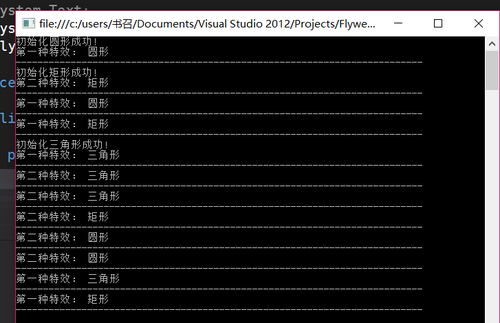
可以看到所有类型的粒子只初始化了一次 , 第二次调用此粒子就是使用的缓存。
实际上打印结果的时候 , 初始化粒子的时候得1s+( 有一种顿挫的感觉 ) , 而直接使用缓存就非常顺滑。
享元模式应用场景 :
当应用程序初始化时 , 不想加载这些粒子( 因为这么多的粒子很耗时间 , 或者有时候使用者根本不使用这些个粒子 ) , 那么我们就可以使用享元模式,保证应用程序整体的流畅性(使用才加载(并缓存),不使用不加载。
本文出自 “Better_Power_Wisdom” 博客,请务必保留此出处http://aonaufly.blog.51cto.com/3554853/1939471
原文:http://aonaufly.blog.51cto.com/3554853/1939471