
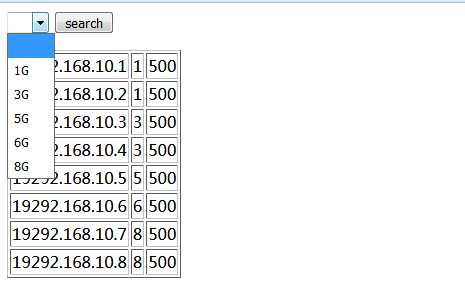
 效果如图所示,可以根据条件来选择对象
cat pc.py
#!/usr/bin/python
from flask import Flask,render_template,request,redirect,session
import MySQLdb as mysql

con = mysql.connect(host=‘59.110.**.**‘,user=‘woniu‘,passwd=‘123456‘,db=‘wangjin‘)
cur =con.cursor()
#sql = ‘select * from user where (username="%s") and (password="%s")‘%(‘tt‘,‘tt‘)
#cur.execute(sql)
#print  cur.fetchone()


app = Flask(__name__)
@app.route(‘/pc‘,methods=[‘GET‘,‘POST‘])
def pc():
    mem = request.args.get(‘mem‘)
    sql = ‘select * from pc‘
    cur.execute(sql)
    res = cur.fetchall()

    mem_list = []
    for item in res:
        m=item[1]
        if m not in mem_list:
            mem_list.append(m)

    pc_list = []
    for item in res:
        if not mem or (item[1]==int(mem)):
            pc_list.append(item)

    return render_template(‘pc.html‘,pc=pc_list,mem_list=sorted(mem_list))
if __name__=="__main__":
    app.run(host=‘0.0.0.0‘,port=12121,debug=True)
templates下的文件
cat pc.html
<form>
<select name=‘mem‘>
    <option></option>
    {% for m in mem_list %}
    <option value="{{m}}">{{m}}G</option>
    {% endfor %}
</select>
<input type=‘submit‘ value=‘search‘>
</form>


<table border=‘1‘>
{% for p in pc %}
<tr>
    <td>
        {{p[0]}}
    </td>
    <td>
        {{p[1]}}
    </td>
    <td>
        {{p[2]}}
    </td>
</tr>

{% endfor %}
</table>
原文:http://www.cnblogs.com/nopnog/p/7065415.html