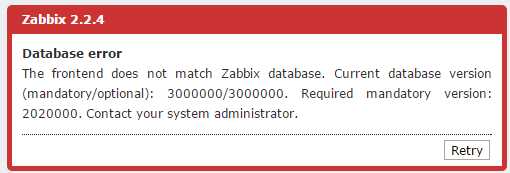
原因:web前端的数据版本升级到了3.0,但是后端配置连接的还是2.0.2版本的数据库
解决方式:后端配置成3.0版本的数据库
6、error: Failed dependencies:dejavu-sans-fonts is needed by zabbix-web-2.2.3-1.el6.noarch
[root@localhost ~]# rpm -ivh zabbix-web-2.2.3-1.el6.noarch.rpm zabbix-web-mysql-2.2.3-1.el6.noarch.rpm
warning: zabbix-web-2.2.3-1.el6.noarch.rpm: Header V4 DSA/SHA1 Signature, key ID 79ea5ed4: NOKEY
error: Failed dependencies:dejavu-sans-fonts is needed by zabbix-web-2.2.3-1.el6.noarch
解决方法:
[root@localhost ~]# yum -y install dejavu-sans-fonts
二、监控项错误
三、触发器错误
四、Agent端错误
1、zabbix报错first network error, wait for 15 seconds
2、zabbix_server.log出现的提示Sending list of active checks to [192.168.100.12] failed: host [CentOS-35] not found
解决方法:
因为zabbix_agentd.conf配置文件中的Hostname与web中的主机名不一致,需要修改agent中的hostname和web中主机名称一致,注意:这里不是可见名称。
3、agent连接不上,提示Get value from agent failed: cannot connect to [[192.168.30.2]:10050]: [111] Connection refused
4、zabbix_agentd [20529]: cannot create Semaphore: [28] No space left on device
zabbix_agentd [20529]: unable to create mutex for log file
修改/etc/sysctl.conf
添加如下行:
kernel.sem = 500 64000 64 256
修改之后,执行sysctl -p使其生效。
5、安装错误Error Downloading Packages
Error Downloading Packages:
zabbix-agent-1.8.22-1.el6.x86_64: Insufficient space in download directory /var/cache/yum/x86_64/6/epel/packages
* free 0
* needed 131 k
zabbix-1.8.22-1.el6.x86_64: Insufficient space in download directory /var/cache/yum/x86_64/6/epel/packages
* free 0
* needed 93 k
原因:
磁盘空间不足,通过
df -lh命令查看得知磁盘被占满,删除一些日志即可
五、server端错误
1、zabbix 创建map显示 map image update failed
chown nginx:nginx /var/lib/php/session