
目的:本编文章主要想分享一下NIO方面的知识,由于最近几天工作不忙,趁机学习了下Java NIO Selector的相关知识;主要是实践操作的;具体的理论知识,可以参考网上的文章。
测试用例主要有三种方式:
其实,是服务器端的逻辑不变,客户端有三种方式而已。
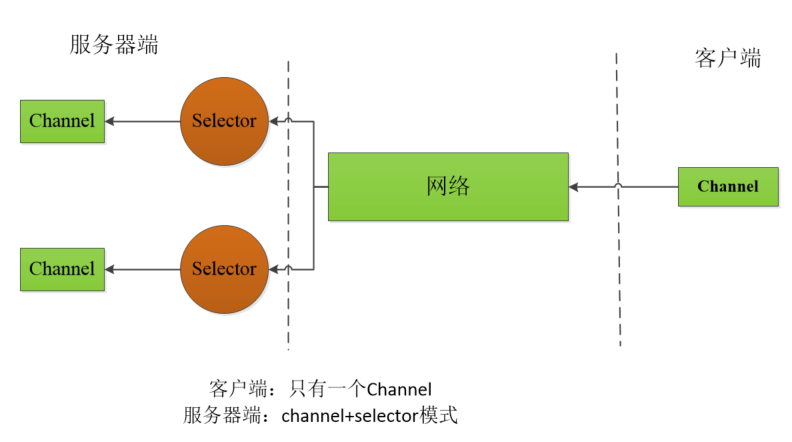
服务器端:2个selector + channel, 客户端:一个channel
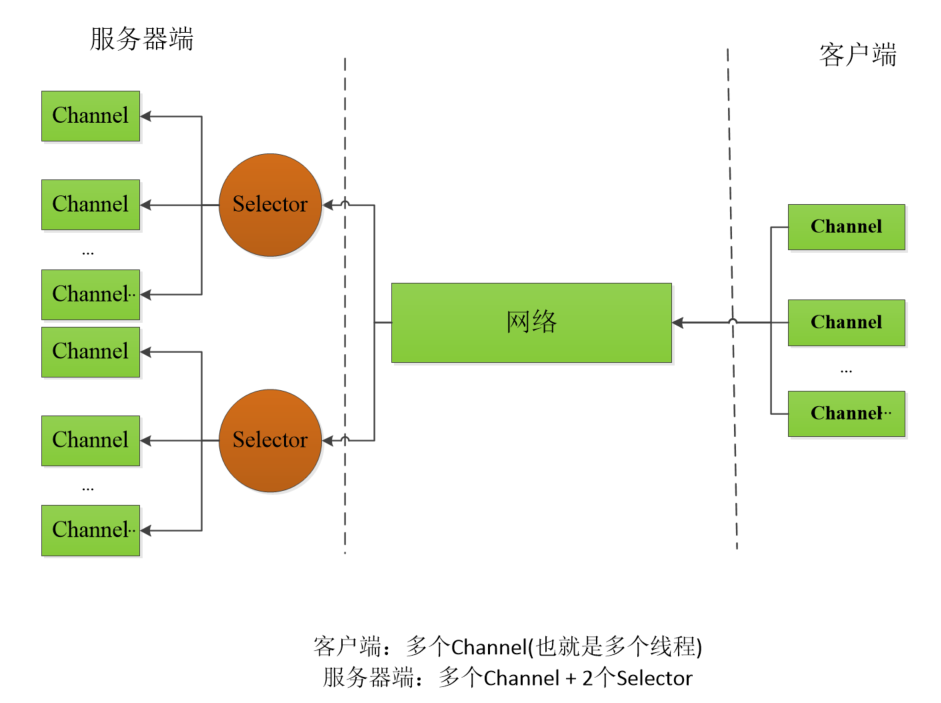
服务器端:2个selector + channel, 客户端:多个channel(多线程方式)
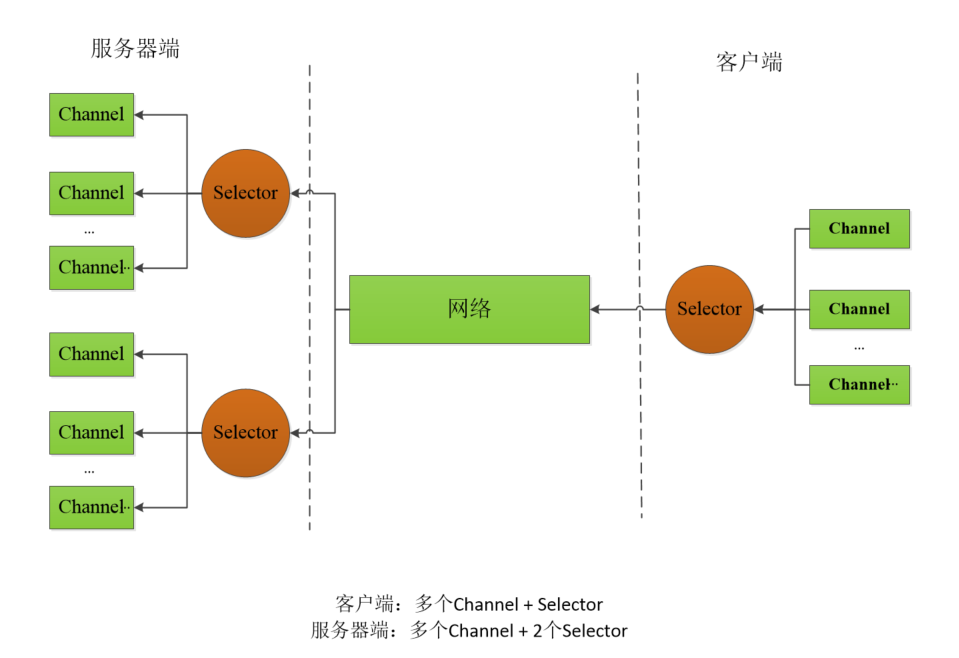
服务器端:2个selector + channel, 客户端:1个selector + channel
服务端,如果想要一个selector+channel的话,直接在initAndRegister()方法中,注释掉相关代码即可了,当然,客户端也要修改端口部分
服务端代码:
package xingej.selector.test002;

//基本思路逻辑:
//------------------------------------------------------------------------------
//1、创建一个通道选择器Selector
//2、创建服务器端的ServerSocketChannel通道
//      设置ServerSocketChannel属性,
//      端口号的绑定
// 3、将通道选择器 与  ServerSocketChannel通道进行绑定,并向通道选择器注册感兴趣的事件
//------------------------------------------------------------------------------
// 4、通道选择器开始工作监听管道事件,调用select()方法,死循环的方式调用
//      如果用户感兴趣的事件发生,就去处理
//      否则,就阻塞在这里

import java.net.InetSocketAddress;
import java.nio.ByteBuffer;
import java.nio.channels.*;
import java.util.Iterator;
import java.util.Set;

public class NIOSelectorServer {
    //这里声明了两个缓存区,发送和接收缓冲区
    //其实,一个就可以了
    private static ByteBuffer sendBuffer = ByteBuffer.allocate(1024);
    private static ByteBuffer receiveBuffer = ByteBuffer.allocate(1024);
    private Selector selector;

    public void initAndRegister() throws Exception {
        //监听两个服务,因此需要两个端口的
        int listenPortA = 8081;
        int listenPortB = 8082;

        //创建第一个ServerSocketChannel对象实例
        ServerSocketChannel serverSocketChannelA = builderServerSocketChannel(listenPortA);
        //创建第二个ServerSocketChannel对象实例
        ServerSocketChannel serverSocketChannelB = builderServerSocketChannel(listenPortB);

        //创建通道选择器Selector
        selector = Selector.open();

        //将serverSocketChannelA 通道注册到通道选择器Selector里
        register(selector, serverSocketChannelA);
        //将serverSocketChannelB 通道注册到通道选择器Selector里
        register(selector, serverSocketChannelB);
    }

    //开始业务监听了
    public void listen() throws Exception {

        System.out.println("-----服务器-------开始接收请求-------OK--------");

        while (true) {
            int readyChannelNum = selector.select();
            if (0 == readyChannelNum) {
                continue;
            }
            //从选择器中的selectedKeys,可以获取此时已经准备好的管道事件
            Set<SelectionKey> selectionKeys = selector.selectedKeys();
            Iterator<SelectionKey> iterator = selectionKeys.iterator();
            while (iterator.hasNext()) {
                SelectionKey selectionKey = iterator.next();
                //从迭代器移除刚选好的键
                iterator.remove();
                dealSelectionKey(selector, selectionKey);
            }

            Thread.sleep(2000);

        }
    }

    //处理具体事件
    private void dealSelectionKey(Selector selector, SelectionKey selectionKey) throws Exception {
        if (selectionKey.isAcceptable()) {

            ServerSocketChannel serverSocketChannel = (ServerSocketChannel) selectionKey.channel();
            SocketChannel clientSocketChannel = serverSocketChannel.accept();
            clientSocketChannel.configureBlocking(false);
            clientSocketChannel.register(selector, SelectionKey.OP_READ | SelectionKey.OP_WRITE);
        } else //读取客户端的内容
            if (selectionKey.isReadable()) {

                SocketChannel socketChannel = (SocketChannel) selectionKey.channel();
                receiveBuffer.clear();
                StringBuilder msg = new StringBuilder();
                //将客户端发送过来的数据,从管道中读取到或者说写到 接收缓存里
                while (socketChannel.read(receiveBuffer) > 0) {
                    receiveBuffer.flip();
                    msg.append(new String(receiveBuffer.array()));
                    receiveBuffer.clear();//清楚数据,下次可以重新写入
                }
                socketChannel.register(selector, SelectionKey.OP_READ | SelectionKey.OP_WRITE);
                //打印输出从客户端读取到的信息
                System.out.println("------>:\t" + msg.toString());

//                socketChannel.close();
            } else
                //向客户端 发送数据
                if (selectionKey.isWritable()) {
                    SocketChannel socketChannel = (SocketChannel) selectionKey.channel();
                    sendBuffer.flip();
                    socketChannel.write(sendBuffer);
                    selectionKey.interestOps(SelectionKey.OP_READ);
                }
    }

    //将ServerSocketChannel 向 Selector进行注册,也就是将两者绑定在一起,
    private void register(Selector selector, ServerSocketChannel serverSocketChannel) throws Exception {
        serverSocketChannel.register(selector, SelectionKey.OP_ACCEPT);
    }

    //创建ServerSocketChannel对象,并进行属性设置
    private ServerSocketChannel builderServerSocketChannel(int port) throws Exception {
        ServerSocketChannel serverSocketChannel = ServerSocketChannel.open();
        //设置属性,如非阻塞模式
        serverSocketChannel.configureBlocking(false);
        //绑定端口号
        serverSocketChannel.bind(new InetSocketAddress(port));
        return serverSocketChannel;
    }

    public static void main(String[] args) throws Exception {
        NIOSelectorServer nioSelectorServer = new NIOSelectorServer();
        //初始化 并 注册
        nioSelectorServer.initAndRegister();
        //开始监听
        nioSelectorServer.listen();
    }
}
客户端请求方式一:
模型如下:
代码如下:
package xingej.selector.test002;

import java.net.InetSocketAddress;
import java.nio.ByteBuffer;
import java.nio.channels.SocketChannel;

public class NIOClient {
    public static void main(String[] args) throws Exception {
        SocketChannel clientChannel = SocketChannel.open();
        clientChannel.connect(new InetSocketAddress("localhost", 8081));
        clientChannel.configureBlocking(false);
        ByteBuffer buffer = ByteBuffer.allocate(1024);
        buffer.put(new String ("hello, server! ").getBytes());
        buffer.flip();
        clientChannel.write(buffer);
        clientChannel.close();
    }
}
客户端请求方式二:
模型如下:
代码如下:
package xingej.selector.test002;

import java.io.IOException;
import java.net.InetSocketAddress;
import java.nio.ByteBuffer;
import java.nio.channels.SocketChannel;
import java.util.Random;

public class NIOClient2 {
    public static void main(String[] args) throws Exception {

        String msg = "hello, NIO Server, I‘m ";

        int[] ports = {8081, 8082};
        for (int i = 0; i < 10; i++) {
            int index = i % 2;
            int port = ports[index];
            new Thread(new SocketChannelThread(msg + i +" client", port)).start();
        }
    }
}

class SocketChannelThread implements Runnable {
    //向服务器发送的消息体
    private String msg;
    private int port;

    private SocketChannel clientChannel;

    public SocketChannelThread(String msg, int port) {
        this.msg = msg;
        this.port = port;
    }

    @Override
    public void run() {
        try {
            //创建一个SocketChannel对象实例
            clientChannel = SocketChannel.open();
            //链接服务器
            clientChannel.connect(new InetSocketAddress("localhost", port));
            //设置通道未非阻塞模式
            clientChannel.configureBlocking(false);
            ByteBuffer buffer = ByteBuffer.allocate(1024);
            int sendNum = new Random().nextInt(5) + 1;
            for(int i = 0; i < sendNum; i++) {
                buffer.put(new String(msg).getBytes());
                buffer.flip();
                //将缓冲区的内容发送到通道里
                clientChannel.write(buffer);
                //清理缓存区,下次重新写入
                buffer.clear();
                //每次发送完成后,休息几秒中,就是为了测试
                Thread.sleep(sendNum * 1000);
            }

        } catch (Exception e) {
            e.printStackTrace();
        } finally {
            try{
                //如果此通过处于开通状态的话,就关闭此通道
               if (clientChannel.isOpen()) {
                   System.out.println("-----关闭通道了------");
                   clientChannel.close();
               }
            }catch (IOException e) {
                e.printStackTrace();
            }
        }
    }
}
客户端请求方式三:
模型如下:
代码如下:
package xingej.selector.test002;
//创建SocketChannel
//      链接服务器
//向服务器发送消息

import java.net.InetSocketAddress;
import java.nio.ByteBuffer;
import java.nio.channels.SelectionKey;
import java.nio.channels.Selector;
import java.nio.channels.SocketChannel;
import java.util.Iterator;
import java.util.Random;
import java.util.Set;
import java.util.concurrent.CountDownLatch;
import java.util.concurrent.ExecutorService;
import java.util.concurrent.Executors;

//
public class NIOSelectorClient {
    private static Selector selector;
    private static boolean flag = false;
    private ByteBuffer sendBuffer = ByteBuffer.allocate(1024);

    public void initAndRegister() throws Exception{
        selector = Selector.open();
        createAndRegister(5);
    }

    private void createAndRegister(int socketChannelNum) throws Exception{
        ExecutorService socketThreadPool = Executors.newFixedThreadPool(5);
        CountDownLatch _latchs = new CountDownLatch(socketChannelNum);
        Integer[] ports = {8081, 8082};

        for(int i = 0; i < socketChannelNum; i++) {
            int port = ports[i % 2];
           socketThreadPool.submit(new SocketChannelThread(port, _latchs));
        }
        _latchs.await();
        socketThreadPool.shutdown();
        flag = true;

    }

    class SocketChannelThread implements Runnable{
        private CountDownLatch _latch;
        private int port;
        private SocketChannel socketChannel;

        public SocketChannelThread(int port, CountDownLatch _latch) {
            this.port = port;
            this._latch = _latch;
        }
        @Override
        public void run() {
            try {
                socketChannel= SocketChannel.open();
                socketChannel.configureBlocking(false);
                //1到10秒钟,随机休息
                //这里,添加时间的目的,是想模拟一下,不想同一时间,向服务器发起请求
                int time = (new Random().nextInt(10) + 1) * 1000;
                System.out.println("----此通道----休息的时间是------:\t" + time / 1000 + " 秒");
                Thread.sleep(time);
                System.out.println("--------2-------port:\t" + port);
                socketChannel.connect(new InetSocketAddress("localhost", port));
                System.out.println("--------3-------");
                socketChannel.register(selector, SelectionKey.OP_CONNECT);
            } catch (Exception e) {
                e.printStackTrace();
            } finally {
                //计数器,减一
                _latch.countDown();
            }
        }
    }

    public void listen() throws Exception{

        while (true) {
            System.out.println("-----客户端----准备好了----:\t");
            int readyChannelNum = selector.select();

            System.out.println("-----客户端----准备好的管道数量是-----:\t" + readyChannelNum);
            if (0 == readyChannelNum) {
                continue;
            }

            Set<SelectionKey> selectionKeys = selector.selectedKeys();

            Iterator<SelectionKey> iterator = selectionKeys.iterator();
            while (iterator.hasNext()) {
                SelectionKey selectionKey = iterator.next();
                SocketChannel socketChannel = (SocketChannel) selectionKey.channel();
               //下面的方法,就可以将selectionKey 键移除
                iterator.remove();
                if (selectionKey.isConnectable()) {
                    if (socketChannel.isConnectionPending()) {
                        socketChannel.finishConnect();
                        System.out.println("----客户端----链接完毕了-----");
                    }
                    socketChannel.register(selector, SelectionKey.OP_WRITE);
                }else if (selectionKey.isWritable()) {
                    sendBuffer.clear();
                    sendBuffer.put("hello, server, I‘m client! Are you OK!!!".getBytes());
                    //flip()必须有的
                    sendBuffer.flip();
                    socketChannel.write(sendBuffer);
                    System.out.println("----客户端---向服务器---发送消息-----完毕----OK-----");
                    //这里注册的事件是write,
                    //效果就是,客户端不断的发送消息
                    //当然,也可以修改成其他事件,如SelectionKey.OP_READ
                    selectionKey.interestOps(SelectionKey.OP_WRITE);
                }

            }
            //每隔1秒中,就向服务器发送信息
            Thread.sleep(1000);
        }

    }

    public static void main(String[] args) throws Exception{
        NIOSelectorClient nioSelectorClient = new NIOSelectorClient();
        nioSelectorClient.initAndRegister();

        //死循环的方式,来监听标志位,
        //一旦标志位发生改变,就开始监听
        while (true) {
            if (flag) {
                nioSelectorClient.listen();
                break;
            }
        }
    }
}
总结:
1、在调用Selector.select()方法之前,最好将要使用的一个SocketChannel或者多个SocketChannel 完成注册功能;也就是说,所有SocketChannel完成注册事件后,才能调用select方法;
不然,很容易出现死锁现象。
如下图所示:
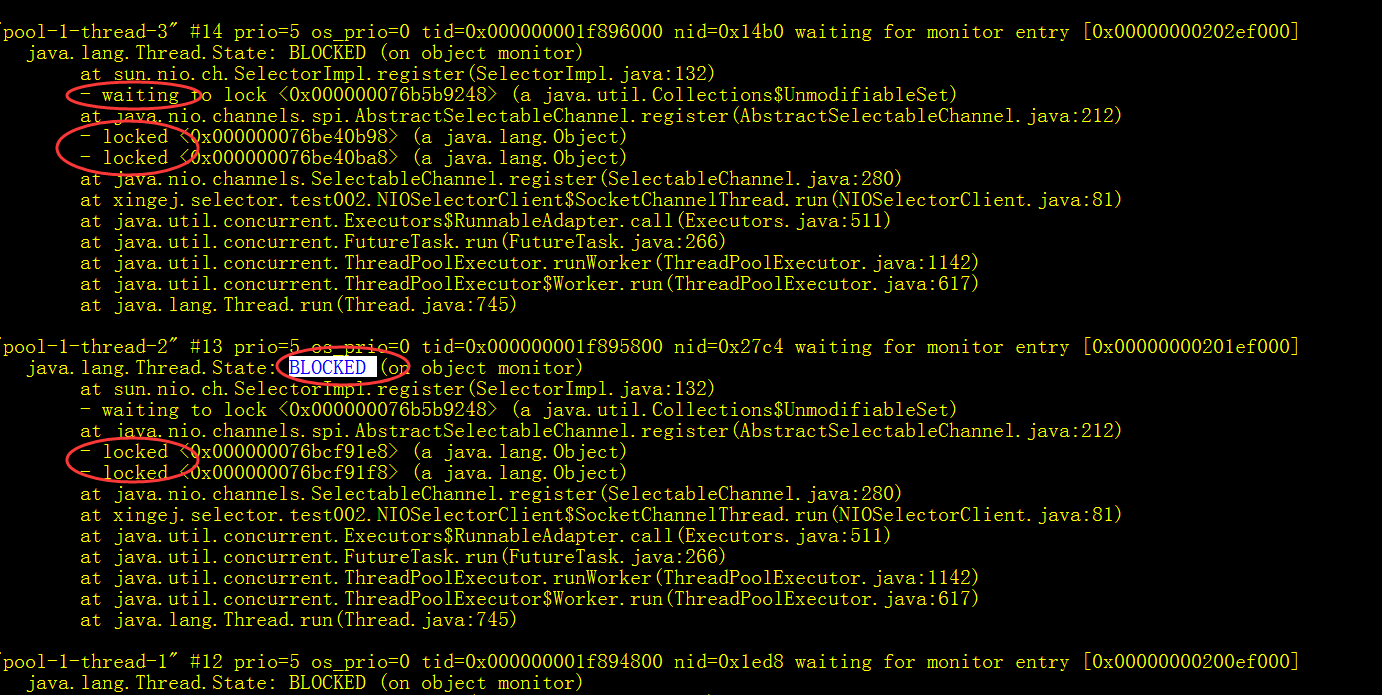
解决措施方式一: 客户端请求方式三,刚开始并没有添加
CountDownLatch 计数器
,针对死锁才添加的。
主线程再调用监听方法时,最好使用观察者模式,目前这里使用了死循环的方式监听,感觉不太好。
2、SocketChannel 通道属于长链接方式,客户端不再发送消息时,通道依旧存在,因此,可以调用Channel.close方法进行关闭
学习方式的建议
如果想更加深入的了解NIO,Selector的话,最好还是不断的进行测试,
如在客户端添加Channel.close(),修改感兴趣的事件,等等
去观察客户端,服务器端的现象,
去总结,去研究源码,
研究源码的目的,不光光是搞清楚背后的原理,
还希望能够学到背后优秀的设计模式,设计思路,使用场景等等,
扩展眼界
代码已分享到git上
https://github.com/xej520/xingej-nio
本文出自 “XEJ分布式工作室” 博客,请务必保留此出处http://xingej.blog.51cto.com/7912529/1969782
原文:http://xingej.blog.51cto.com/7912529/1969782