
1、使用request域对象存储数据:将请求中的参数存储在request中,使用setAttribute()方法可以在jsp页面访问该属性。
@RequestMapping("/test17")
public String test17(HttpServletRequest request String name) throws IOException {
    request.setAttribute("name", name);
    return SUCCESS;
}
2、使用session域对象存储数据:
// 存储数据:session
@RequestMapping("/test18")
public String test18(HttpSession session, String name) throws IOException {
    session.setAttribute("name", name);
    return SUCCESS;
}
3、使用ModelAndView存储数据:new ModelAndView(SUCCESS);中的SUCCESS是设置执行完该函数后将要跳转的页面。ModelAndView既可以存储八大基本类型的数据,也可以存储List、Set、Map类型的集合。
// 存储数据:ModelAndView
@RequestMapping("/test19")
public ModelAndView test19(String name) throws IOException {
    ModelAndView mav = new ModelAndView(SUCCESS);
    ArrayList<String> list = new ArrayList<String>();
    list.add("Anna");
    list.add("Jay");
    list.add("Joe");
    list.add("John");
    mav.addObject("list", list);

    HashMap<String, Integer> map = new HashMap<String, Integer>();
    map.put("a", 12);
    map.put("b", 23);
    map.put("c", 34);
    mav.addObject("map", map);
    mav.addObject("name", name);
    return mav;
}
4、使用Model对象存储数据
// 存储数据:Model
@RequestMapping("/test20")
public String test20(Model model) {
    model.addAttribute("name", "任我行");
    ArrayList<String> list = new ArrayList<String>();
    list.add("Anna");
    list.add("Jay");
    list.add("Joe");
    list.add("John");
    model.addAttribute("list", list);

    HashMap<String, Integer> map = new HashMap<String, Integer>();
    map.put("a", 12);
    map.put("b", 23);
    map.put("c", 34);
    model.addAttribute("map", map);
    return SUCCESS;
}
5、使用Map存储数据
// 存储数据:Map
@RequestMapping("/test21")
public String test21(Map<String, Object> map) {
    map.put("name", "任我行");
    ArrayList<String> list = new ArrayList<String>();
    list.add("Anna");
    list.add("Jay");
    list.add("Joe");
    list.add("John");
    map.put("list", list);
    return SUCCESS;
}
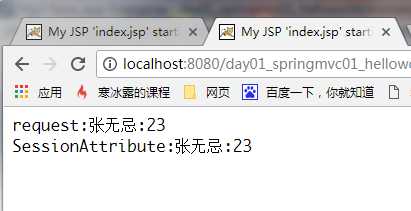
6、将请求参数保存一份到session当中
在类上加上注解:@SessionAttributes
@SessionAttributes(names={"name", "age"}, types={String.class, Integer.class})
方法代码:
// 存储数据:将请求参数保存一份到session当中
@RequestMapping("/test22")
public String test22(String name, Integer age, ModelMap model) {
    return SUCCESS;
}
结果:
原文:http://www.cnblogs.com/snow1234/p/7619777.html