
提示:这篇文章是本人在2011年11月5日有感而写的一篇电子邮件,因为其中的内容会在即将发表的一篇新博文被引用,故重新贴于此处。由于是近三年前的内容,技术也在不断进步,其中的部分内容已经不再适合于现在,仅作了解技术发展之用。
Citrix Blog经常会有一些Blog写的很有深度,适合于高手;也有一些Blog善于归纳,适合经验总结。今天看到一篇博客就属于后者,讲解PVS写缓存的容量大小设计和部署位置的考虑,供大家参考。
我们摘要一些第一篇博客的精要:
一:部署位置
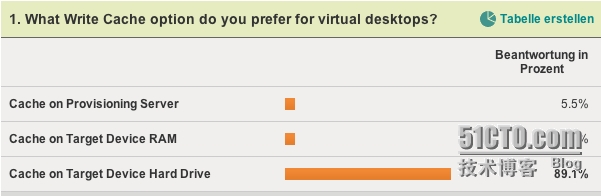
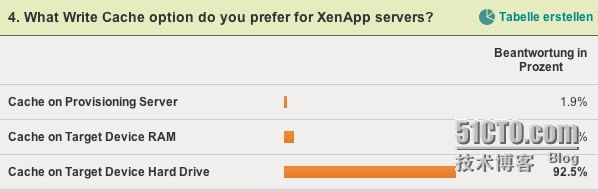
写缓存的部署地点可以有
Cache on ProvisioningServer
Cache on Target Device RAM
Cache on Target Device HardDrive
把写缓存设置在target side
好处
it keeps the write “close”to the target;
minimizes the load on theProvisioning Servers
this disk can also be usedfor data, which needs to be persistent
缺点
it requires more resourceson the target side
作者的倾向:
Personally I prefer using a target side hard disk for storingthe write cache for virtual desktops and XenApps.
二:本地磁盘
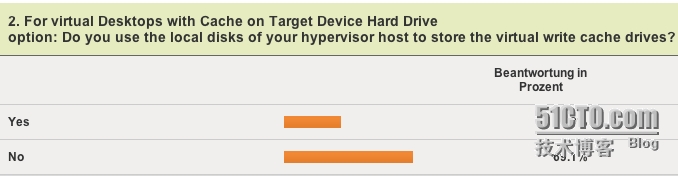
本地磁盘和共享存储部署写缓存的优缺点分析:
Option 1 – write cache disk on sharedstorage
Pro:
High level of performance(typically)
Easy to scale
Central monitoring andmanagement
Virtual targets can bemoved between hypervisor hosts for load balancing and/ or management reasons
Con:
Complexity
Cost
Available disk space onhypervisor hosts is wasted
Option 2 – write cache disk on localdisk
Pro:
Cheap (compared to sharedstorage)
Low complexity
Con:
Can be a performancebottleneck / hard to scale
Virtual targets are “tied”to a hypervisor host
Hypervisor hosts must havelocal drives
并没有这样一个尚方宝剑来告诉你哪一个是最好的,用户的实际选择是各自不同的。
作者的观点
Personally I prefer to use local disks for provisioned XenAppservers whenever possible from an performance and management point of view.
刀片上的硬盘是不合适的,因为刀片一般就只有两块硬盘,无法满足虚拟桌面的并发需求。
三:磁盘大小
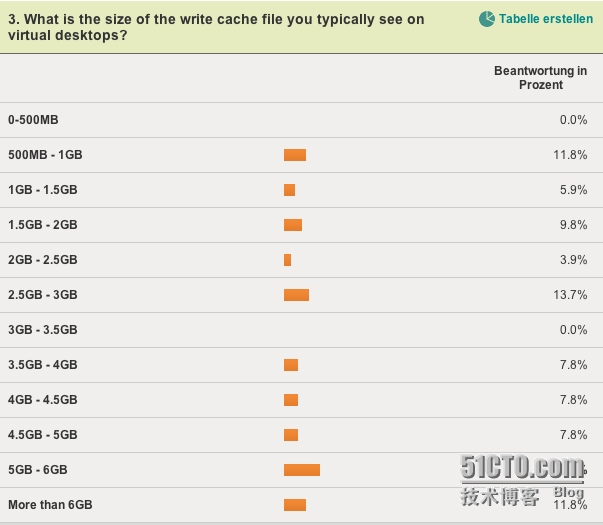
估算写缓存的大小是不可能的,因为这很大程度上取决于用户的行为和应用程序的工作模式。
例如用户拷贝大量文件到写缓存中;
应用程序缓存大量文件,例如数据库文件;
理论上写缓存不能大于vDisk的大小,当然,99.99999%的情况下这种情况不会发生;
如何减小写缓存的大小,提高读写效率
文件夹重定向:Keep the user profile small by redirecting profile folders suchas Desktop, My Documents, Application Data and so on.
使用App-V共享缓存或者是最新的CitrixApplication Streaming,后者现在具有VHD Mount feature (similarto App-V Shared Cache),不会再本地构建streaming cache。
重启设备后在本地硬盘上永久保存的文件
Windows Pagefile..
Windows Event Log.
Citrix related logs.
Anti-Virus pattern.
App-V / Application Streaming Cache in case a shared cacheconcept cannot be used.
EdgeSight DB.
四、本地磁盘
当把写缓存和其他items重定向到target的本地永久磁盘后我们需要考虑 两件事情:
永久性
必须记住把文件写在永久磁盘上违背了PVS中央管理的初衷,如何管理或者是删除这些文件是我们需要考虑的问题;
磁盘驱动器的大小。如果本地盘的容量不够支撑写缓存,如果不够的话写缓存就会写到PVS服务器上
举例说明
假设有一个XenApp服务器有50个并发用户,每个用户有20M的用户Profile,每个用户也都创建了50M的工作环境(例如临时文件),计算结果:
1.0GB user profiles (50 x 20MB)
2.5GB user workspace (50 x 50MB)
1.0GB system workspace (assumed, different for everyenvironment)
= 4.5GB write cache file
4.5GB write cache file
4.0GB Pagefile (check out KB889654 / KB2021748)
0.1GB Windows Event Logs
0.1GB Citrix Logs
0.3GB EdgeSight
1.0GB other
4.0GB Dedicated Dump File (see UPDATE section below)
2.0GB buffer (some room to grow)
= 16 GB local disk size required per XenApp target
五、调查结果
1.0GB other
4.0GB Dedicated Dump File (see UPDATE section below)
2.0GB buffer (some room to grow)
= 16 GB local disk size required per XenApp target
五、调查结果
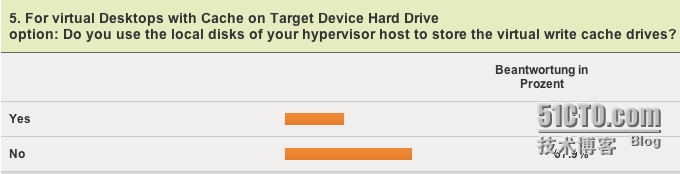
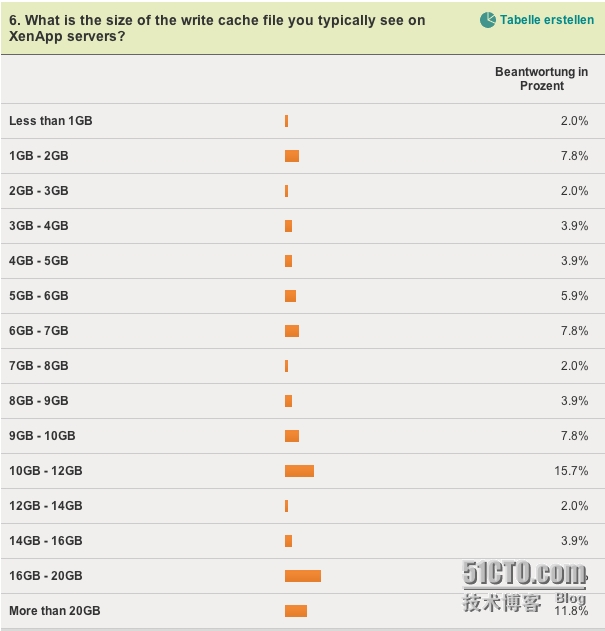
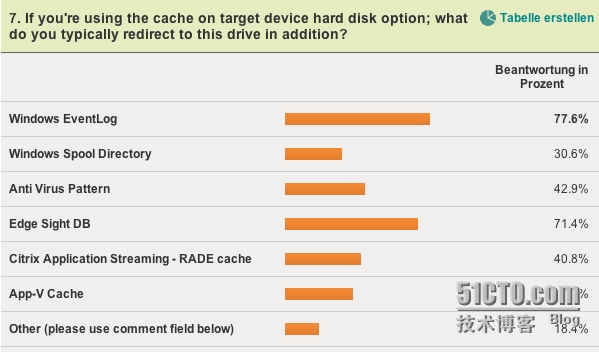
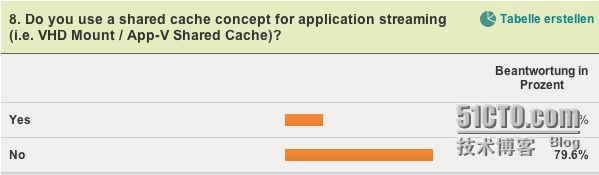
本文出自 “Citrix的虚拟世界有你有我” 博客,请务必保留此出处http://virtualworld.blog.51cto.com/1412963/1441381
原文:http://virtualworld.blog.51cto.com/1412963/1441381