
1. 准备工作:
为了省事,这里以eclipse中项目Class2Json为例,该项目结构如下:
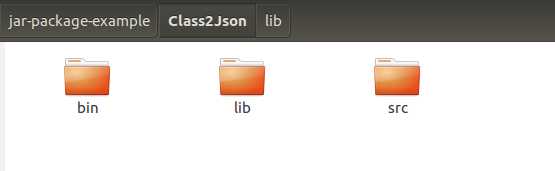
bin:是根据执行.java生成的.class文件,bin下的目录与src目录一样,只不过是.class文件
lib:外部依赖包
src:我们自己写的.java文件
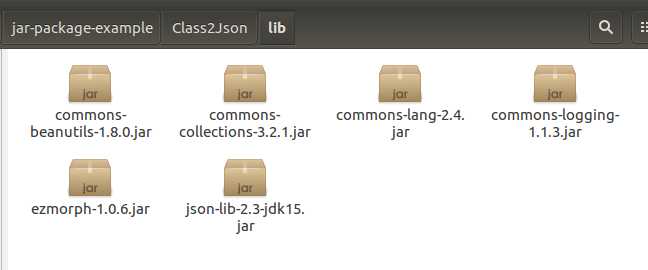
接下来:
1. 我们新建一个Class2Json_jar的文件夹
2. 把bin下的文件复制到Class2Json_jar
3. 并把lib整个复制过去,把lib改名为class2json3_lib
4. 创建META-INF文件夹,并在该文件夹下创建MANIFEST.MF文件
在MANIFEST.MF文件中添加如下内容:(书写注意规范,中间都要用一个空格隔开,即使下一行,开头也要一个空格)
(第一个是版本号; 第二个是额外的jar包,第三个是启动的主类)
Manifest-Version: 1.0
Class-Path: . class2json3_lib/commons-beanutils-1.8.0.jar class2json3_
 lib/commons-collections-3.2.1.jar class2json3_lib/commons-lang-2.4.ja
 r class2json3_lib/commons-logging-1.1.3.jar class2json3_lib/ezmorph-1
 .0.6.jar class2json3_lib/json-lib-2.3-jdk15.jar
Main-Class: com.zc.class2json.trans.test.TestDataClass2Json
2. jar命令打jar包
1) jar命令用法
zhangchao@zc:~/zc/jar-package-example/Class2Json_jar$ jar
Usage: jar {ctxui}[vfmn0PMe] [jar-file] [manifest-file] [entry-point] [-C dir] files ...
Options:
    -c  create new archive
    -t  list table of contents for archive
    -x  extract named (or all) files from archive
    -u  update existing archive
    -v  generate verbose output on standard output
    -f  specify archive file name
    -m  include manifest information from specified manifest file
    -n  perform Pack200 normalization after creating a new archive
    -e  specify application entry point for stand-alone application
        bundled into an executable jar file
    -0  store only; use no ZIP compression
    -P  preserve leading ‘/‘ (absolute path) and ".." (parent directory) components from file names
    -M  do not create a manifest file for the entries
    -i  generate index information for the specified jar files
    -C  change to the specified directory and include the following file
If any file is a directory then it is processed recursively.
The manifest file name, the archive file name and the entry point name are
specified in the same order as the ‘m‘, ‘f‘ and ‘e‘ flags.

Example 1: to archive two class files into an archive called classes.jar:
       jar cvf classes.jar Foo.class Bar.class
Example 2: use an existing manifest file ‘mymanifest‘ and archive all the
           files in the foo/ directory into ‘classes.jar‘:
       jar cvfm classes.jar mymanifest -C foo/ .
2)第一种方式 jar -cvf ./class2json.jar ./com (这种方法不行)
jar -cvf ./class2json.jar ./com
class2json.jar是jar包名称
./com  是将这个文件打入jar包
jar包内容如下所示:
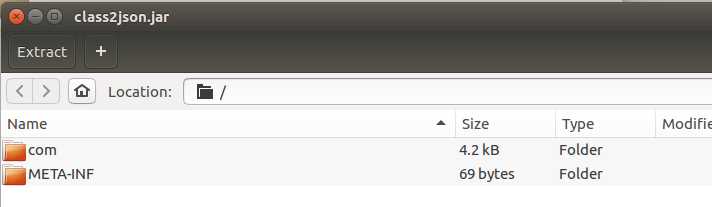
其中META-INF/MANIFEST.MF是自动生成的,如下所示:并没有额外的jar包以及主类
Manifest-Version: 1.0
Created-By: 1.8.0_181 (Oracle Corporation)
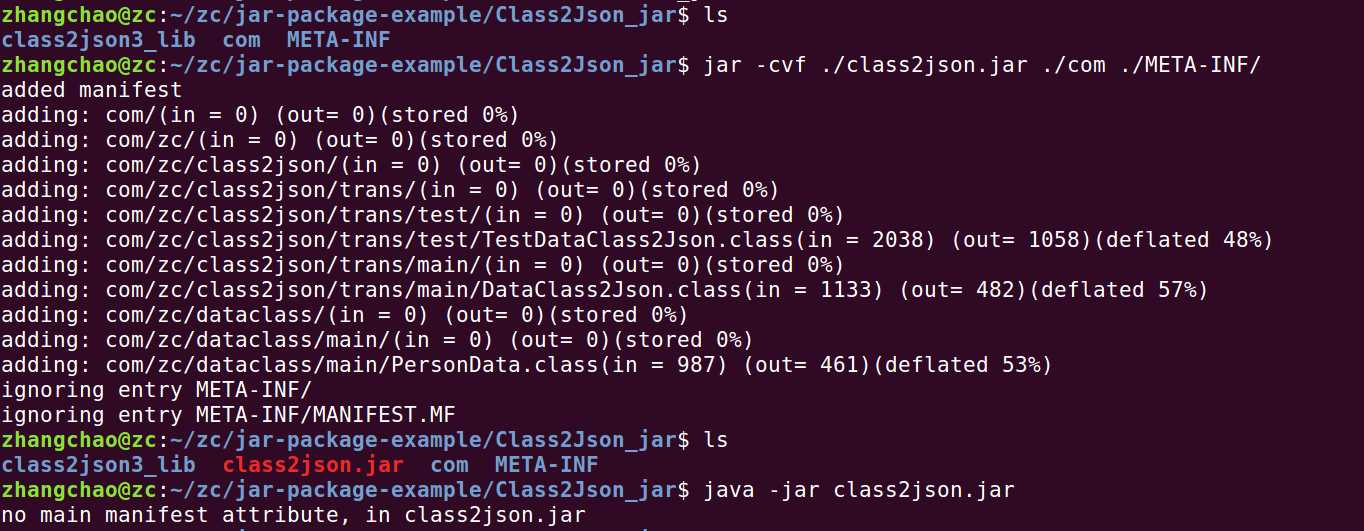
命令行如下所示:因为我们没指定运行的主类,所以 java -jar class2json.jar 运行失败,因为找不到主类
3)第二种方式 jar -cvf ./class2json.jar ./com (这种方法不行)
原文:https://www.cnblogs.com/zhangchao0515/p/9534806.html