
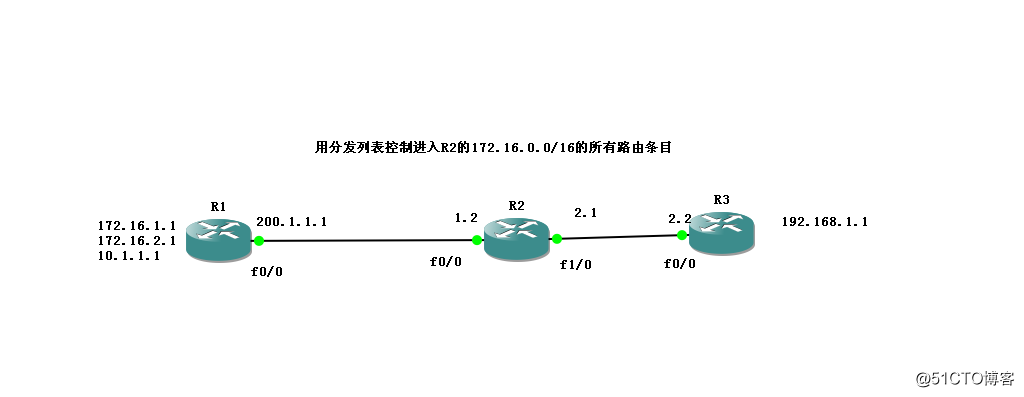
一、基本实验配置
R1 参考配置
配置接口地址
interface Loopback0
ip address 172.16.1.1 255.255.255.0
interface Loopback1
ip address 172.16.2.1 255.255.255.0
interface Loopback2
ip address 10.1.1.1 255.255.255.0
interface FastEthernet0/0
ip address 200.1.1.1 255.255.255.0
no shutdown
配置RIP路由:
router rip
version 2
timers basic 5 10 10 15 修改计时器
network 10.0.0.0
network 172.16.0.0
network 200.1.1.0
no auto-summary
R2参考配置
接口地址配置
interface FastEthernet0/0
ip address 200.1.1.2 255.255.255.0
no shutdown
interface FastEthernet1/0
ip address 200.1.2.1 255.255.255.0
no shutdown
RIP路由配置
router rip
version 2
timers basic 5 10 10 15 修改计时器
network 200.1.1.0
network 200.1.2.0
no auto-summary
R3 参考配置
interface Loopback0
ip address 192.168.1.1 255.255.255.0
interface FastEthernet0/0
ip address 200.1.2.2 255.255.255.0
no shutdown
router rip
version 2
timers basic 5 10 10 15
network 192.168.1.0
network 200.1.2.0
no auto-summary
配置完成后在R2上查看路由
R 172.16.1.0/24 is possibly down,
routing via 200.1.1.1, FastEthernet0/0
R 172.16.2.0/24 is possibly down,
routing via 200.1.1.1, FastEthernet0/0
10.0.0.0/24 is subnetted, 1 subnets
R 10.1.1.0 [120/1] via 200.1.1.1, 00:00:01, FastEthernet0/0
R 192.168.1.0/24 [120/1] via 200.1.2.2, 00:00:01, FastEthernet1/0
在R2过滤掉172.16.0.0 的路由
第一步创建列表
access-list 10 deny 172.16.0.0 0.0.255.255
access-list 10 permit any
第二步确定方向和接口,并应用分发列表
R2(config)#router rip
R2(config-router)#distribute-list 10 in FastEthernet0/0
在f0/0口的in方向应用分发列表调用10号访问控制列表
查看路由,172.16.0.0的路由已经消失,但10.1.1.0的路由依然可以看到,说明实验成功
C 200.1.1.0/24 is directly connected, FastEthernet0/0
C 200.1.2.0/24 is directly connected, FastEthernet1/0
10.0.0.0/24 is subnetted, 1 subnets
R 10.1.1.0 [120/1] via 200.1.1.1, 00:00:00, FastEthernet0/0
R 192.168.1.0/24 [120/1] via 200.1.2.2, 00:00:01, FastEthernet1/0
原文:http://blog.51cto.com/ronning/2325786