
使用excel管理用例
①、读取excel的用例数据,每一类参数保存在list中返回;
②、那么接下来使用unitest编写用例时,可以去调用这个函数。使用里面的数据;
个人认为好处是,大部分人还是习惯excel的编写用例习惯,将实际用例与代码分离,有助于分工和维护
#写文件
import xlwt;
#读文件
import xlrd;
import unittest;
import requests;
#使用写文件模式打开文件
open_workbook=xlrd.open_workbook(r‘D:\Users\4399-3046\Desktop\test.xls‘);
#最终返回的是文件类型
print(open_workbook);
#打印该文件下,对应数据表的行数
#print(open_workbook.sheet_by_name(‘mytest‘).nrows);

#打印该文件下,对应数据表的列数
#print(open_workbook.sheet_by_name(‘mytest‘).ncols);
#for item_rows in range(1,open_workbook.sheet_by_name(‘mytest‘).nrows):
    #for item_cols in range(1,open_workbook.sheet_by_name(‘mytest‘).ncols):
        #print(open_workbook.sheet_by_name(‘mytest‘).cell(item_rows,item_cols));


#循环打印出所有数据,并分别保存在list中
#编号
listkey=[];
#测试地址
listurl=[];
#提交方式
listtype=[];
#参数1
listcanshu1=[];
#参数2
listcanshu2=[];
#预期结果
listyuqi=[];
#实际结果
listresult=[];
#通过比对是否正常
for item_row in range(1,open_workbook.sheet_by_name(‘mytest‘).nrows):
    #获取用例编号
    listkey.append(open_workbook.sheet_by_name(‘mytest‘).cell(item_row,0));
    # 获取参数1
    listcanshu1.append(open_workbook.sheet_by_name(‘mytest‘).cell(item_row, 1));
    # 获取参数2
    listcanshu2.append(open_workbook.sheet_by_name(‘mytest‘).cell(item_row, 2));
    # 获取预期结果
    listyuqi.append(open_workbook.sheet_by_name(‘mytest‘).cell(item_row, 3));
    # 获取实际结果
    listresult.append(open_workbook.sheet_by_name(‘mytest‘).cell(item_row, 4));


print(listkey);
print(listcanshu1);
print(listcanshu2);
print(listyuqi);
print(listresult);
运行结果:

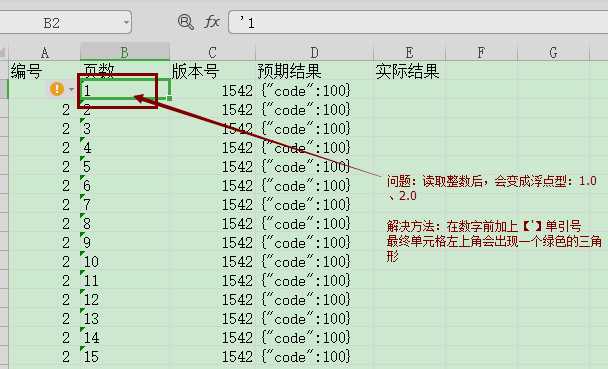
遇到的问题
原文:https://www.cnblogs.com/shenyexiaoqingxin/p/10400648.html