
原文 https://stuff.seans.com/2011/02/14/creating-a-listbox-that-shows-all-predefined-wpf-colors/
在WPF中,您可以使用Colors类访问一系列预定义颜色,这些颜色定义为Colors类的静态属性。您只需使用颜色名称引用每种颜色。
作为参考,这里有一个小应用程序,显示ListBox中的所有颜色。(感谢casperOne,在stackoverflow文章中展示了如何创建一个封装Colors类中属性列表的对象)。
这是最终的结果。(单击图像可查看其全尺寸)。
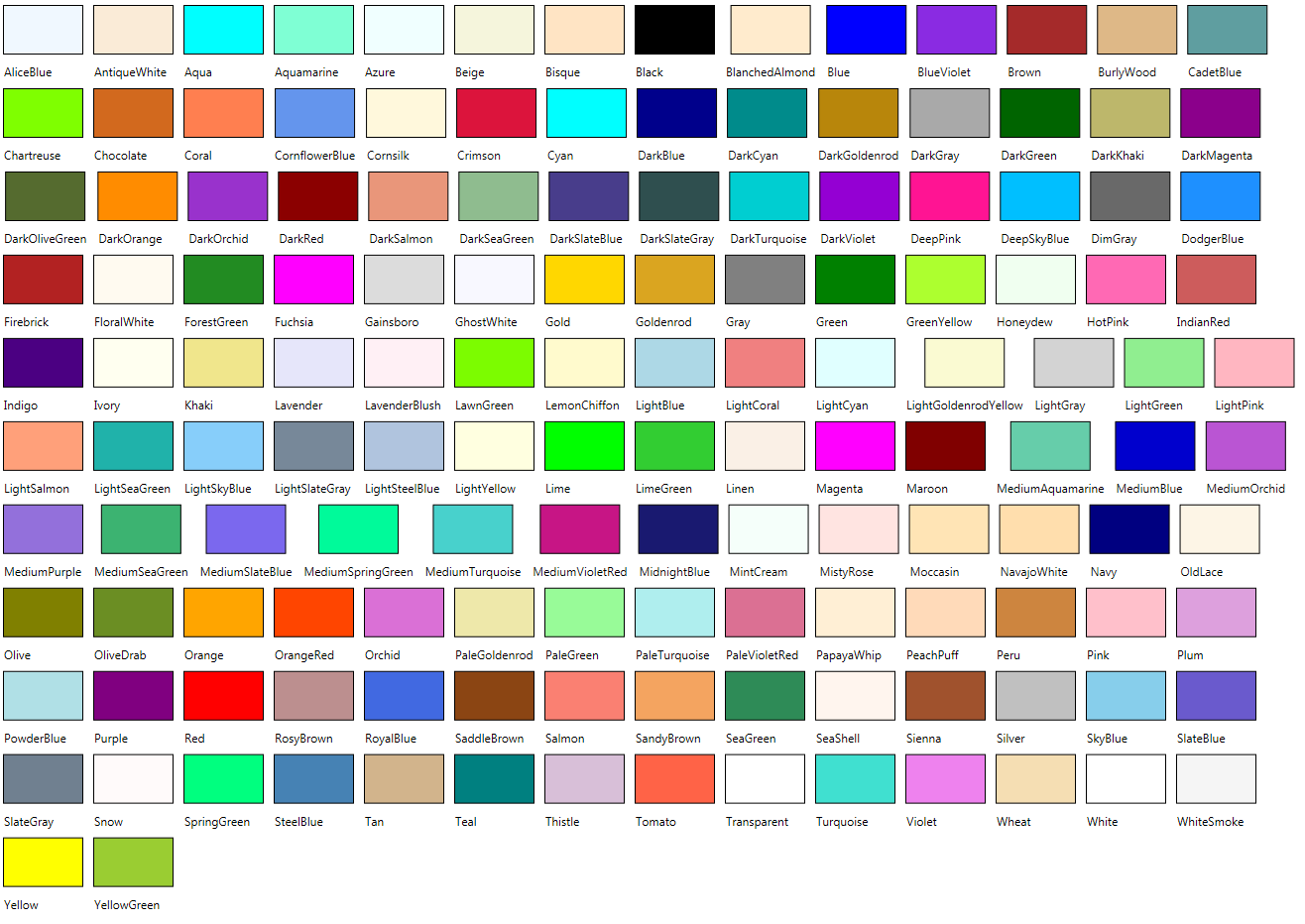
用于生成此列表的XAML非常简单:
|
1
2
3
4
五
6
7
8
9
10
11
12
13
14
15
16
17
18
19
20
21
22
23
24
25
26
27
28
29
三十
31
32
33
34
35
36
37
38
39
40
41
42
43
44
|
<Window xmlns:d="http://schemas.microsoft.com/expression/blend/2008" xmlns:mc="http://schemas.openxmlformats.org/markup-compatibility/2006" mc:Ignorable="d" xmlns:local="clr-namespace:WpfApplication1" xmlns:sys="clr-namespace:System;assembly=mscorlib" x:Class="WpfApplication1.MainWindow" x:Name="Window" Title="All Colors" Width="640" Height="480" > <Window.Resources> <ObjectDataProvider MethodName="GetType" ObjectType="{x:Type sys:Type}" x:Key="colorsTypeOdp"> <ObjectDataProvider.MethodParameters> <sys:String>System.Windows.Media.Colors, PresentationCore, Version=3.0.0.0, Culture=neutral, PublicKeyToken=31bf3856ad364e35</sys:String> </ObjectDataProvider.MethodParameters> </ObjectDataProvider> <ObjectDataProvider ObjectInstance="{StaticResource colorsTypeOdp}" MethodName="GetProperties" x:Key="colorPropertiesOdp"> </ObjectDataProvider> </Window.Resources> <ListBox ItemsSource="{Binding Source={StaticResource colorPropertiesOdp}}" ScrollViewer.HorizontalScrollBarVisibility="Disabled" ScrollViewer.VerticalScrollBarVisibility="Auto" > <ListBox.ItemsPanel> <ItemsPanelTemplate> <WrapPanel /> </ItemsPanelTemplate> </ListBox.ItemsPanel> <ListBox.ItemTemplate> <DataTemplate> <StackPanel Orientation="Vertical"> <Rectangle Fill="{Binding Path=Name}" Stroke="Black" Margin="4" StrokeThickness="1" Height="50" Width="81"/> <Label Content="{Binding Path=Name}" /> </StackPanel> </DataTemplate> </ListBox.ItemTemplate> </ListBox></Window> |
原文:https://www.cnblogs.com/lonelyxmas/p/10799493.html