
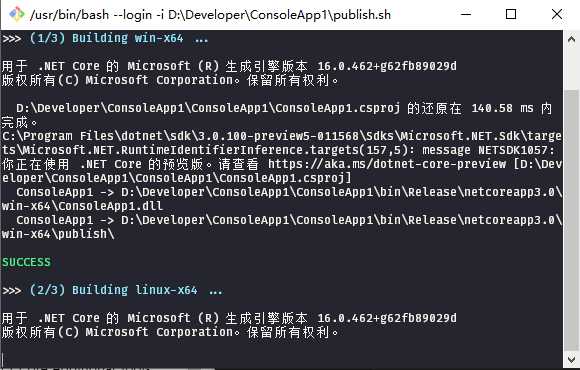
dotnet publish 命令,bash脚本如下(Windows安装git即可建议sh关联)
publish.sh
 1 #!/usr/bin/env bash
 2
 3 # one line command:
 4 # array=( win-x64 linux-x64 osx-x64 ); for i in "${array[@]}"; do printf "\n>>> building $i ...\n\n"; dotnet publish -c Release -r $i; done
 5
 6 set +x +e
 7 # runtime array: https://docs.microsoft.com/en-us/dotnet/core/rid-catalog
 8 array=( win-x64 linux-x64 osx-x64 )
 9 config=‘Release‘
10 # publish args: https://docs.microsoft.com/en-us/dotnet/core/tools/dotnet-publish
11 args=‘‘
12 declare -i count=${#array[*]}
13 declare -i num=1
14 printf ‘>>> \033[1;36mClean bin folder ...\033[0m\n\n‘
15 find . -type d \( -iname ‘bin‘ -o -iname ‘obj‘ \) | xargs rm -rf
16 printf ‘\033[1;36mOK\033[0m\n‘
17 for i in "${array[@]}"; do
18     printf "\n>>> \033[1;36m($num/$count) Building $i ...\033[0m\n\n"
19     dotnet publish -c $config -r $i $args
20     if [ $? = 0 ]; then
21         printf ‘\n\033[1;32m‘SUCCESS‘\033[0m\n‘
22     else
23         printf ‘\n\033[1;31m‘ERROR: $?‘\033[0m\n‘
24     fi
25     let num+=1
26 done
27 printf "\n\033[1;36mAll done. 10s to exit ...\033[0m\n"
28 sleep 10s
原文:https://www.cnblogs.com/Bob-wei/p/10921487.html