
一、vue生命周期的8个阶段
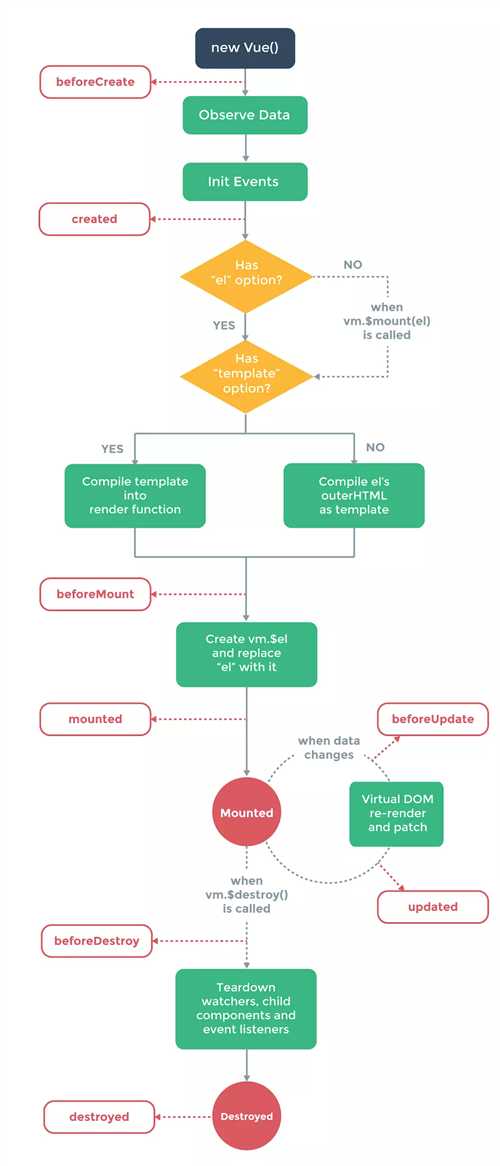
beforeCreate:在new一个vue实例后,只有一些默认的生命周期钩子和默认事件,其他的东西都还没创建。在beforeCreate生命周期执行的时候,data和methods中的数据都还没有初始化。不能在这个阶段使用data中的数据和methods中的方法
create:data 和 methods都已经被初始化好了,如果要调用 methods 中的方法,或者操作 data 中的数据,最早可以在这个阶段中操作
beforeMount:执行到这个钩子的时候,在内存中已经编译好了模板了,但是还没有挂载到页面中,此时,页面还是旧的
mounted:执行到这个钩子的时候,就表示Vue实例已经初始化完成了。此时组件脱离了创建阶段,进入到了运行阶段。 如果我们想要通过插件操作页面上的DOM节点,最早可以在和这个阶段中进行
beforeUpdate: 当执行这个钩子时,页面中的显示的数据还是旧的,data中的数据是更新后的, 页面还没有和最新的数据保持同步
updated:页面显示的数据和data中的数据已经保持同步了,都是最新的
beforeDestory:Vue实例从运行阶段进入到了销毁阶段,这个时候上所有的 data 和 methods , 指令, 过滤器 ……都是处于可用状态。还没有真正被销毁
destroyed: 这个时候上所有的 data 和 methods , 指令, 过滤器 ……都是处于不可用状态。组件已经被销毁了。
---------------------
原文:https://blog.csdn.net/lizhengxv/article/details/81541292
二、生命周期函数
<!DOCTYPE html>
<html lang="en">

    <head>
        <meta charset="UTF-8">
        <meta name="viewport" content="width=device-width, initial-scale=1.0">
        <meta http-equiv="X-UA-Compatible" content="ie=edge">
        <title>vue生命周期学习</title>
        <script src="https://cdn.bootcss.com/vue/2.4.2/vue.js"></script>
    </head>

    <body>
        <div id="app">
            <input v-model="message"></input>
            <h1>{{message1}}</h1>
        </div>
    </body>
    <script>
        var vm = new Vue({/*创建vue对象*/
            el: ‘#app‘,/****挂载目标****/
            data: {/****数据对象****/
                message: ‘Hello World!‘
            },
            computed:{/****实现某一属性的实时计算****/
                message1:function(){
                    return this.message.split("").reverse().join("");
                }
            },
            watched:{/****检测某一属性值的变化****/

            },
            methods:{/****组件内部的方法****/

            },

            beforeCreate: function() {
                console.group(‘------beforeCreate创建前状态------‘);
                console.log("%c%s", "color:red", "el     : " + this.$el); //undefined
                console.log("%c%s", "color:red", "data   : " + this.$data); //undefined
                console.log("%c%s", "color:red", "message: " + this.message)//undefined
            },
            /**
             * 1.在beforeCreate和created钩子之间,程序开始监控Data对象数据的变化及vue内部的初始化事件
             *
             * */
            created: function() {
                console.group(‘------created创建完毕状态------‘);
                console.log("%c%s", "color:red", "el     : " + this.$el); //undefined
                console.log("%c%s", "color:red", "data   : " + this.$data); //已被初始化
                console.log("%c%s", "color:red", "message: " + this.message); //已被初始化
            },
            /**
             * 2.在created和beforeMount之间,判断是否有el选项,若有则继续编译,无,则暂停生命周期;
             * 然后程序会判断是否有templete参数选项,若有,则将其作为模板编译成render函数。若无,则将外部html作为模板编译(template优先级比外部html高)
             *
             * */
            beforeMount: function() {
                console.group(‘------beforeMount挂载前状态------‘);
                console.log("%c%s", "color:red", "el     : " + (this.$el)); //已被初始化
                console.log(this.$el);
                console.log("%c%s", "color:red", "data   : " + this.$data); //已被初始化
                console.log("%c%s", "color:red", "message: " + this.message); //已被初始化
            },
            /**
             * 3.在beforeMount和mounted之间,程序将上一步编辑好的html内容替换el属性指向的dom对象或者选择权对应的html标签里面的内容
             *
             * */
            mounted: function() {
                console.group(‘------mounted 挂载结束状态------‘);
                console.log("%c%s", "color:red", "el     : " + this.$el); //已被初始化
                console.log(this.$el);
                console.log("%c%s", "color:red", "data   : " + this.$data); //已被初始化
                console.log("%c%s", "color:red", "message: " + this.message); //已被初始化
            },
            /**
             * 4.mounted和beforeUpdate之间,程序实时监控数据变化
             *
             * */
            beforeUpdate: function() {
                console.group(‘beforeUpdate 更新前状态===============》‘);
                console.log("%c%s", "color:red", "el     : " + this.$el);
                console.log(this.$el);
                console.log("%c%s", "color:red", "data   : " + this.$data);
                console.log("%c%s", "color:red", "message: " + this.message);
            },
            /**
             * 5.beforeUpdate和updated之间,实时更新dom
             *
             * */
            updated: function() {
                console.group(‘updated 更新完成状态===============》‘);
                console.log("%c%s", "color:red", "el     : " + this.$el);
                console.log(this.$el);
                console.log("%c%s", "color:red", "data   : " + this.$data);
                console.log("%c%s", "color:red", "message: " + this.message);
            },
            beforeDestroy: function() {
                console.group(‘beforeDestroy 销毁前状态===============》‘);
                console.log("%c%s", "color:red", "el     : " + this.$el);
                console.log(this.$el);
                console.log("%c%s", "color:red", "data   : " + this.$data);
                console.log("%c%s", "color:red", "message: " + this.message);
            },
            /**
             * 6.实例销毁
             *
             * */
            destroyed: function() {
                console.group(‘destroyed 销毁完成状态===============》‘);
                console.log("%c%s", "color:red", "el     : " + this.$el);
                console.log(this.$el);
                console.log("%c%s", "color:red", "data   : " + this.$data);
                console.log("%c%s", "color:red", "message: " + this.message)
            }
        })
    </script>

</html>

原文:https://blog.csdn.net/yana_li/article/details/78780335
原文:https://www.cnblogs.com/qing-5/p/11305098.html