
1、字体样式font-family、颜色color
<!DOCTYPE html>
<html>

    <head>
        <meta charset="UTF-8">
        <title>CSS</title>
        <style type="text/css">
            .class1 {
                font-family: "楷体";
                font-size: 20px;
                color: black;
            }
        </style>
    </head>

    <body bgcolor="aquamarine">
        <center>
            <p class=class1>
                举头望明月,低头思故乡。
            </p>
        </center>
    </body>

</html>

2、字体大小font-size(绝对大小)
<!DOCTYPE html>
<html>

    <head>
        <meta charset="UTF-8">
        <title>CSS</title>
        <style type="text/css">
            .class1 {
                font-size: 20px;
            }

            .class2 {
                font-size: 30px;
            }

            .class3 {
                font-size: 40px;
            }

            .class4 {
                font-size: xx-small;
            }

            .class5 {
                font-size: x-small;
            }

            .class6 {
                font-size: large;
            }

            .class7 {
                font-size: x-large;
            }
        </style>
    </head>

    <body bgcolor="aquamarine">
        <center>
            <p class=class1>
                举头望明月,低头思故乡。(20px)
            </p>
            <p class=class2>
                举头望明月,低头思故乡。(30px)
            </p>
            <p class=class3>
                举头望明月,低头思故乡。(40px)
            </p>
            <p class=class4>
                举头望明月,低头思故乡。(xx-smaall)
            </p>
            <p class=class5>
                举头望明月,低头思故乡。(x-small)
            </p>
            <p class=class6>
                举头望明月,低头思故乡。(large)
            </p>
            <p class=class7>
                举头望明月,低头思故乡。(x-large)
            </p>
        </center>
    </body>

</html>
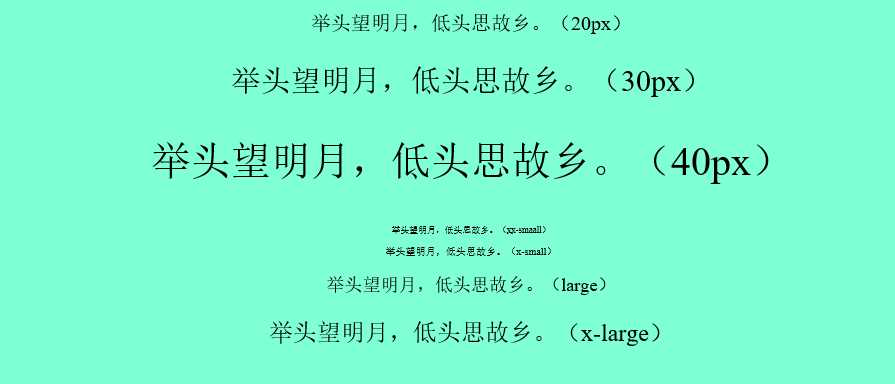
绝对大小定义字体大小有两种方式:
(1)直接以px为单位定义字体大小。
(2)以关键字:xx-small,x-small,small,medium,large,x-large,xx-large定义字体大小。
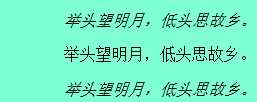
3、字体的显示形式font-style
<!DOCTYPE html>
<html>

    <head>
        <meta charset="UTF-8">
        <title>CSS</title>
        <style type="text/css">


            .class3 {
                font-style:italic;
            }
                .class4 {
                font-style:normal;
            }

            .class5 {
                font-style:oblique;
            }

        </style>
    </head>

    <body bgcolor="aquamarine">
        <center>


            <p class=class3>
                举头望明月,低头思故乡。
            </p>
            <p class=class4>
                举头望明月,低头思故乡。
            </p>
            <p class=class5>
                举头望明月,低头思故乡。
            </p>

        </center>
    </body>

</html>
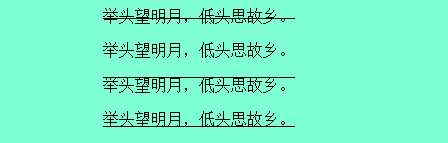
4、字体形式
<!DOCTYPE html>
<html>

    <head>
        <meta charset="UTF-8">
        <title>CSS</title>
        <style type="text/css">
            .class4 {
                text-decoration: line-through;
            }

            .class5 {
                text-decoration: none;
            }

            .class6 {
                text-decoration: overline;
            }

            .class7 {
                text-decoration: underline;
            }
        </style>
    </head>

    <body bgcolor="aquamarine">
        <center>

            <p class=class4>
                举头望明月,低头思故乡。
            </p>
            <p class=class5>
                举头望明月,低头思故乡。
            </p>
            <p class=class6>
                举头望明月,低头思故乡。
            </p>
            <p class=class7>
                举头望明月,低头思故乡。
            </p>

        </center>
    </body>

</html>
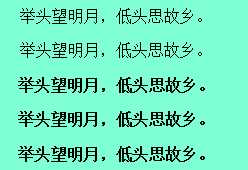
5、字体加粗(九级)
<!DOCTYPE html>
<html>

    <head>
        <meta charset="UTF-8">
        <title>CSS</title>
        <style type="text/css">
            .class1 {
                font-weight: 100;
            }

            .class2 {
                font-weight: 300;
            }

            .class3 {
                font-weight: 600;
            }

            .class4 {
                font-weight: 800;
            }

            .class5 {
                font-weight: 900;
            }
        </style>
    </head>

    <body bgcolor="aquamarine">
        <center>

            <p class=class1>
                举头望明月,低头思故乡。
            </p>
            <p class=class2>
                举头望明月,低头思故乡。
            </p>
            <p class=class3>
                举头望明月,低头思故乡。
            </p>
            <p class=class4>
                举头望明月,低头思故乡。
            </p>
            <p class=class5>
                举头望明月,低头思故乡。
            </p>

        </center>
    </body>

</html>
原文:https://www.cnblogs.com/zhai1997/p/11413933.html